 ToneBird
AI Reply Assistant Privacy and Where Your Messages Go
Check what a reply assistant reads, what reaches a model provider, what it remembers and which controls apply to each stage.
 By Xinran Zhao
 Reviewed & edited byMonica Cheng
Before using an AI reply assistant, check what it reads, which service processes the draft and what remains afterward. The tool may need to read part of a real conversation that includes names, deadlines, work details, family plans, or information you would never think to put into a generic AI prompt.
That makes “Is this AI private?” too broad to be very useful. A better way to evaluate an AI reply assistant is to ask what it can access, what leaves your device when you generate a reply, what gets stored afterward, and what control you still have over that information.
The difficulty is that privacy policies do not always make those answers easy to find. A 2024 user study of LLM privacy policies found that participants still missed important information even after reading policies carefully, and detailed reading did not fully resolve their privacy concerns.
Before using it on a particular conversation, decide whether that information can be processed by the selected service. Local memory, reply generation and optional uploads need separate checks. If you cannot establish the route for the information you are about to share, use the approved communication process instead of relying on a “private AI” label.
For example, a client email might contain a name, a delivery date and unreleased pricing. You may only want help wording a deadline acknowledgment, but the assistant’s readable context could contain all three. Review what the tool can access before triggering a draft; checking the outgoing reply later addresses a different disclosure.
Follow the information used for a reply
Terms such as “private AI,” “local AI,” and “on device AI” can sound reassuring, but they do not tell you enough on their own.
An assistant can store your preferences locally while still sending part of the current conversation to an external model when you ask it to generate a reply. Another tool might process more on the device but keep account data or analytics in the cloud. Neither setup can be understood from one label.
A more useful approach is to follow the data. The NIST Privacy Framework similarly focuses on how organizations identify and manage privacy risk around the way data is processed, rather than treating privacy as a single product feature.
For a reply assistant, that means being able to answer three separate questions: what can the tool read, what does it keep, and what does it send somewhere else to complete a request.
What can the assistant read?
A useful reply needs context. Depending on the product, that may include the visible conversation, earlier messages, information about the person you are talking to, your writing preferences, or a commitment that was mentioned earlier.
Some assistants may also need operating system permissions that allow them to read text inside supported apps.
The important question is not simply whether a permission sounds broad. It is what the product actually does with the access that permission gives it.
For example, there is a meaningful difference between reading the current conversation when you trigger a reply and continuously uploading everything visible in an app. A privacy page should make that difference understandable without expecting you to reverse engineer the product.
The same applies to screen access. Some desktop apps need screen recording permission because certain apps do not expose their text through normal accessibility interfaces. That permission tells you what the software is technically allowed to access. It does not tell you whether screenshots are stored, processed locally, or sent to another service.
Local storage and model processing
A memory stored on your Mac answers where that memory lives. It does not answer who processes the next draft.
Local storage means some information is saved on your computer or phone rather than in the company’s cloud database. On device AI means some AI processing itself happens on that device. A product can use one without doing everything through the other.
Imagine a reply assistant that keeps your tone profile and relationship notes on your laptop. Those memories are locally stored. But when you ask for a new reply, the app may still send the relevant conversation context to a cloud model because that model is doing the generation.
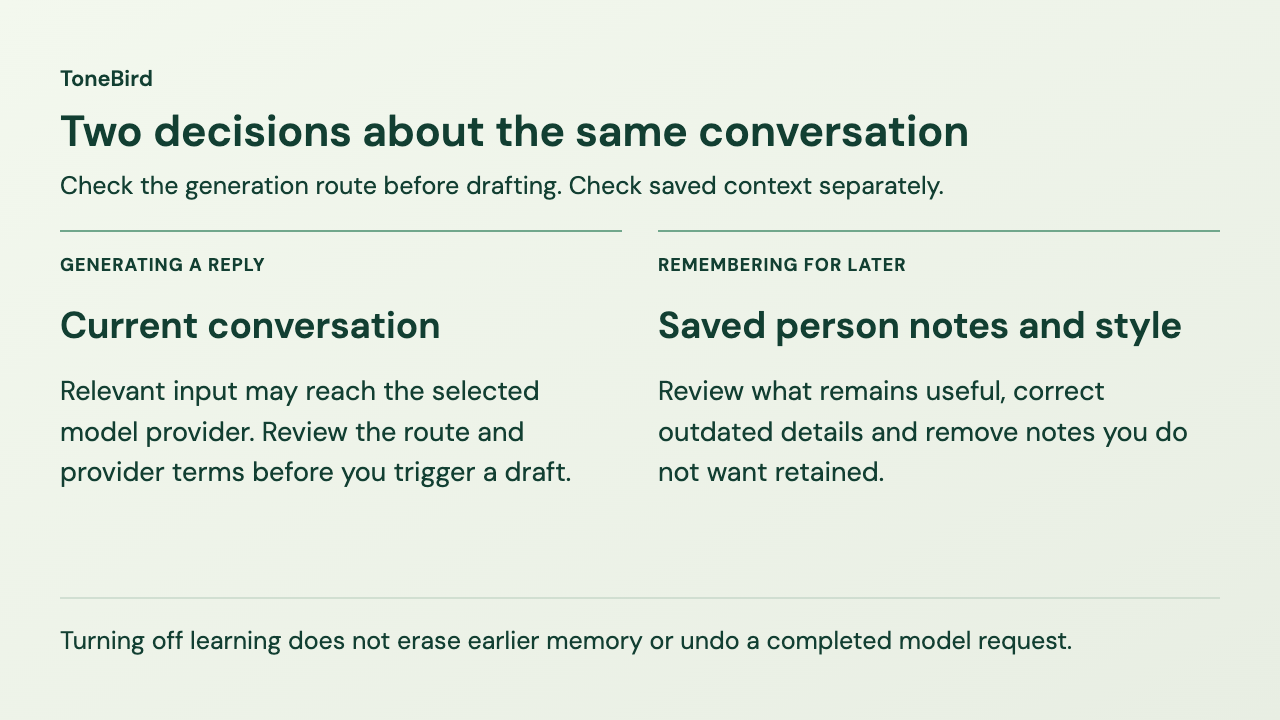
That does not make the phrase “stored locally” false. It simply answers one privacy question, not all of them.
Question | What you are actually checking |
|---|---|
Where is memory stored? | Whether saved preferences, relationship data, or history live locally or on a server |
Where is the reply generated? | Whether AI processing happens on your device or through an external model |
What leaves the device? | What context, instructions, images, or metadata are sent during a request |
What is retained afterward? | Whether that information is logged, temporarily stored, or deleted |
What can you control? | Whether you can review, disable, export, or delete stored information |
This is why on device AI should not be treated as a synonym for private AI. Privacy depends on the full data flow, not only where one part of the processing happens.
What leaves your device for generation?
If an external model generates the response, it needs some information to work with.
That does not necessarily mean the assistant sends your entire inbox or full conversation history. A request may include only the context considered relevant to the current reply. What matters is whether the product tells you what is being sent and who receives it.
The NIST Generative AI Risk Management Profile treats data privacy as one of the risks organizations need to manage when building and using generative AI systems. It also considers risks that arise from cloud services, third party components, and the broader AI lifecycle, not only from the model itself.
For a reply assistant, that makes the model provider part of the privacy picture. You should be able to tell whether a request is handled by the assistant company, forwarded to another AI provider, or sent directly to a provider through your own model key.
What remains after a draft is generated
Review persistent memory
A tool may use the current conversation once to generate a reply and forget it afterward. A relationship aware assistant may also save something that remains useful later, such as how you usually address a person or whether you prefer shorter replies with them.
That persistent information can improve future suggestions, but it deserves separate controls.
You should be able to understand what the assistant is learning, whether that learning happens automatically, whether you can correct it, and how to remove something that should no longer be remembered.
Relationships also change. A preference that made sense six months ago may no longer fit, and a detail from one conversation should not quietly become permanent context without a way to review it.
Check training and provider retention
These terms are easy to collapse into one privacy question, but they describe different processes.
A conversation may be processed by a model to generate the reply you asked for without becoming long term memory.
The assistant may separately save a preference or relationship detail as memory so it can use that information again.
Both are different from using conversations to train or improve a model.
So a statement such as “your conversations are not used for training” is useful, but it does not tell you whether the message still reaches an outside model for generation, whether anything is saved locally, or how long a provider may retain a request.
If a product has an optional program that uses interactions for internal testing or improvement, that should also be explained separately from ordinary reply generation.
Find the controls before sharing a conversation
Look for privacy information in the permission request, learning settings and upload screen as well as the policy. Those are the places where you decide what to allow.
The CLEAR research project explored this kind of contextual privacy support in ChatGPT and the Gemini plugin in Gmail. Its evaluation found better understanding of data practices and risks. It was a separate research system; it does not mean ToneBird detects sensitive content or displays the same warnings.
For a reply assistant, the same idea is useful. Important privacy information should not live only in legal text. Permissions, learning settings, support uploads, and deletion controls should be understandable where users actually make those choices.
Drafting and sending are separate decisions
An AI reply assistant does not only interact with your data. It also helps produce communication that another person may receive.
That makes the boundary between drafting and sending important.
A system that suggests a message for you to review gives you a different level of control from one that can automatically send messages or take communication actions without another confirmation step. Neither approach is automatically wrong, but you should know which one you are using.
Reviewing the draft before sending lets you catch the wrong name, an incorrect date or context you did not intend the recipient to see. If a cloud model already generated the draft, that review does not undo the earlier processing of its input. Check the generation route before drafting, then check the recipient-facing message before sending.
Check these settings in ToneBird
If you use ToneBird as your AI reply assistant, review the route for the conversation before generating a draft. Its published Privacy & Data page describes local storage and external model processing separately. The settings image below is the author’s Mac example; it shows controls for learning, export, deletion and temporary files.
Data and destination | Retention | Where to control it | Source and check date |
|---|---|---|---|
Saved tone, person notes and history stay on the device. Relevant context may still be used in a model request. | Until removed; account records are separate. | Settings > Privacy & Data: Export My Data or Delete My Data. Turning learning off does not erase existing memory. | Privacy & Data · checked Oct 23, 2026 |
Reply context and instructions go to the selected model provider, through ToneBird for managed models or directly with your own key. | The provider’s policy applies; ToneBird gives no single period for every provider. | Check the selected provider before drafting. Local deletion does not remove provider records. | Privacy policy, sections 5 and 6 · checked Oct 23, 2026 |
A cropped conversation image may reach a vision model if local text recognition is insufficient. | ToneBird says it discards the image after the read. Provider handling follows its policy. | Screen Recording permission in system privacy settings controls access. | Privacy & Data · checked Oct 23, 2026 |
Optional internal testing uploads managed gateway prompts, shown or sent drafts and voice transcripts to ToneBird. | Encrypted uploads are deleted after 30 days. This is not a general model retention period. | Settings > Privacy & Data: Help improve the product (internal). It is off by default. | Privacy & Data · checked Oct 23, 2026 |
Submitted feedback sends your chosen note, diagnostics and attachments to Supabase; a safe triage summary goes to Linear. | Private live record: inaccessible after 14 days, scrubbed within 24 hours; backups may last seven more days. Delivery and Linear records have separate periods. | Remove optional attachments before submitting. Contact support@amplift.ai about submitted data. | Privacy policy, sections 5, 7 and 9 · checked Oct 23, 2026 |
Conversation access and model requests
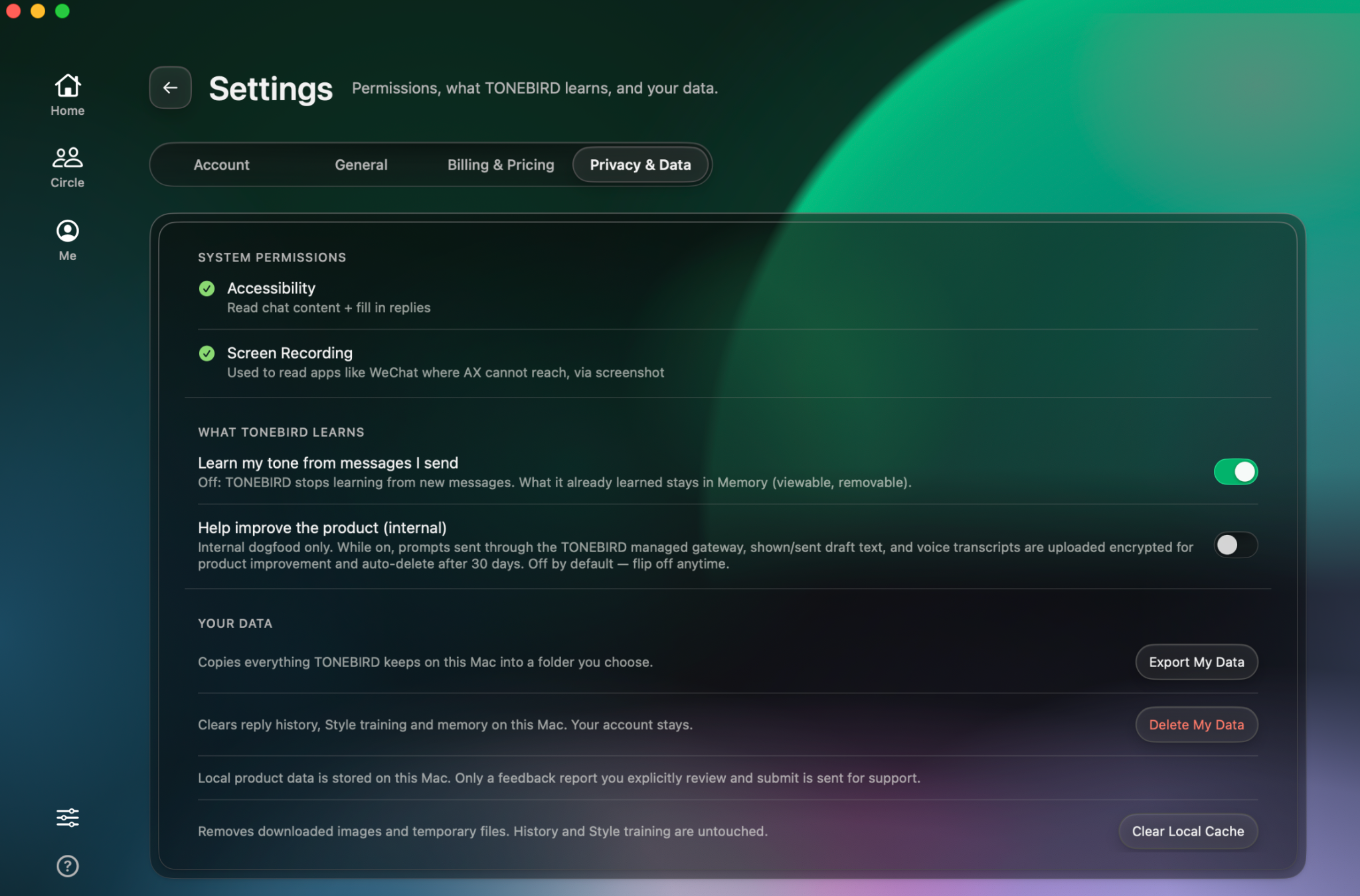
Settings → Privacy & Data on a Mac. Export My Data, Delete My Data and Clear Local Cache serve different purposes.
ToneBird says Accessibility lets it read the current conversation and fill in a reply when you trigger it. In apps such as WeChat, where Accessibility may not expose the text, Screen Recording can be used instead. ToneBird first tries text recognition on the device. If that is not enough, a cropped conversation image may be sent to a vision model for that read and is then discarded.
ToneBird says it does not train foundation models on your conversations. The selected model provider still processes the content needed for generation under its own policy. With a managed model, ToneBird forwards the request; with your own model key, writing requests go directly to that provider. Neither route makes the provider’s handling irrelevant.
Learning and saved memory
Turning off “Learn my tone from messages I send” stops learning from new messages. Existing memory stays available to review or remove. For the client email example, stopping new learning does not remove a person note that has already been saved. Suggested adjustments wait for approval before they affect future drafts.
Delete memory or clear temporary files
Choose Export My Data if you want a copy of the local data before changing it. Delete My Data clears local reply history, Style training and memory on that Mac; your account remains. Clear Local Cache removes downloaded images and temporary files while keeping history and Style training.
Deleting local memory does not recall a request already sent to a provider or delete account and support records. For those, use the applicable provider controls or contact ToneBird support as described in the privacy policy.
Optional uploads and retention
“Help improve the product (internal)” is separate from learning your tone and is off by default. When enabled, the Privacy & Data page says prompts sent through the managed gateway, shown or sent drafts, and voice transcripts are uploaded encrypted and deleted after 30 days. That period applies to the optional program; it is not a promise about every model request.
Support feedback follows a separate route. Diagnostics stay on the device unless you submit a report, and you can preview or remove optional conversation excerpts, drafts and screenshots. The privacy policy describes retention for those submitted records and identifies providers. Check it separately from the internal testing option.
Finally, ToneBird does not send the reply itself. Insert places the draft into the reply field, and you use the original app’s send button after reviewing it.
Decide whether this conversation belongs in an AI tool
Return to the client email containing a name, deadline and unreleased pricing. Before asking for a deadline acknowledgment, check whether the information the assistant can read is allowed to reach the selected service.
Check access and the generation route
Identify the readable conversation and any screenshot fallback, then the provider that would receive it. If an unrelated detail is confidential, do not assume that leaving it out of the final reply also excludes it from the generation input.
Check what persists and what you can remove
Review saved person notes, learning settings, provider retention and any optional uploads. Know which control stops future learning, which deletes local memory and which only clears temporary files.
Make the decision before drafting
If your workplace, school or client has rules for this information, use the approved process. When you cannot establish whether a conversation may be processed by the selected service, pause before triggering generation. You can still write the reply yourself.
Once the information is suitable for that route, review the outgoing draft for details the recipient should see. That final check protects a different boundary from the earlier decision to share the input with a model.
Frequently asked questions
Does end to end encryption still protect a message if an AI assistant reads it on my device?
End to end encryption protects a message while it travels between the people in the conversation. Once the message is displayed on your device, software that you authorize to access that content may be able to read it.
That does not mean the encrypted messaging service itself has been broken. It means you also need to understand what the AI assistant does with the content after it becomes available on your device.
Is using my own AI provider key automatically more private?
Not automatically. A personal model key may change how the request reaches the model provider and which account governs that processing, but the provider still receives the information needed to complete the request.
Check both the reply assistant’s data flow and the provider terms attached to the account or API key you are using.
Can my employer or school see that I am using an AI reply assistant?
Possibly, depending on the device, account, network, and software management policies involved.
A company or university managed computer may have monitoring, software restrictions, or data handling rules that are separate from the privacy controls inside the AI assistant. If you are using institutional information, the organization’s policy matters even when the assistant itself offers strong privacy settings.
Does deleting the app delete everything connected to my account?
Not necessarily. Removing an application from your device may delete local files, but account data, submitted support information, or data handled by an external provider can follow different retention rules.
Before uninstalling a tool for privacy reasons, check whether it has separate controls for local data, account deletion, exports, and submitted feedback.

Xinran Zhao has a background in writing and journalism. She writes about the messages we overthink and when AI replies help or miss the point, drawing on her experience starting a career in a second language.