 ToneBird
Relationship-Aware AI Replies Start With Who You’re Talking To
See how relationship, conversation history, writing style and current commitments can change an AI reply, with real ToneBird screenshots.
 By Xinran Zhao
 Reviewed & edited byMonica Cheng
A relationship aware AI reply assistant uses relevant conversation history, person context and writing preferences alongside the latest message. You probably would not reply to your manager the same way you reply to your closest friend. Even if they sent the exact same message, the answer that feels natural could be completely different.
A fluent response to the words on the screen can still miss the history that makes a conversation specific. Who is this person to you? What have you already talked about? How do you normally sound with them? Is there something one of you already promised to do?
The useful question is what context changes the next reply. More history helps only when it is relevant and still accurate.
A 2025 CHI study on relational AI tested suggestions in conversations between people with similar or different political and social views. In its experiment with 482 participants, suggestions designed for that intergroup setting improved cooperation with outgroup partners. This supports studying social context in AI suggestions; it does not establish a rule for replying to friends, managers or advisors.
How relationship context changes a reply
Suppose someone sends:
Are you free tomorrow afternoon?
Suppose you have checked your calendar and are free from 2 to 4 tomorrow. Keep that fact the same in both replies.
To a friend whose chats are usually casual:
Yeah, I’m free from 2 to 4. What time works?
To a recruiter arranging an interview:
Thank you for checking. I’m available tomorrow between 2 and 4. Which time would suit you?
The availability and willingness to meet stay the same. The greeting and register change with the conversation. A recruiter you know well might need less formality, and a sensitive conversation with a friend might need more care.
History can change the substance too. If an advisor already asked you to bring a completed form, you may need to mention that form in the reply. That is a separate change in context, rather than a tone change alone.
That is why generating fluent text is only part of the job. A useful reply also needs enough context to understand what kind of answer belongs in that conversation.
When the history matters
You do not need deep relationship context for every message. A one word confirmation or a simple factual answer may be easy to generate from the latest message alone.
The difference becomes more useful when there is history to carry. A recruiter is scheduling another interview after an earlier call. An advisor refers back to a requirement you discussed last week. A client follows up on something you promised to send. A teammate asks for an update in a conversation where your usual tone is casual and direct.
In these situations, the difficult part is not writing a grammatically correct sentence. It is remembering what matters in this conversation and turning that into the next appropriate response.
What each piece of context adds
A draft based only on the latest message can work well when that message stands on its own. “Thanks for sending the file” may need no more than “Of course, happy to help.” More context matters when the next reply depends on information outside that sentence.
Available context | What it can change in the reply |
|---|---|
Latest message | The immediate question or acknowledgment. |
Who the person is | The amount of explanation and the way you address them. |
Earlier conversation | What “that works” or “the file” refers to. |
Your usual style together | Whether a short, formal or playful reply fits. |
An unfinished commitment | Whether the reply needs to confirm a promised next step. |
Current status | Whether an old promise is still pending or has already been completed. |
You can supply that context manually to a writing tool. A contextual assistant can reduce the need to repeat it when relevant information is available. The useful distinction is the context the draft uses, rather than a product label that guarantees one tool is better than another.
Four sources of relationship context
Not every piece of available information makes a reply better. What matters is whether the context could realistically change what you should say next.
For a relationship aware reply assistant, that usually comes from four places: who the person is to you, what has already happened in the conversation, how you normally communicate with them, and whether something still needs to happen next.
Who this person is to you
A professional tone is not one fixed style.
You might be concise with a manager you have worked with for two years, more explanatory with a new client, casual with a close teammate, and careful with someone you have only spoken to once. Even within work relationships, the right amount of formality can change with familiarity and with what you are asking for.
That means a label such as “coworker” or “client” can be useful, but it is rarely the whole relationship.
What has already happened in the conversation
Many short messages only make sense because both people know what happened earlier.
“That works for me” could refer to a meeting time, a deadline change, a price, or a revised project scope. If the assistant only sees those four words, it has very little basis for deciding what should come next.
Earlier messages can resolve that ambiguity when they are available to the assistant. If the relevant part of the thread is hidden or missing, you may need to supply it yourself.
How you normally communicate with this person
Relationship context also shows up in smaller choices.
Some conversations include emojis and jokes. Others are short and direct. You may explain more with one person and barely need to explain anything with another. Those patterns can be more useful than choosing “formal” or “casual” from a menu every time you write.
A 2023 ACL paper on personalized dialogue tested RECAP, a system that retrieved relevant personal information from earlier English Reddit conversations. It outperformed the comparison systems in human and automatic evaluations on that task. That supports the retrieval approach in the studied setting; it does not establish how well ToneBird handles a workplace relationship.
The point is not to copy every phrase you have used before. It is to avoid a reply that makes sense on paper but feels strangely unlike the conversation around it.
What still needs to happen next
Conversations often create small commitments that disappear from the latest message.
You may have said you would send a revised file tomorrow, confirm a meeting after checking your calendar, follow up with another person, or come back with a final answer once you know more.
If that commitment still matters, it can change the reply even when the newest message does not repeat it. Relationship context is therefore about more than tone. Sometimes the most useful thing to remember is simply what you already said you would do.
For example, a client asks, “How is it going?” You previously promised the revised proposal for Friday and have now emailed it this morning. These authored examples show how the available context can change a reply; they are not recorded ToneBird outputs.
Context available | Illustrative reply | What to check |
|---|---|---|
Only the latest message: “How is it going?” | Which part would you like an update on? | The message alone does not identify the proposal or its status. Ask rather than inventing progress. |
The latest message and the earlier promise to send the revised proposal on Friday. | I’ll send the revised proposal by Friday. | This repeats an old promise. The proposal has already been sent, so the draft is now out of date. |
The same message and promise, plus the update that the proposal was emailed this morning. | I sent the revised proposal this morning. Let me know if it hasn’t arrived. | The reply reflects the completed task instead of promising to do it again. |
Check the commitment as well as the tone
In the author’s group chat below, the wording is casual. The draft follows that register, but its suggested next step still needs a separate check.
In this group chat, one teammate has already said to ignore a plan because “it’s impossible.” The conversation is short, casual, and familiar, so a polished response such as “I understand. We can explore another option” would technically make sense but sound out of place.
ToneBird instead continues in the same register:
lol yeah that's not happening, we'll figure something out
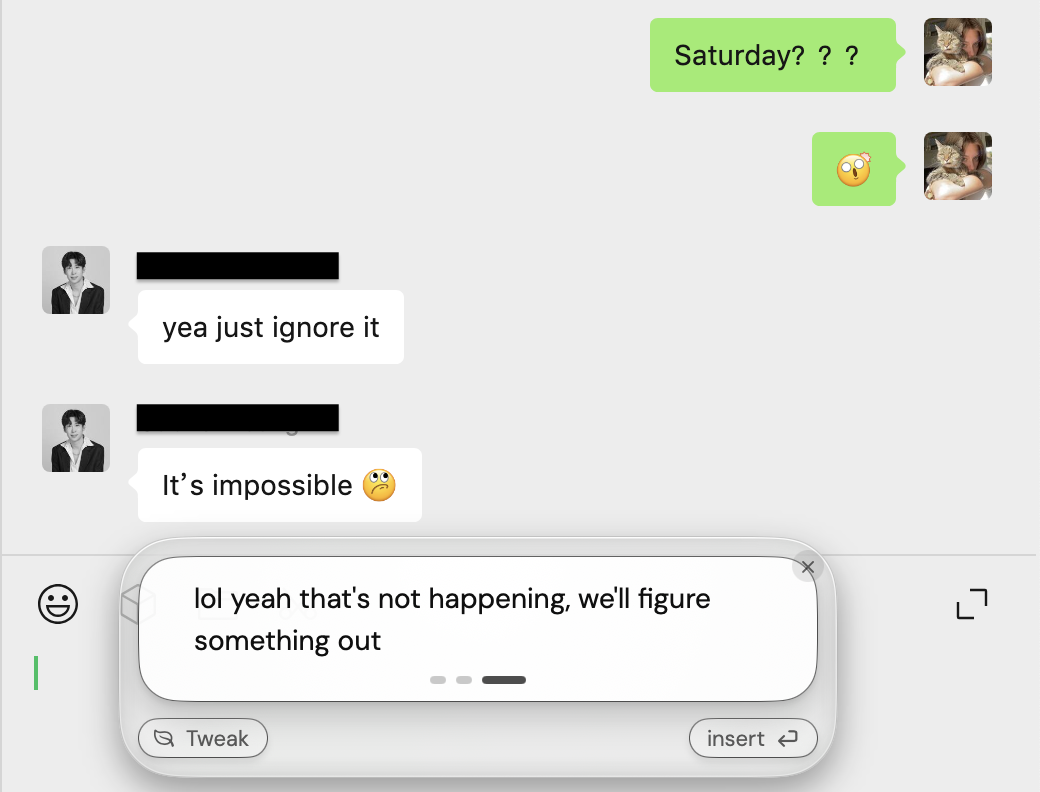
A casual suggested reply in an ongoing group conversation. Matching the register is one part of choosing a reply.
Review the substance as well as the style. “We’ll figure something out” implies a willingness to help find an alternative. If that is not what you intend, revise the draft before inserting it. A reply can fit the tone and still suggest a next step you do not want.
Using relationship memory in ToneBird
With ToneBird as your AI reply assistant, you can draft in supported email and chat fields while keeping available person context close to the conversation. Its relationship memory can include earlier conversations, forms of address and commitments. Your saved tone preferences guide the wording; the current thread and your instruction supply the facts to keep.
Review the person and the available history
Open Circle and select the person to review the captured conversation and open tasks. The author’s profile below includes inferred style and recent topics. Treat those notes as something to inspect, especially when a relationship or project has changed.
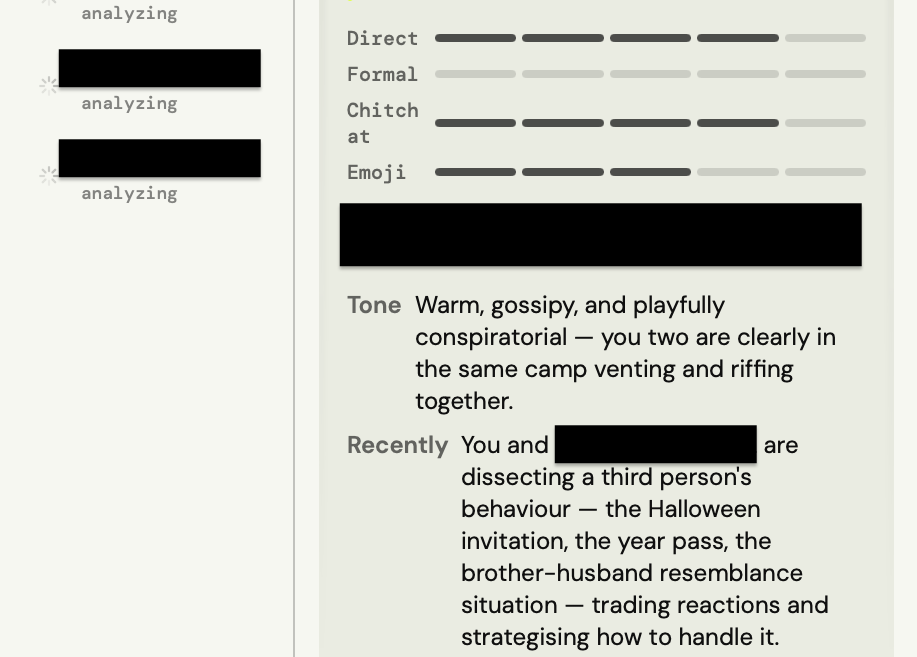
A person profile with inferred tone and recent conversation topics. Check these descriptions against what you know about the person.
Choose a draft in the reply field
Keep the relevant messages visible, click a supported reply field and open the ToneBird bubble. Choose the draft closest to your answer. Use Tweak for a specific mismatch, then Insert and review the message in the app before sending it. The support guide explains this workflow.
For a first message to a new contact, give ToneBird the purpose of the message and how you know the person. There may be no shared history yet. A draft should introduce you or make the request without inventing an earlier conversation.
Saved tone preferences can carry forward the wording you like. They do not make every contact equally familiar, and they should not override a firm answer you have given for this message.
What to check when the context is wrong
Choose the context that matters
A long history can include unrelated small talk and finished tasks. For a new reply, keep the facts that affect what you should say now. A promise to confirm a date may matter; an old conversation on another topic may not.
The assistant does not need to mention everything it remembers. Check whether a person note or earlier message has helped answer the current question, or introduced something the recipient did not ask about.
Update facts that are no longer current
A person’s role, your level of familiarity or a commitment can change. If the proposal was sent this morning, a note saying “send on Friday” should not keep producing a promise to send it later.
Review or remove the outdated memory, then give the current status when drafting. If you only change the final sentence, the same wrong assumption may affect the next reply too.
Compare drafts while keeping the facts fixed
Try this with one incoming message: keep your availability, intention and commitments the same, then compare the wording for different relationships.
For the 2 to 4 availability example, compare a friend’s invitation with a recruiter’s scheduling email. The wording may change, but neither draft should offer a time outside that window.
Some replies should stay similar across relationships. “Thank you” does not need to become a different sentence for every person.
But when the relationship genuinely changes what is appropriate, the draft should change too. A client waiting on a delayed deliverable may need a clear commitment and acknowledgment. A teammate asking about the same deadline may only need a quick status update. A close friend may not need either.
If the wording stays the same, first ask whether this message needed a different reply. If it did, check whether relevant context was available and accurate. A changed draft alone is not proof of a better draft.
What relationship memory stores and sends
An assistant that remembers conversations naturally raises another question: what information is being stored, and what leaves your device when a reply is generated?
Check what is saved locally, what can reach an AI provider for generation and which settings let you review or remove memory. These are separate decisions.
ToneBird’s Privacy & Data page says that tone profiles, person cards, learned corrections, and usage counts are stored on the device. The context needed to generate a reply may still be sent to the selected AI provider. ToneBird also says learned adjustments wait for user approval and that local data can be exported or deleted.
The AI reply assistant privacy guide explains how to check processing, saved memory, optional uploads and deletion. Make that choice before using a conversation you would not normally share with an external service.
Carry forward what still matters
A useful contextual reply keeps the current facts and your intended answer intact. When the wording feels wrong, check the underlying person note or unfinished commitment as well as the sentence itself.
Good use of memory can be quiet: a correct form of address, no repeated question, or an acknowledgment of the next step you already agreed. Those are more useful checks than whether the draft sounds more polished.
Frequently asked questions
What happens if there is little or no history with someone?
A relationship aware assistant can still work with the conversation in front of it, but there will naturally be less personal context to draw from. As the conversation develops, there may be more useful information about tone, preferences, and shared history.
It should not invent familiarity that does not exist just to make the reply feel personalized.
Does relationship aware AI know how the other person feels?
Not necessarily. A system may use what someone actually wrote, the conversation history, and observable communication patterns, but that is different from knowing another person’s private feelings or intentions.
A useful assistant should help with the evidence available in the conversation rather than treating guesses about someone’s emotions as facts.
Is relationship aware AI the same as CRM personalization?
No. CRM systems often organize structured information such as a person’s role, company, account history, or sales activity.
Relationship awareness in a reply assistant is more focused on the communication itself. It can include how the conversation has developed, how you normally speak to the person, what has already been discussed, and what still needs to happen next.
Can a relationship aware AI reply assistant work in more than one language?
Yes, as long as the underlying tool supports those languages. Relationship context and language are separate questions. The assistant may understand who someone is and what you discussed while still needing strong multilingual generation to produce a natural reply.
ToneBird supports multilingual replies according to its support guide. Review names, dates, numbers and meaning before sending, especially when changing languages in the same conversation.

Xinran Zhao has a background in writing and journalism. She writes about the messages we overthink and when AI replies help or miss the point, drawing on her experience starting a career in a second language.