 ToneBird
Reply Paralysis and How to Answer the Message You’re Avoiding
Work out what is stopping the reply, ask for missing details, say no when needed and handle an ordinary delay differently from a missed commitment.
 By Xinran Zhao
 Reviewed & edited byMonica Cheng
A stuck reply gets easier when you separate the decision from the wording. Work out what the sender needs and whether you can give that answer. Then write it plainly. If you are missing information or need more time, that can be the reply.
Why you are stuck | What to do now | A reply to adapt |
|---|---|---|
You need information before deciding. | Ask for the missing detail. | Could you send me the deck and let me know when you need comments? |
You have checked the work and can meet the timing. | Confirm only what you can do. | Yes, I can review it at 2 and send comments by 4. |
You cannot take on the work. | Decline clearly so they can make another plan. | I cannot review the deck today. Please arrange another reviewer if you need comments by 4. |
The delay was minor and you have checked your availability. | Answer the original question. | Sorry for the slow reply. Thursday works for me. |
You missed an agreed deadline. | Acknowledge it and ask what would still help. | I’m sorry I missed the 4 pm review deadline. Has the deck already gone out, or would comments still help? |
A reply that should have taken thirty seconds can suddenly sit there for an hour. This experience is often called reply paralysis. It is not a clinical diagnosis, and it does not always come from the same place. Sometimes you are busy, sometimes the relationship makes the message feel more important, and sometimes you are simply trying to make a very ordinary sentence feel completely safe before you send it.
You may be unsure whether to accept, worried about sounding blunt, or wondering how to answer after a delay. Each calls for a different next step.
Why a short reply can feel difficult
A two line reply may require you to decide what the other person actually needs, what you want to say, what tone fits the relationship, how much explanation is necessary, and when you should send it. None of those decisions is especially large on its own, but together they can make a simple reply feel heavier than it should.
Research on mobile messaging supports part of this picture. A study of mobile instant messaging technostress identified overload, urgency, invasion, and ambiguity as different sources of messaging related strain. You do not need to experience all of them at once to get stuck. Sometimes a message simply arrives while your attention is somewhere else, and by the time you return to it, the delay itself has become another thing you feel like you need to manage.
That is why the visible size of the message can be misleading. The text box may be small, but the amount of decision making behind it is not always small.
Find the decision holding up your reply
Before thinking about the exact wording, it helps to decide what the reply is supposed to do. Most everyday messages do not need a beautifully composed response. They usually need an acknowledgment, an answer, an action, or a signal that the conversation needs more time.
“Got it, thanks” may be enough for an acknowledgment. A scheduling reply needs a real availability decision: “Thursday works for me” is useful after you have checked that it does. “I’ll send it by 4” is useful when 4 is a commitment you can make. For a conversation that needs more attention, suggest a call at a time you can actually offer.
You need information before you can answer
Suppose a colleague asks, “Can you review the deck today?” You have not seen the deck or its deadline. Writing a warmer “Sure” will not settle that uncertainty. Ask for the missing detail first:
Could you send me the deck and let me know when you need comments?
You can accept after checking the work
Now suppose it has ten slides, they need comments by 4, and you have checked that you have time at 2. Your reply can be:
Yes, I can review it at 2 and send comments by 4.
The useful reply confirms the task and the time you can actually commit to.
You need to decline
If you do not have time, a clear answer helps the colleague make another plan: “I cannot review the deck today. Please arrange another reviewer if you need comments by 4.” If you can offer a smaller review or another time, say exactly what you can do. You do not need to invent an alternative just to make the refusal feel nicer.
The point is not to force every conversation into a fixed category. It is to answer one practical question before you start drafting: What does this person actually need from me right now?
Once that is clear, you have already removed one layer of overthinking.
How much attention does this reply need?
A message that affects an agreed deadline deserves more thought than a casual reaction to a meme. A difficult conversation with someone close to you deserves more care than confirming dinner plans. The problem starts when low stakes messages begin receiving the same level of attention as high stakes ones.
Instead of asking yourself what the perfect response would be, ask how much thought this message actually deserves. For an ordinary reply, a useful stopping point is whether the message is clear, appropriate for the relationship, and answers what the other person needs.
If you have an answer but keep swapping equally clear phrases, the remaining problem is knowing when to stop editing. That guide gives you a stopping point. Here, the first job is to make the decision the sender needs.
When tone is the remaining uncertainty
A lot of overthinking happens around very small choices. “Okay.”, “Okay!”, and “Okay :)” all communicate nearly the same information, but they can feel surprisingly different when you are the person deciding which one to send.
That uncertainty is real, but it does not automatically mean the other person is likely to misunderstand you. A 2025 study of real texts and emails compared the emotional tone intended by senders with the tone perceived by receivers. In the studied informal texts and work or educational emails, sender and receiver ratings were generally well aligned. Most messages were positive, and senders and receivers knew each other. This does not establish that difficult or unfamiliar conversations will be interpreted correctly.
For an ordinary reply, an extra punctuation change is not necessarily solving a real misunderstanding.
If the message is low stakes and the meaning is already clear, you are allowed to stop editing.
Replying after a delay
An ordinary delay
A delay can add an apology to a task that originally needed only an answer. At first, the message may simply be:
Are you free Thursday?
A few hours later, you may feel like you also need to explain why you did not answer sooner, apologize for the delay, and make sure the apology itself does not sound strange.
Research on instant messaging responsiveness has found that people consider factors such as perceived obligation, readiness to respond, conversation pace, and whether the situation feels suitable when deciding when to reply. The same research also discusses how awareness cues can increase pressure when people think the sender knows a message has already been seen. You can read the study here.
That helps explain why a delayed message can suddenly feel heavier than the original one. But if the delay was minor, you usually do not need to make it the main topic. “Sorry for the slow reply. Thursday works for me” is often enough. Depending on the relationship, you may not need an apology at all.
Answer the invitation after checking your availability. A long explanation of an ordinary delay can obscure the answer they were waiting for.
A delay that affected someone else’s work
If the deck review was due at 4 and you missed it, acknowledge the missed commitment rather than treating it like a casual late text. The colleague may already have sent the deck, so check what is useful now.
You could write: “I’m sorry I missed the 4 pm review deadline. Has the deck already gone out, or would comments still help?” If you can now complete the review, offer a time you have checked. A more polished apology cannot replace that next step.
Turn your decision into a first draft
You may already have the answer: you can review the ten slides at 2 and return comments by 4. Writing that in a professional but friendly way can still be the part that stalls you.
ToneBird can help with that wording in the email or chat app where you are replying. It works as your AI reply assistant in supported fields, including email, Slack, LinkedIn and WhatsApp. It can also help draft a first message to a new contact when there is no thread to continue. Give it the purpose and the facts you already know.
For the deck example, a practice instruction is: “Confirm I can review the ten slides at 2 and send comments by 4. Keep it friendly and brief.” Its context aware replies can use available messages to connect the request to your answer. You still supply the availability decision.
The author’s separate group chat below shows why that decision matters. A teammate asks whether more slides are needed, and ToneBird suggests offering to add them.
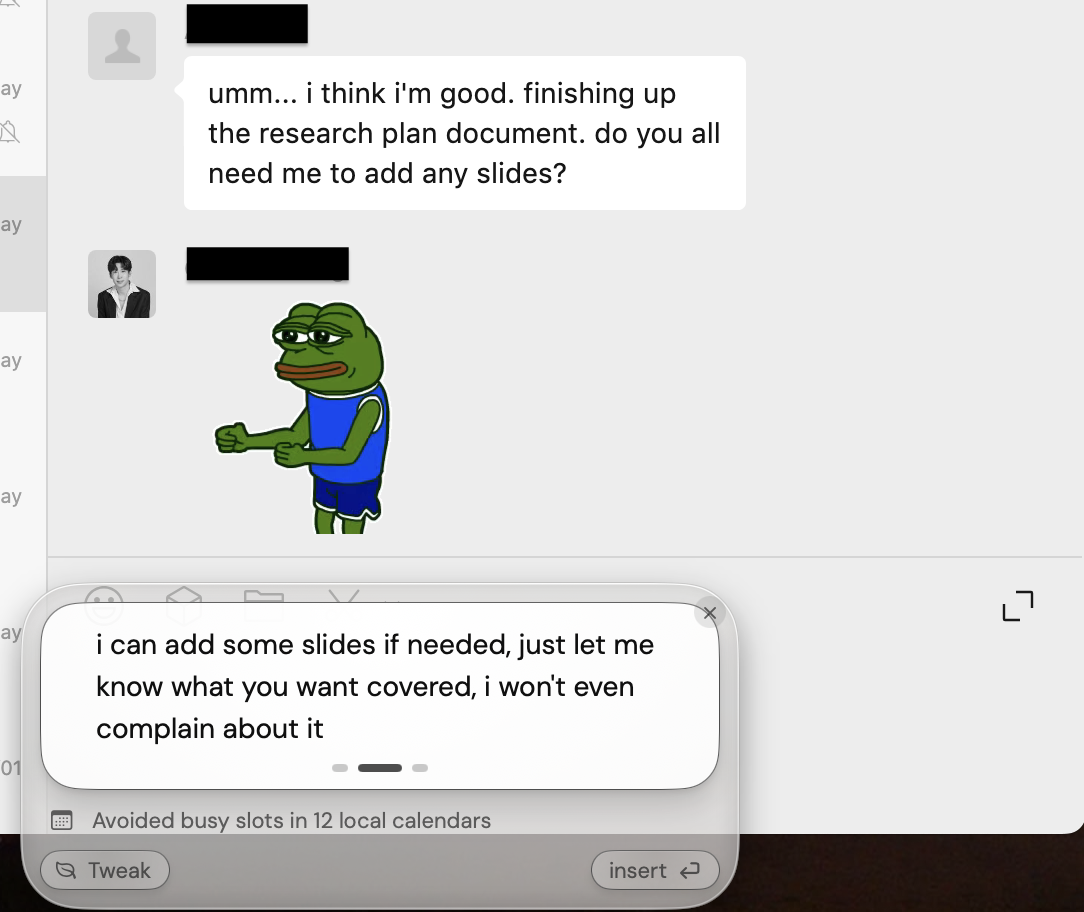
This draft offers to add slides. Check whether you want to make that offer before you spend time adjusting its tone.
The first review question is whether you want to offer that work. If you only want to acknowledge the update, a practice instruction for Tweak is: “Acknowledge the update briefly. Do not offer to add slides.” If you do want to help, check your capacity and the needed topics before accepting the proposed wording.
For later conversations with the same person, relationship memory and saved tone preferences can reduce how often you explain the relationship again. That context helps with wording; your current capacity still determines what you can promise.
Review one draft against your intention. Use Tweak for a specific mismatch, then Insert to place the draft in the original reply field. Review it there before using the app’s send button. The ToneBird support guide describes this workflow.
Choose when a message can wait
Not every unread message needs to become an immediate decision. Some messages genuinely need attention now, while others can wait until you have the time and attention to answer them properly.
There is a difference between intentionally deciding, “I’ll answer these after class,” and repeatedly opening the same message, feeling bad about it, and closing it again. The first choice temporarily removes the decision. The second keeps the message active in your head without moving it forward.
If you cannot give a conversation your attention right now, choose when you will return. For the deck request, that could mean checking your schedule after the meeting. If a reply is needed sooner, send a short acknowledgment or tell the colleague you cannot take it on. A private plan to return later does not tell the other person what to expect.
Give the sender an answer they can use
The next useful reply might be a yes, a no, a question or a time when you can give a fuller answer. Each moves the conversation forward when it reflects what you actually know and can do.
If a delay affected someone else, acknowledge the effect and agree the next step. If the wording is all that remains, review one draft against your intention instead of asking it to make the decision for you.
The goal is not to become someone who always responds instantly. It is to stop making ordinary replies harder than they need to be.
References
Ardèvol-Abreu, A., Rodríguez-Wangüemert, C., & Delponti, P. (2022). Mobile instant messaging techno-stressors: Measurement, dimensionality, and relationships with type of usage. Profesional de la información, 31(4), e310401. https://doi.org/10.3145/epi.2022.jul.01
Lee, H.-P. (Hank), Chiang, Y.-S., Chou, Y.-L., Lin, K.-P., & Chang, Y.-J. (2023). What makes IM users (un)responsive: An empirical investigation for understanding IM responsiveness. International Journal of Human-Computer Studies, 172, 102983. https://doi.org/10.1016/j.ijhcs.2022.102983
Pollmann, M. M. H., & Roos, C. A. (2025). “I get u”. People correctly interpret the tone of text messages and emails. Computers in Human Behavior Reports, 18, 100689. https://doi.org/10.1016/j.chbr.2025.100689

Xinran Zhao has a background in writing and journalism. She writes about the messages we overthink and when AI replies help or miss the point, drawing on her experience starting a career in a second language.