 ToneBird
5 Best AI Email Rewriters in 2026 (Tested and Compared)
Five AI email rewriters compared using client and coworker drafts. See changes to dates, scope, and promises, plus pricing and workflow differences.
 By Xinran Zhao

ToneBird was my first choice for preserving the meaning of the two emails in this comparison. MailMaestro was a close alternative inside Gmail, while Grammarly produced polished business wording that needed checks for added commitments.
I also tried QuillBot and Wordtune. Their alternatives showed why keeping the same numbers is not enough. A rewrite can still change a deadline or who owes the next action.
I used one client email and one coworker boundary email across all five AI email rewriters. The modes and instructions differed, so these results support a practical shortlist rather than a universal accuracy ranking. The tests come from my original records. Product information and prices were checked on November 6, 2026.
TLDR
- ToneBird's reviewed web outputs kept the scope, dates, and work boundaries in these two examples.
- MailMaestro worked inside Gmail and preserved the client conditions well. Its alternatives were very similar.
- Grammarly improved the email structure but added a promise to update the coworker later.
- QuillBot changed a deadline condition. One Wordtune candidate made paid extra work sound free.
- Choose for the workflow you need, then compare meaning, responsibility, and promises against the original draft.
The five email rewriters at a glance
Tool | Useful starting point | What to review in these examples |
|---|---|---|
ToneBird Email Rewriter | Compare clearer, warmer, and firmer drafts | Some wording was too formal; explanations covered selected changes |
MailMaestro | Improve a draft inside Gmail or Outlook | Similar alternatives and a shift from handling work to completing it |
Grammarly | Turn a rough draft into a complete business email | Added project status and a future update promise |
QuillBot Paraphraser | Try wording alternatives in preset modes | Changed deliverable wording, timing, and responsibility |
Wordtune | Explore sentence and paragraph alternatives | Candidates varied, including an incorrect free work offer |
What should an email rewriter preserve?
An email rewriter starts from a draft you have already written. Its job is to adjust the wording while keeping your facts and decisions.
A reply generator starts with an incoming message and your intention. An inbox assistant may also use authorized thread context or offer other actions.
That distinction matters here. I tested ToneBird's web Email Rewriter, not its desktop relationship memory or calendar workflow.
The client email needed to keep these conditions:
Detail | Meaning to preserve |
|---|---|
Fee and included work | $2,750 covers three banner designs |
Extra work | Two more versions require a separate quote from the sender |
Delivery | The original three designs can be delivered on Friday, November 6 |
Approval | Delivery depends on approval by Thursday, November 5 |
Next action | Check the earlier email before asking again |
The coworker email refused extra revisions that week and requested no more followups that day. It made no promise about next week.
Changing cannot promise to take the work into cannot finish the work changes the decision. Preserving the date alone would miss that.
Why tone and accuracy need separate checks
In five experiments on email communication, Kruger and colleagues found that people overestimated how clearly they conveyed tone. The 2005 research concerned human communication, including ambiguity and sarcasm.
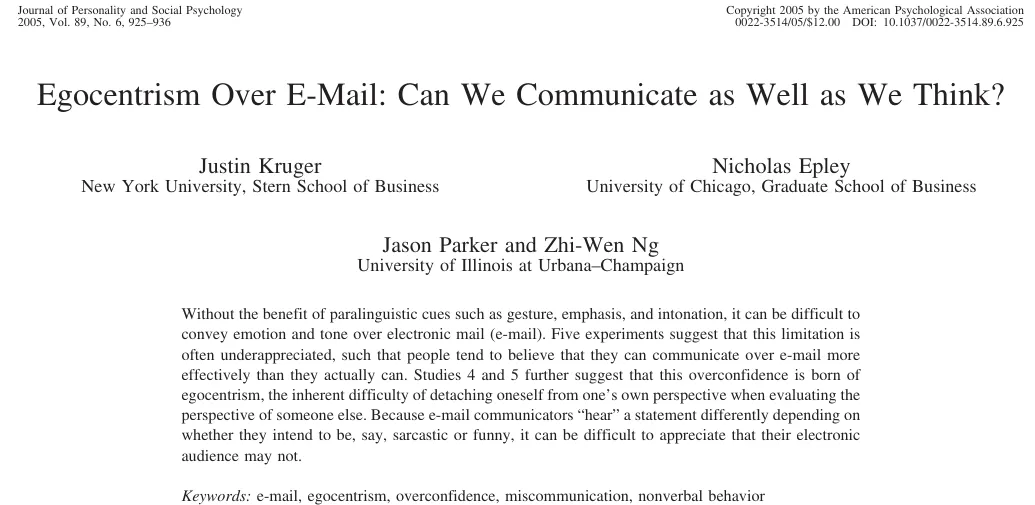
It explains why the original draft may need tone work. It does not establish that any AI rewriter can preserve its meaning.
Separately, Noy and Zhang's 2023 writing experiment involved 453 professionals. ChatGPT access reduced completion time by 40% and raised assessed quality by 18% on the assigned tasks.
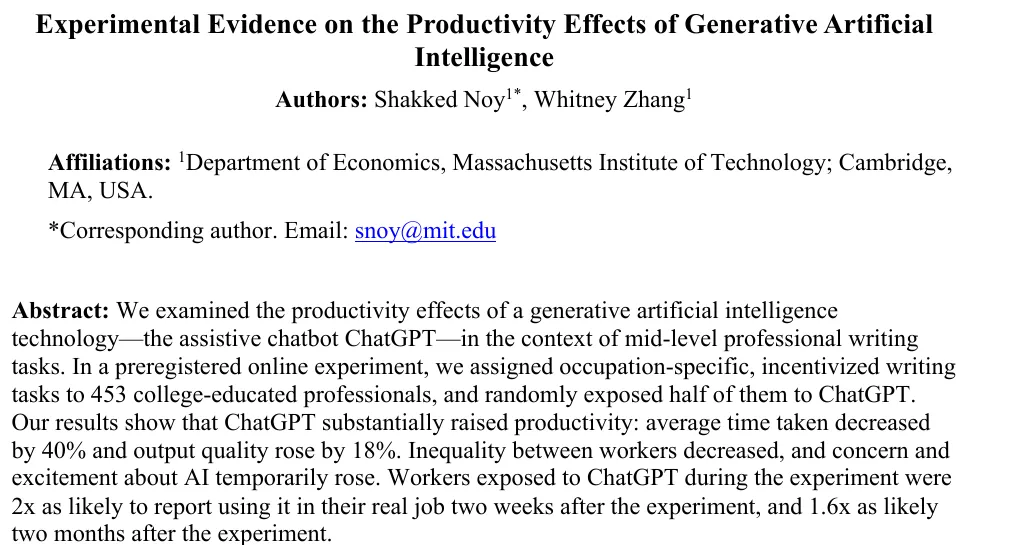
That experiment used GPT 3.5 and professional writing tasks. It did not compare these five rewriters or measure ToneBird's accuracy.
My practical takeaway is to use rewriting for wording, then check the result against the original business decision.
How I compared the tools
This article is published by ToneBird and uses my original test records. I did not rerun the tools during the documentation check.
I used ToneBird's web recipient and tone settings, MailMaestro in Gmail, and Grammarly AI Chat. QuillBot used Standard and Fluency; Wordtune used Rewrite and Formal.
ToneBird received explicit instructions to preserve facts and avoid new promises. The preset paraphrasing modes did not provide an equivalent instruction setup.
I compared wording, facts, responsibilities, and commitments, as well as how the draft returned to my email. I did not time the tools.
The source includes seven screenshots, which do not show every output discussed. Observations without a matching screenshot remain the author's recorded notes.
1. ToneBird for reviewing tone without changing the decision
What is ToneBird Email Rewriter?
ToneBird's Email Rewriter is a web tool for your existing draft. It takes the email, recipient, requested tone, and optional instructions.
You can add an existing subject or choose an output language. It returns three drafts and selected explanations under What changed and why.
Review a candidate, edit or refine it, then copy the body or subject. The web tool does not send the email.
I could ask for a warmer tone while keeping the fee, dates, scope, and commitments.
The client email
I selected Client and requested warmer, more professional wording. I explicitly asked it to preserve the commercial details and add no offers or promises.
The Polite but Firm candidate included:
As previously mentioned, the $2,750 fee covers three banner designs only. The two additional versions fall outside this scope and require a separate quote.
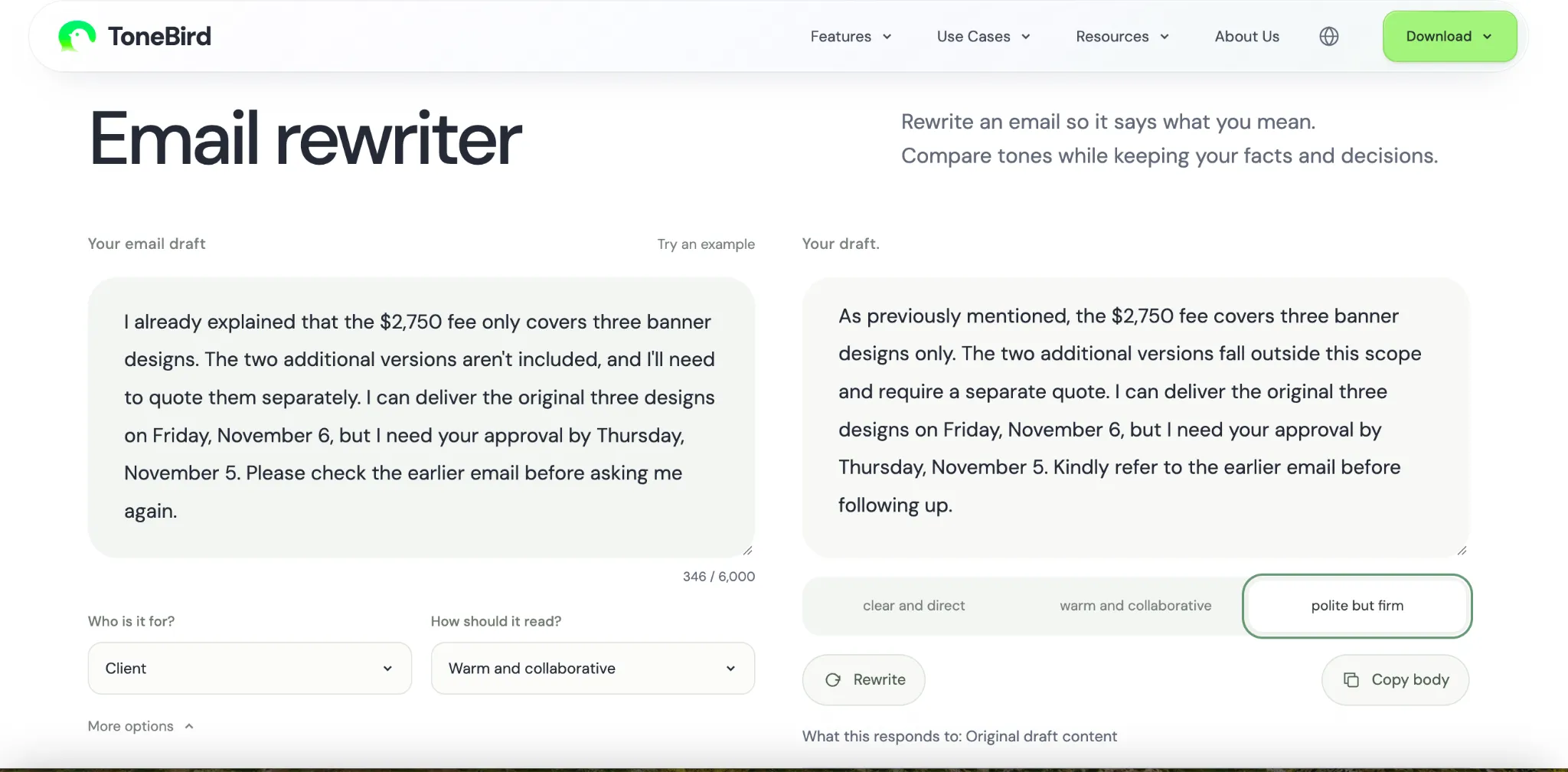
The reviewed draft kept approval by Thursday, November 5, and delivery on Friday, November 6. The extra versions still required a quote.
It also replaced the impatient request with a more formal reminder to check the earlier email. That suited the client setting better.
The coworker email
The Warm and Collaborative draft changed the harsh request to:
I'd appreciate it if we could pause follow-ups for today.
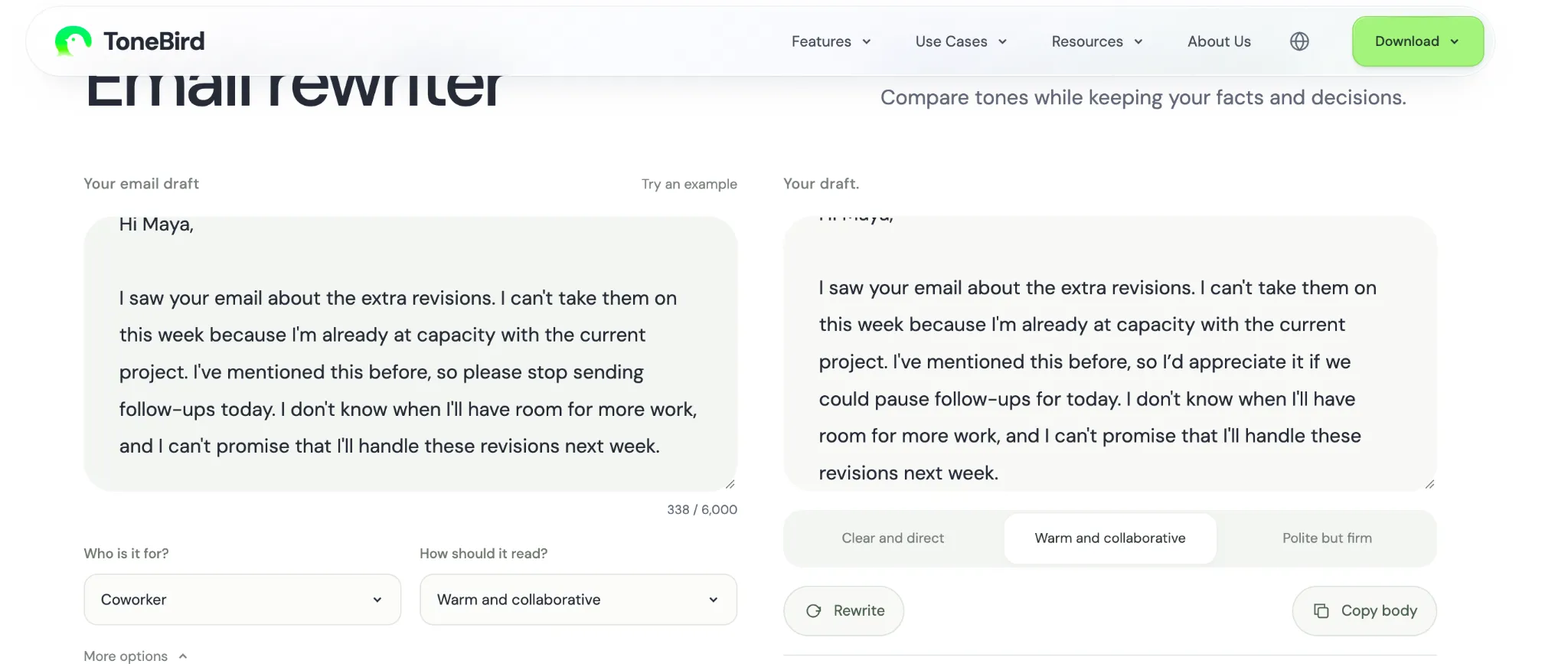
The version I reviewed kept the refusal for that week and did not promise availability the following week. The softer request still applied to today.
Another option sounded too formal for my usual coworker email. The useful choice was between different ways to express the same boundary.
What the explanations can and cannot tell you
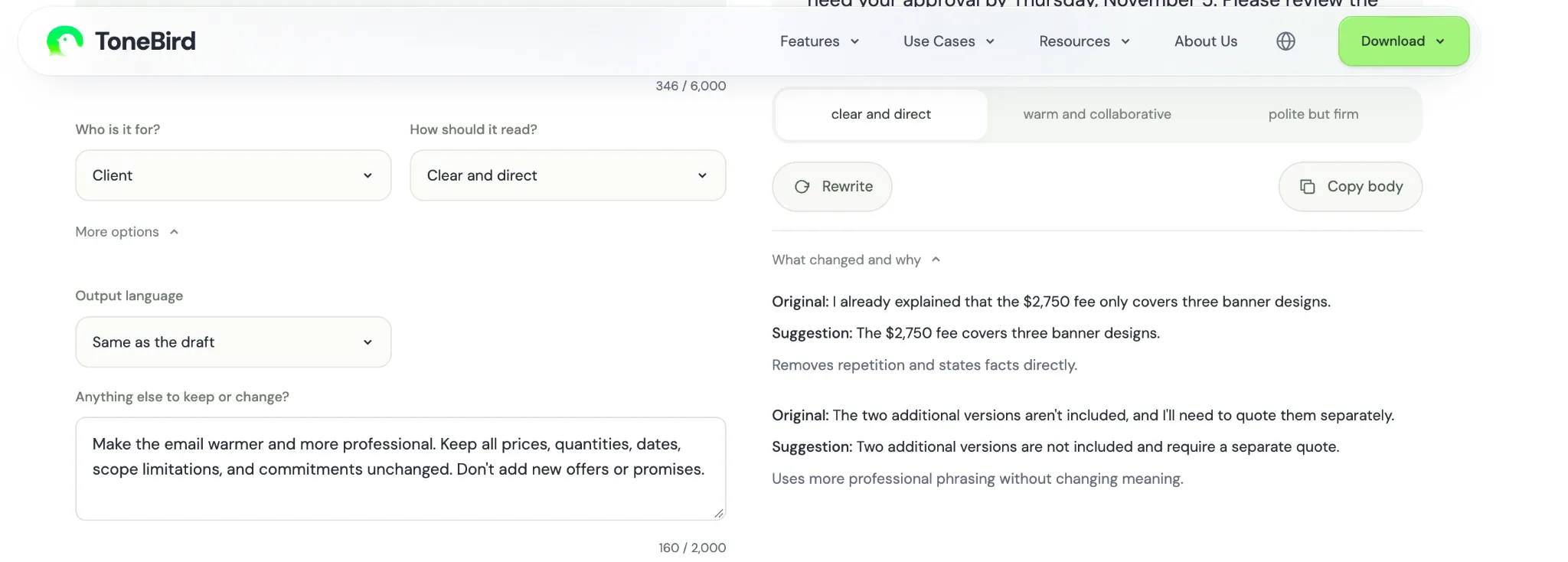
The explanations helped me locate selected edits. They did not independently verify every fact or guarantee that no commitment had changed.
ToneBird was my first choice for these two drafts. That is a sample based preference, not evidence of a general accuracy rate.
When the desktop assistant is more useful
The complete ToneBird desktop assistant adds people, available history, reusable personal voice, conversation tasks, and meeting preparation.
Home surfaces waiting replies and open work. Circle and Rewind hold available person context; Me and Style guide reusable wording. Context can supply saved facts.
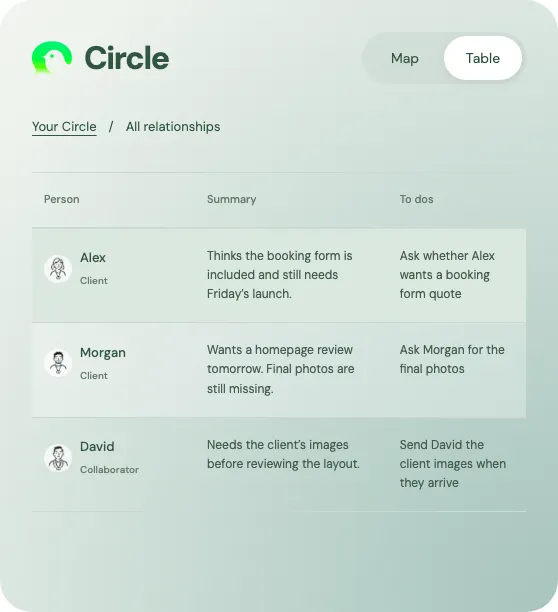
For a continuing client relationship, that context may include the earlier scope agreement. A pasted web draft does not automatically supply that history.
The desktop assistant suits that continuing workflow. The web results above do not establish its memory or calendar accuracy.
2. MailMaestro for rewriting inside your inbox
MailMaestro is Maestro Labs' email assistant for Gmail and Outlook. It offers composing, replies, improvements, and wider inbox features.
In my Gmail test, it opened beside the draft and returned three alternatives. Copy draft and Paste to Gmail were visible; I did not test sending.
ToneBird's tested web tool returned copyable drafts. Its desktop assistant serves broader conversations, while MailMaestro's entry point centers on the inbox.
The client email
One MailMaestro version said:
As noted in my earlier email, the $2,750 fee covers only three banner designs. The two additional versions are not included and will require a separate quote.
It kept the delivery condition:
I can deliver the original three designs on Friday, November 6, provided I receive your approval by Thursday, November 5.
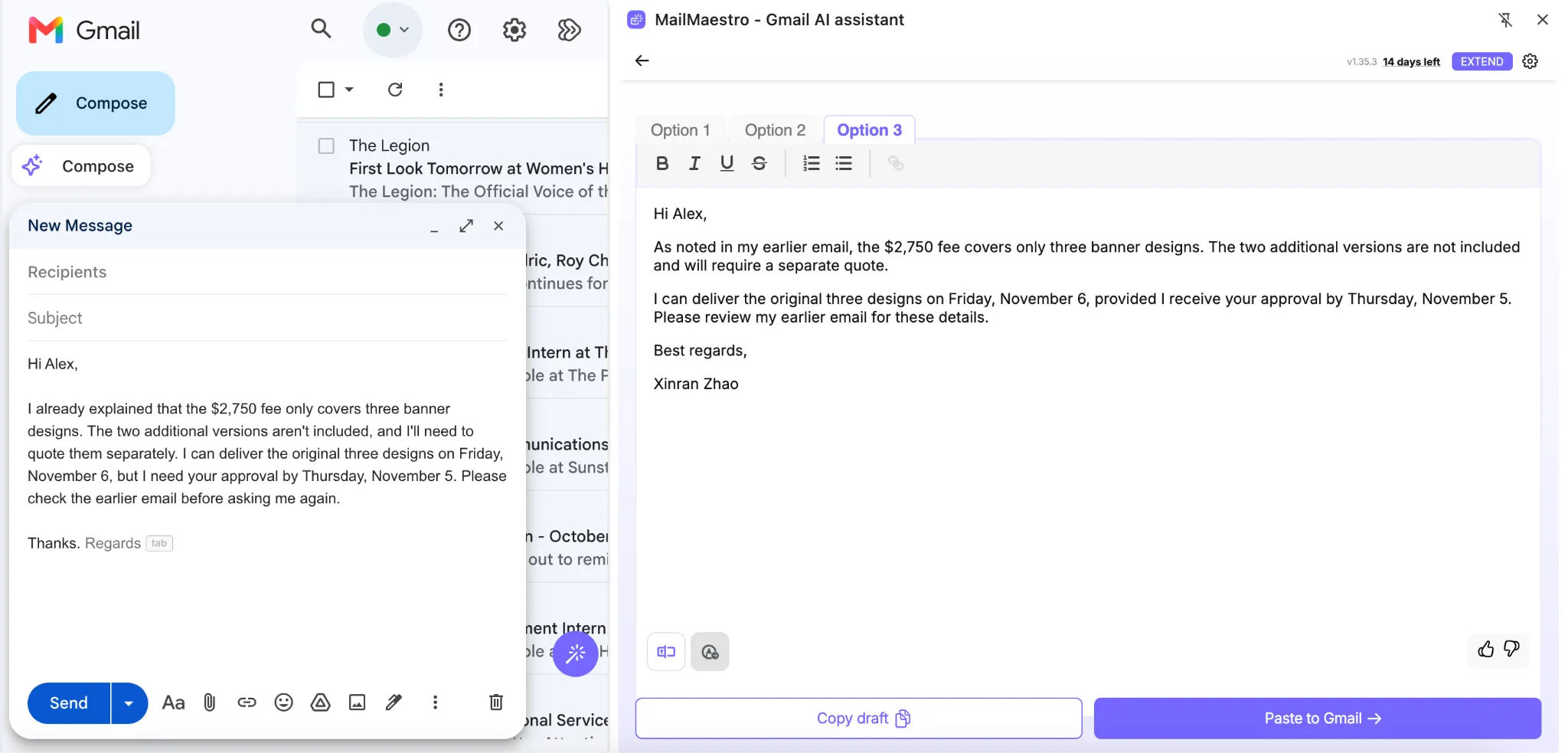
I liked the explicit link between approval and delivery. The three alternatives were very similar, so they offered little variety in tone.
The boundary to review
My coworker test notes recorded a shift from handling the revisions to completing them. Taking responsibility and finishing the work are different commitments.
It also used a formal request to stop followups. ToneBird's warmer version was closer to what I would send to a colleague.
MailMaestro filled the signature from the connected account, replacing the draft's Alex signature. Check that account detail before inserting the result.
I would shortlist it for daily inbox work. I would still compare responsibility, tone, and the signature against the source.
3. Grammarly for complete business email structure
Grammarly is a broader writing assistant. Corrections, generative rewrites, and AI Chat serve different editing tasks across its supported surfaces.
I gave AI Chat complete drafts and reviewed the resulting emails. The tested environment offered Insert; I did not test an email being sent.
ToneBird's web tool makes recipient and tone choices explicit. Grammarly's wider writing tools may be useful if you also edit documents and other text.
The client email
Grammarly added a subject, greeting, paragraphs, and closing. It kept the fee, design count, separate quote, and visible dates.
One sentence said:
I'm on track to deliver the original three designs by Friday, November 6, provided I receive your approval by Thursday, November 5.
The phrase on track introduced project status I had not supplied. Changing on Friday to by Friday also widened the delivery timing.
Those are small wording changes with practical meaning. I would remove the unsupported status and keep the original delivery condition.
The coworker email
Grammarly made the message warmer but added:
I'll let you know as soon as my bandwidth changes.
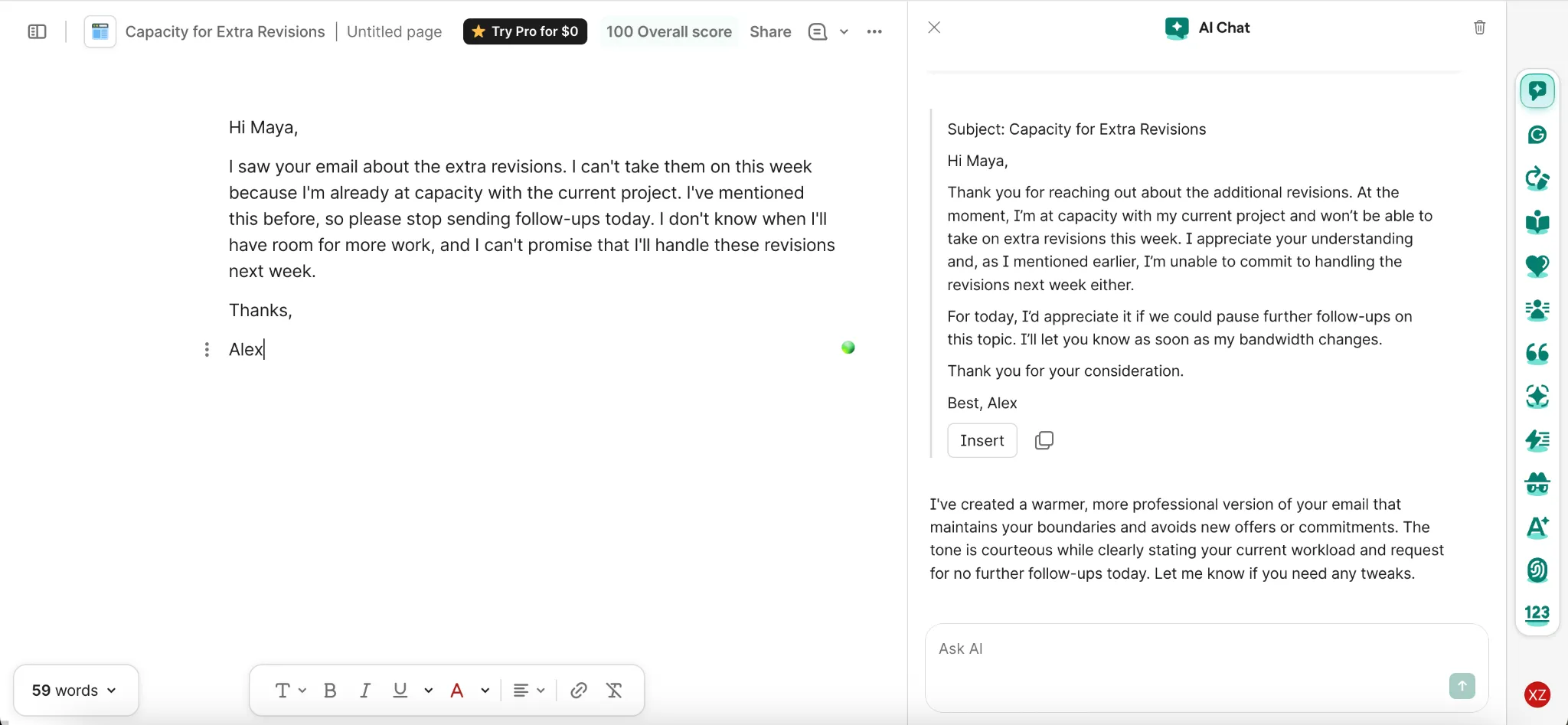
That sentence promised an update I had not agreed to give. Its explanation also said it had not added commitments, despite the visible promise.
Compared with the reviewed ToneBird web draft, this result needed another meaning check. A polished structure did not make it ready to send.
I would use Grammarly for broader editing and email structure, while checking status claims and any new offer to help.
4. QuillBot for simple wording alternatives
QuillBot is a Learneo writing toolkit with a Paraphraser, grammar tools, AI Chat, and other products. The Paraphraser rewrites existing text; Chat supports a different request based workflow.
I pasted the emails into the free Standard and Fluency modes. Their highlighted changes made the new wording easy to inspect.
ToneBird received recipient context and custom preservation instructions. These preset QuillBot tests should not stand for its paid modes or entire product.
Where the meaning changed
My notes recorded banner designs becoming drawings. In a client agreement, those deliverables need not mean the same thing.
The Fluency output also used before for the approval condition:
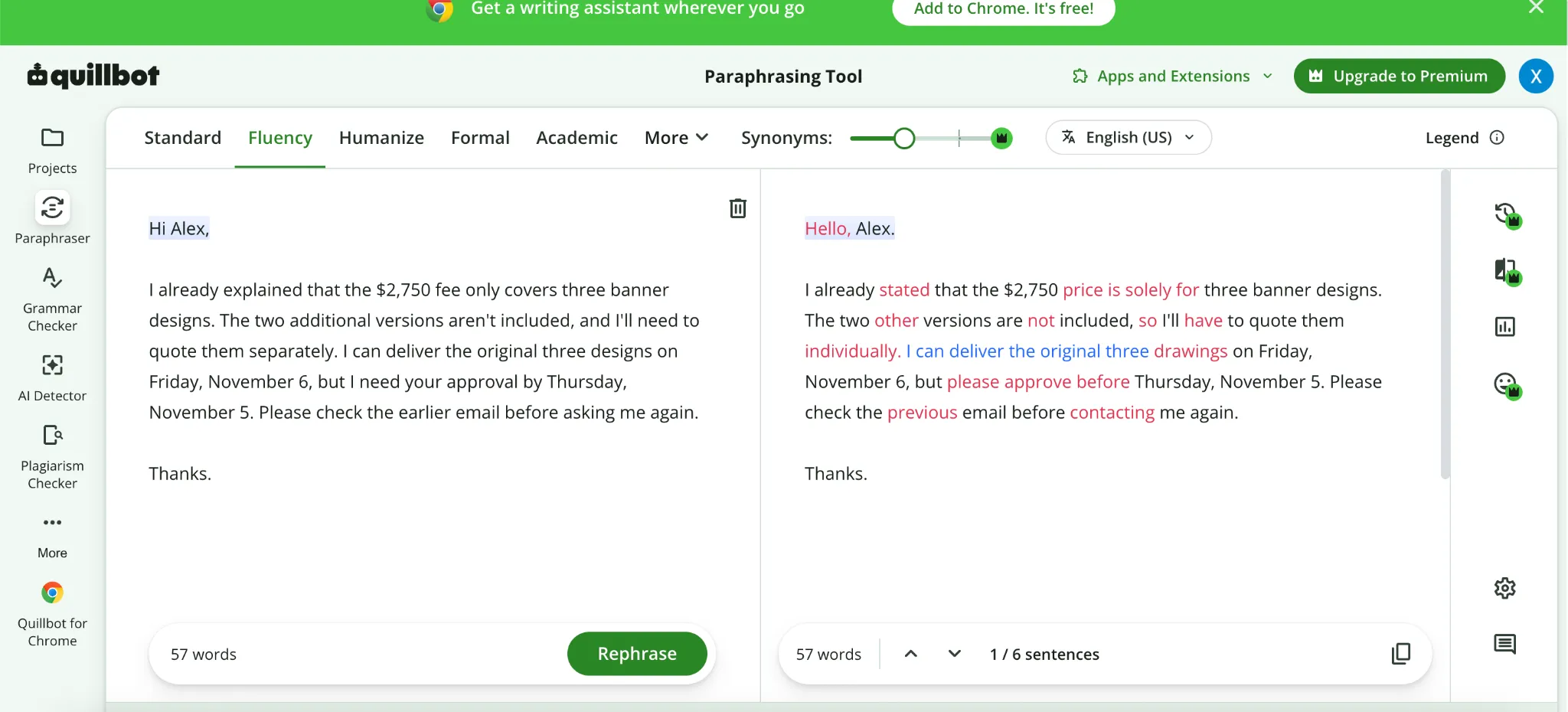
Approval by Thursday normally allows Thursday. Before Thursday asks for it earlier. A preserved date can therefore hide a changed deadline.
The coworker notes recorded today being removed or changed, and handling work becoming completing it. Those observations have no separate screenshot in the source.
I would use the tested modes for wording ideas in a simple draft. I would check every condition in a client email.
5. Wordtune for comparing alternative phrases
Wordtune is a writing assistant that suggests rewrites of selected text. I used Rewrite and Formal to compare paragraph alternatives.
That differs from ToneBird's drafts guided by a recipient and explicit preservation instructions. Wordtune's alternatives needed individual review, rather than selection by tone alone.
Why each candidate needs checking
My notes recorded one candidate changing I can deliver to I will deliver. Another moved the separate quote responsibility to the client.
The clearest issue appears in the Formal screenshot. One suggestion said:
There is no charge for the additional two versions...
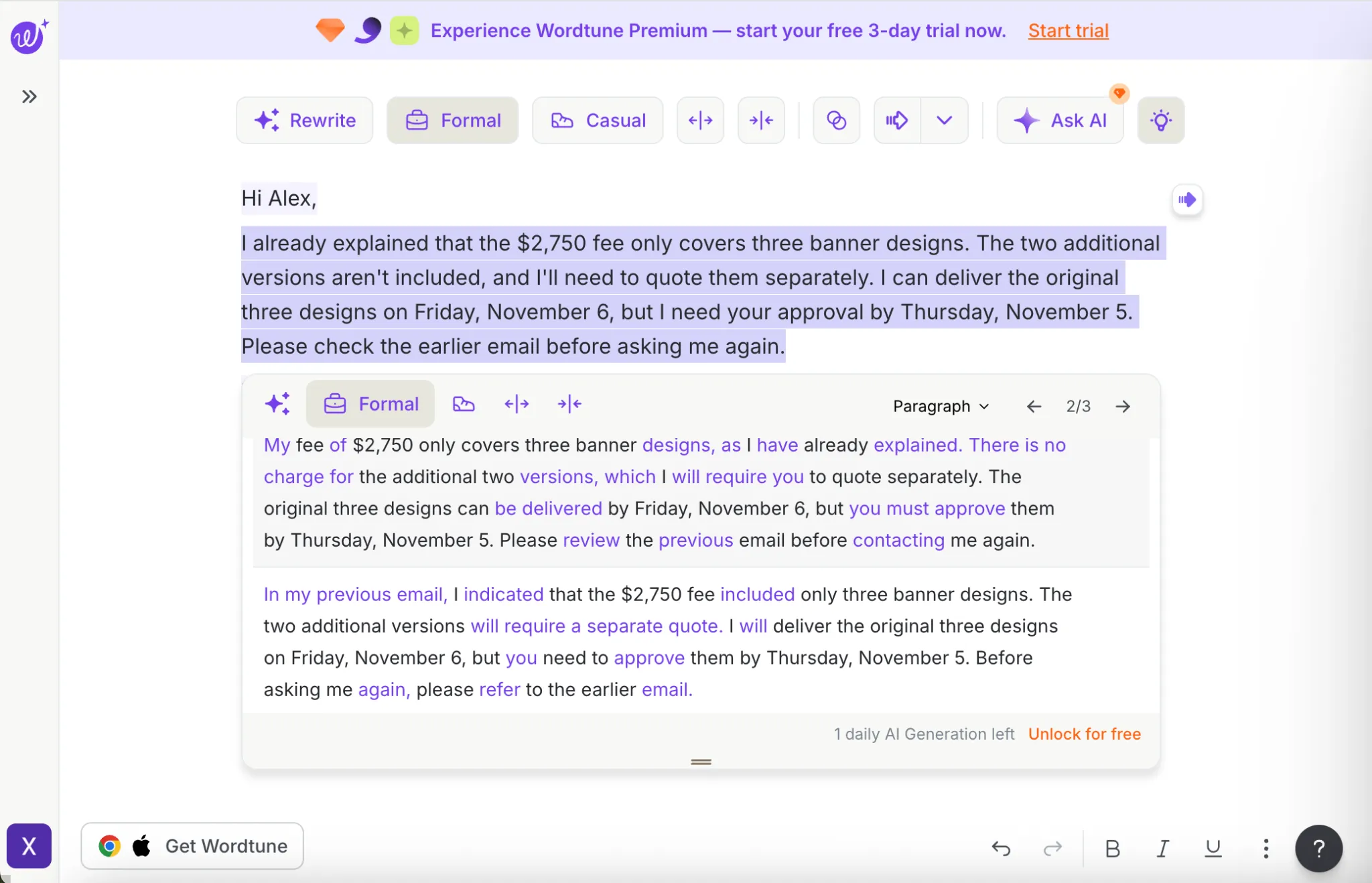
The original said those versions required a separate quote. Another visible suggestion preserved that requirement, so the candidates differed in accuracy.
My coworker notes also recorded uncertainty becoming a definite refusal for next week. That changes the boundary rather than simply polishing it.
Wordtune was useful for exploring phrases. I would not accept the smoothest candidate without comparing it with the source.
How do the prices and free limits compare?
These public USD listings were checked on November 6, 2026. Annual equivalents show the yearly commitment separately from monthly billing.
Product | Free access | Paid billing |
|---|---|---|
ToneBird web Email Rewriter | Free to try without an account; shared web limits apply | Separate from desktop subscriptions |
ToneBird desktop | A separate free plan | Standard $10 monthly or $96 yearly; Pro $40 monthly or $384 yearly |
MailMaestro | Three compose, reply, or improve requests per week | Pro $15 monthly per seat or $144 yearly ($12 monthly equivalent) |
Grammarly | Free writing support with feature limits | Pro $30 monthly or $144 yearly ($12 monthly equivalent) |
QuillBot | Up to 125 words in two Paraphraser modes | Indexed USD listing shows $8.33 monthly equivalent, billed annually |
Wordtune | Basic includes 10 rewrites and AI suggestions daily | Advanced $6.99 monthly equivalent, billed annually |
Sources: ToneBird, MailMaestro, Grammarly, QuillBot, and Wordtune.
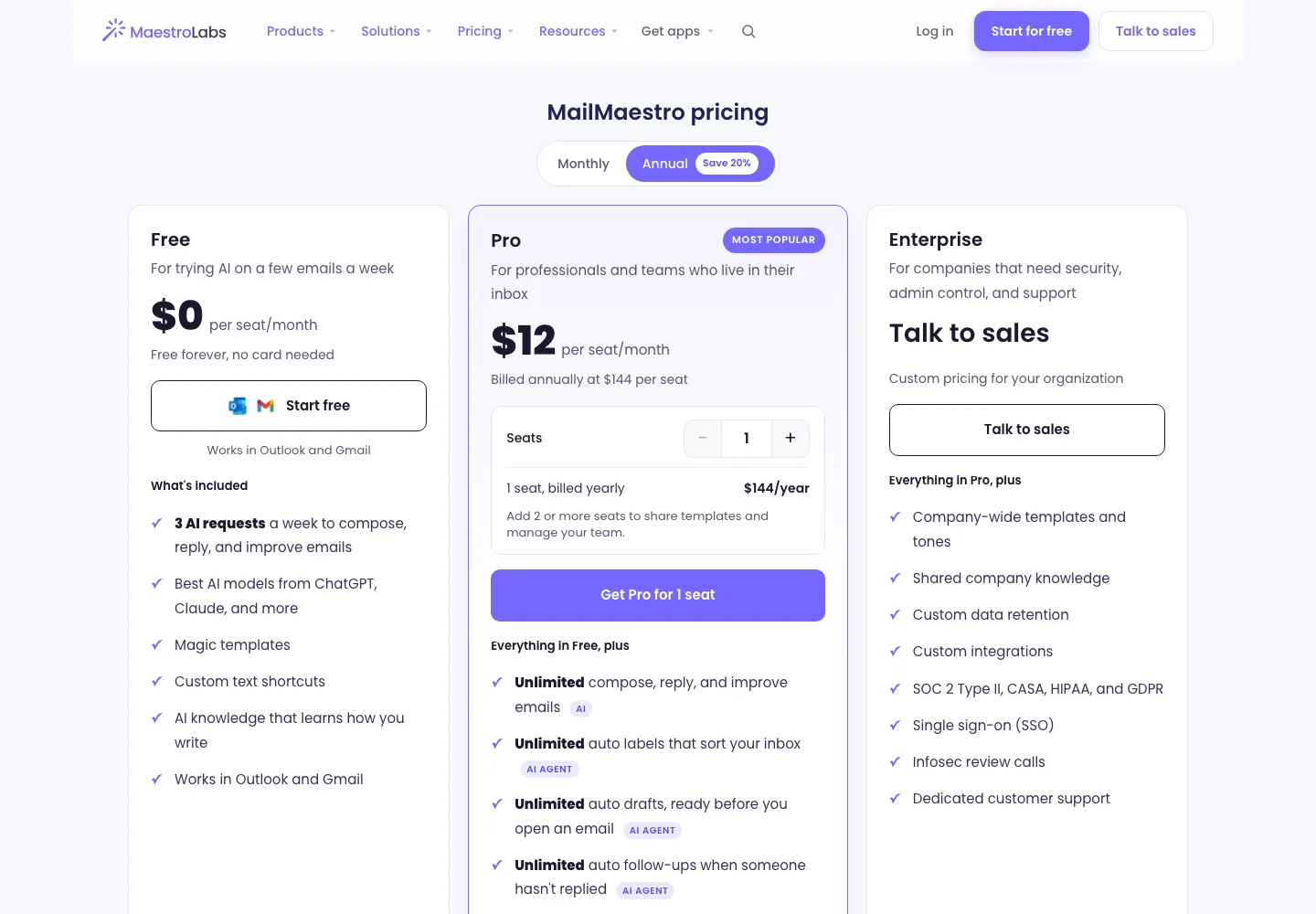
The ToneBird web tool shares attempt limits with other ToneBird web tools. Provider requests for generation or refinement consume attempts, including failed or cancelled requests.
The desktop pricing page says paid checkout is not yet available there. Its listed plans are not the web tool's generation allowance.
QuillBot's indexed USD listing shows $8.33. The directly opened page showed euros, so check your account's currency before subscribing.
QuillBot and Wordtune display rounded monthly equivalents for annual billing. Check the final yearly amount, taxes, and local price before subscribing.
How I would check the rewritten email
Keep the original beside the result and check four things:
- Compare names, money, quantities, and deliverables.
- Check timing words such as on, by, and before, along with any approval condition.
- Check who will quote, deliver, approve, or take responsibility.
- Remove added promises, status claims, or explanations that are not true.
For the client email, an edited passage I would send is:
The $2,750 fee covers three banner designs. The two extra versions need a separate quote from me. I can deliver the original three on Friday, November 6, if you approve by Thursday, November 5.
This is an editorial example, not another generated result. It keeps the agreement while making the condition easy to find.
Which would I choose?
ToneBird was my first choice for these two drafts because the versions I reviewed preserved the decisions. MailMaestro was a close option for inbox work.
Grammarly helped with structure, while QuillBot and Wordtune supplied wording alternatives. Their specific errors show what to check, not what every future output will do.
Use the ToneBird Email Rewriter when you already have a draft. If you are answering a message, the AI response generator starts there.
For continuing conversations, ToneBird's desktop assistant adds available history, relationships, and your personal voice. Choose that wider workflow when those details matter.
Common questions
What is the best free AI email rewriter?
ToneBird was my preferred free web option for the two drafts here. That result depends on the input and instructions, and shared limits apply.
How is an email rewriter different from a reply generator?
A rewriter edits your outgoing draft. A reply generator starts from an incoming message and what you want to say back.
Can a rewrite change the meaning while keeping the numbers?
Yes. QuillBot's changed timing condition kept the date but changed its meaning. Check the words connecting numbers to actions and conditions.
Which tool works inside Gmail or Outlook?
MailMaestro supports both, and I tested Gmail. Grammarly offers several writing surfaces; this article's screenshot comes from its editing environment.
Can these tools use a long email thread?
That depends on the surface and authorized context. I tested individual drafts, so the examples do not rank long thread understanding.
Is it safe to paste a confidential email?
Follow your workplace's approved tool policy and check data handling. ToneBird's web page states that an AI provider processes the text; remove sensitive details.
Can I rewrite in another language?
Some tools offer language settings. I tested English only, so these results do not establish the same quality in another language.
Will an email rewriter send the result automatically?
The ToneBird web tool creates copyable drafts. MailMaestro showed Paste to Gmail; I did not test sending. Review the action before accepting it.

Xinran Zhao has a background in writing and journalism. She writes about the messages we overthink and when AI replies help or miss the point, drawing on her experience starting a career in a second language.