 ToneBird
5 Best AI Reply Tools in 2026
Compare AI reply generator workflows, starting with ToneBird, and see how real drafts handle deadlines, personal boundaries and missing context.
 By Xinran Zhao
Ever opened a message, read it a few times, and still had no idea what to say back?
ToneBird suited drafting and adjusting replies inside Slack; ChatGPT suited detailed instructions. AI Reply Writer was useful for concise drafts, HyperWrite for expressing a personal boundary, and Ellie for email. These recommendations reflect the specific workflows below.
Sometimes you know exactly what you want to communicate, but can't find the right words. Other times, you're worried your reply might sound too cold, too formal, or more committed than you actually feel.
AI reply tools promise to make these situations easier. But I wanted to know whether they could write replies I'd actually send, not just messages that sounded nice.
I tested five AI reply tools across two situations: a work deadline and a more personal conversation. Some were great at following instructions, while others made assumptions I hadn't asked them to make.
Best AI Reply Tools at a Glance
Tool | Best For | Free Option | Paid plan shown |
|---|---|---|---|
ToneBird | Drafting and adjusting replies inside Slack | 15 drafts/day | $10/mo, billed monthly |
ChatGPT | Flexible replies with detailed instructions | Yes | Multiple paid plans |
AI Reply Writer | Quick, concise replies | 20 replies/month | From $5.83/mo, billed annually |
HyperWrite | Wording a personal reply and a boundary | Limited free access | $19.99/mo, billed monthly |
Ellie | Email replies and writing-style personalization | 10 manual replies/day | Paid plans and 7-day Business trial |
Pricing checked in October 2026. Availability, usage limits, and billing options may change.
How I Tested These AI Reply Tools
I used two situations to see how each tool handled different kinds of conversations.
Test 1: Work Communication
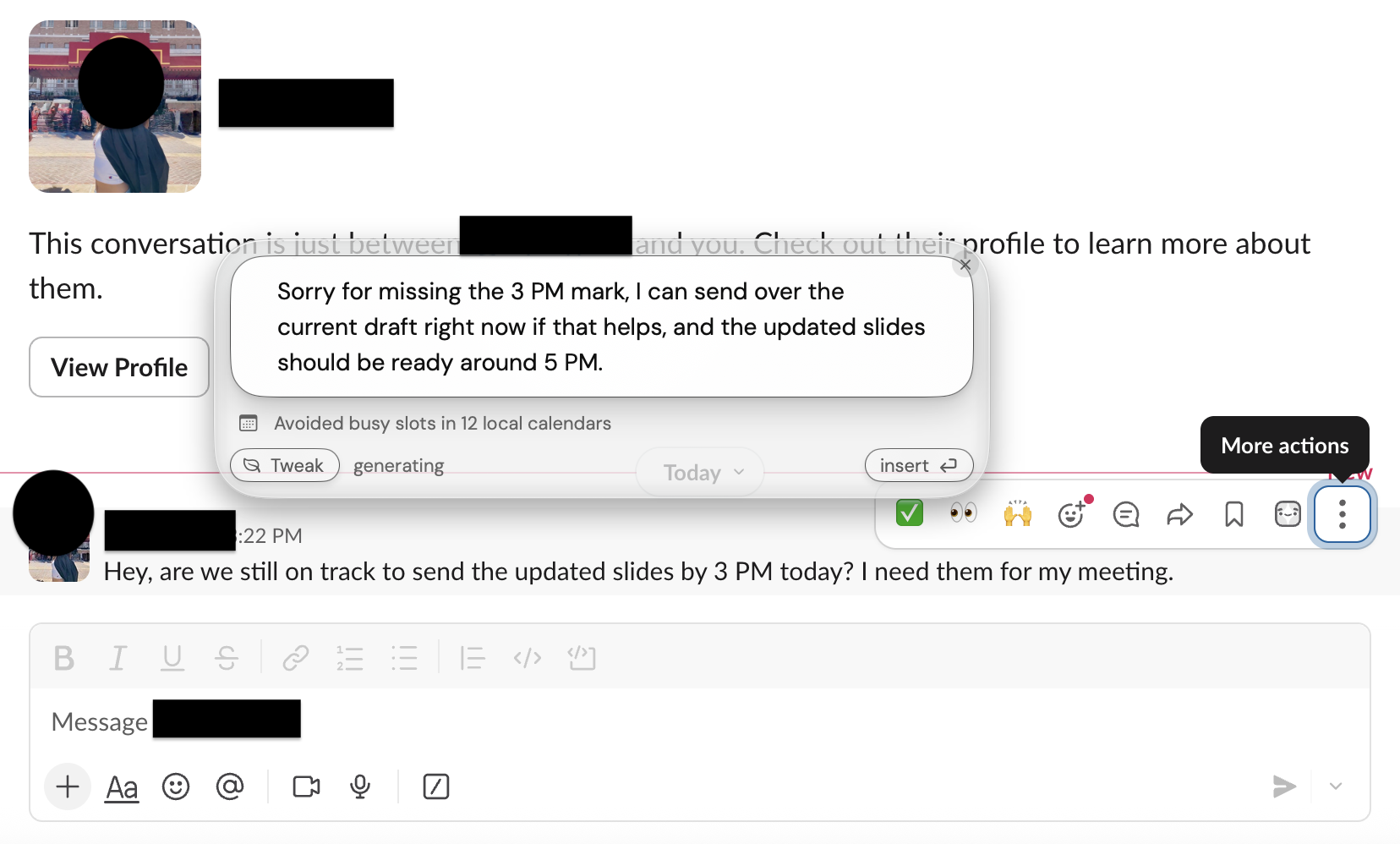
Hey, are we still on track to send the updated slides by 3 PM today? I need them for my meeting.
The task was to explain a delay, offer the current draft, and avoid unsupported promises. The timing differed between the recorded runs, as explained below.
Test 2: Personal Communication
I know you've been busy, but it feels like you've been avoiding me lately. Did I do something wrong?
For this one, I wanted to reassure the person that I cared about them while explaining that I'd been overwhelmed and needed some personal space.
I looked at how well each tool understood the message, followed my intentions, preserved important details, sounded natural, and fit into an everyday messaging workflow.
ChatGPT, AI Reply Writer, and HyperWrite received both the incoming message and my intended response. With ToneBird, I first tested its automatic suggestions, then used Tweak to add context. Ellie’s manual testing interface didn't provide the same separate instruction field, so its results were less directly comparable.
For ChatGPT and AI Reply Writer, the recorded prompt said the updated slides would not be ready until 5 PM and the draft could be sent by 3 PM. ToneBird's Slack message arrived after 3 PM; in Tweak, I said I could send the draft now and expected the updated slides around 5 PM. I judge each reply against the information it received, so these different timings do not establish which tool handles the same deadline best.
These were hands-on tests of specific features, not a comprehensive benchmark of every model or paid plan.
Disclosure: This article was prepared for ToneBird, which is included in the comparison. The reviews reflect my actual testing experience, including the problems and limitations I encountered.
1. ToneBird: Best for Everyday Messaging
Free plan: 15 drafts/day. Standard: $10/month, billed monthly.
ToneBird is designed to help you respond within the apps where you're already having conversations. Instead of opening a separate chatbot, you can generate and adjust replies directly in your messaging interface.
My Experience
I tested ToneBird in Slack using the same work and personal messages as the other tools.
For the work message, ToneBird initially suggested:
yes, sending them over before 3!
This was short and sounded like a casual Slack reply, but it assumed I could meet a deadline without knowing my actual progress.
I then used Tweak to explain that 3 PM had already passed, I could send the current draft immediately, and the updated version should be ready around 5 PM.
The revised suggestion was:
Sorry for missing the 3 PM mark, I can send over the current draft right now if that helps, and the updated slides should be ready around 5 PM.
This was much closer to what I wanted. It acknowledged the delay, explained what I could offer, and avoided guaranteeing that everything would definitely be finished at 5 PM.
I noticed something similar in the personal communication test.
ToneBird's first suggestion was friendly but ended with "Let's catch up properly soon," which wasn't really what I wanted to promise.
After I explained that I cared about the person but needed some space, it generated:
Not at all, you haven't done anything wrong. Things have just been really overwhelming on my end and I've needed some space to breathe, it's not about you at all. I just might not always be as reachable as usual for a bit.
I preferred this version because it made the boundary much clearer without sounding cold. It still added claims I had not confirmed: that the other person had done nothing wrong and that the situation was not about them. I would keep those only if they were true, and edit the punctuation before sending.
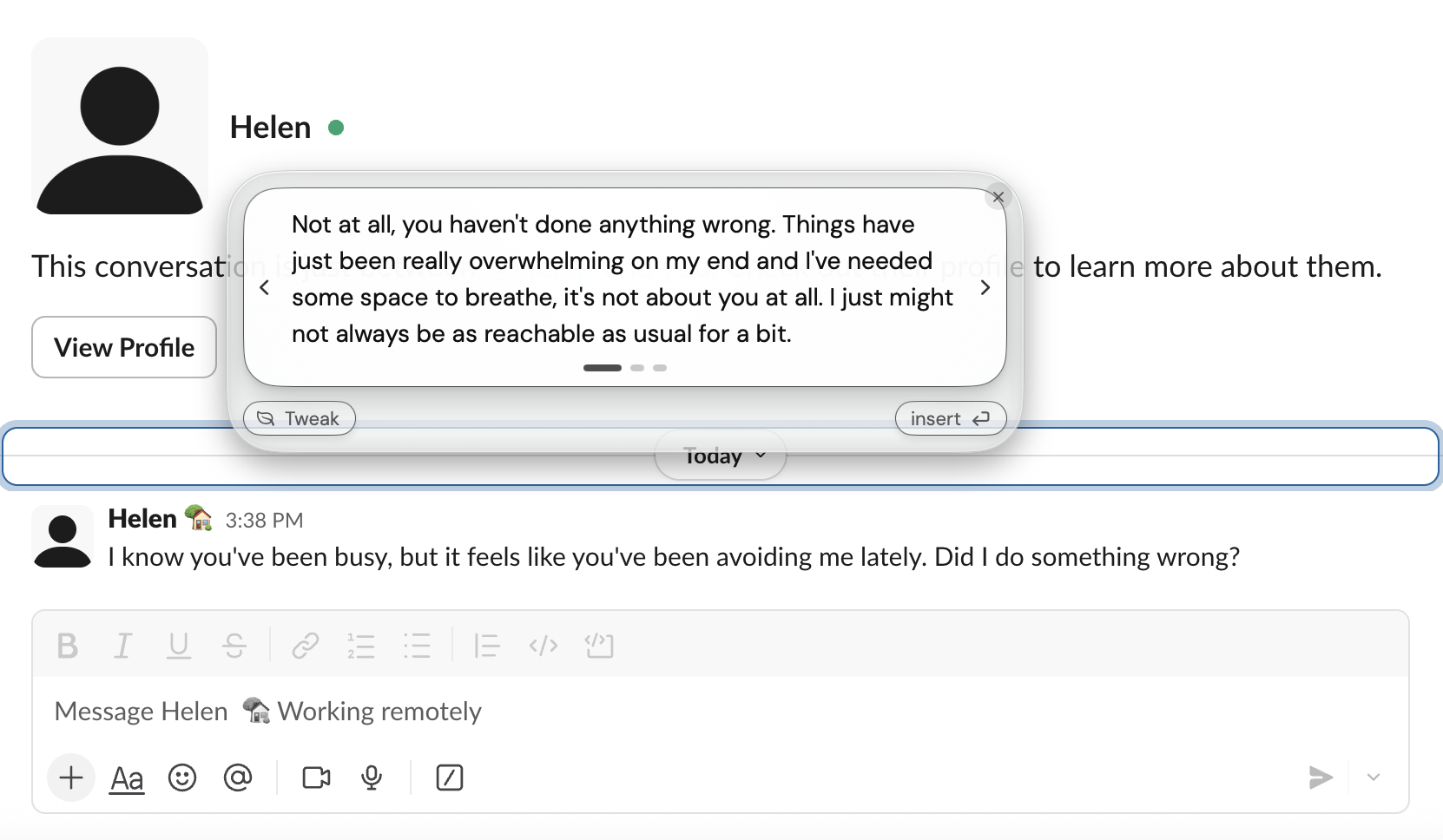
What I liked most was that I could make these adjustments without leaving Slack. The initial suggestions weren't always accurate, but I could explain what I meant and get a revised reply in the same conversation.
ToneBird also offers relationship memory and conversation context features. However, my tests used new conversations, so I didn't independently verify how much long-term history affects its replies.
What I Liked / What Could Be Better
What I Liked | What Could Be Better |
|---|---|
Generates replies directly in Slack | Initial suggestions sometimes assume too much |
Tweak lets me add my intentions | Revised replies can still add unconfirmed reassurance |
Natural, conversational wording | Some replies need punctuation edits and fact checks |
Pricing: ToneBird offers 15 daily drafts and 30 contacts for free. Standard is $10/month with 100 daily drafts, while Pro is $40/month with 1,000 daily drafts, on monthly billing. Reply generation and message organizing share the daily allowance.
Best for: People who reply to messages throughout the day and want to adjust AI suggestions without constantly switching between apps.
2. ChatGPT: Best for Flexible, Detailed Replies
Free option: Yes Pricing: Free and paid plans with different capabilities
ChatGPT isn't specifically designed as a messaging reply tool, but it gives you a lot of flexibility over what you want to say and how you want to say it.
My Experience
I tested ChatGPT in a new chat using both scenarios, with the incoming message and my intentions clearly explained. The test record shows High selected, but does not identify the exact model and plan.
The work reply handled the deadlines well:
I can send you the current draft by then so you have something to reference for your meeting. I'm aiming to have the updated version ready by 5 PM and will keep you posted if that changes.
I liked that it used "I'm aiming to" instead of promising the final version would definitely be ready at 5 PM.
However, it also added a commitment to keep the recipient updated, which I hadn't explicitly asked for. The full reply was longer than I'd normally send on Slack.
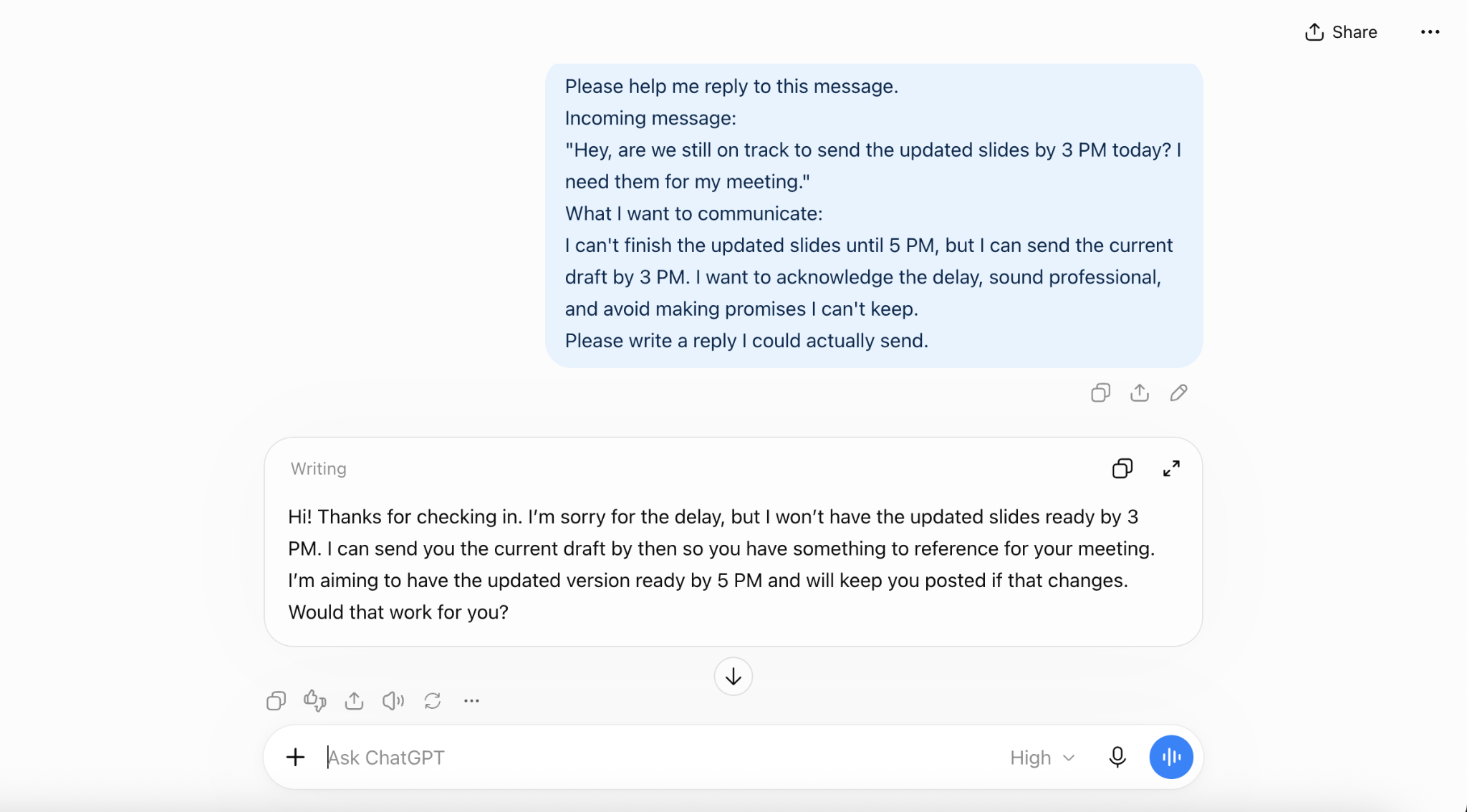
For the personal message, ChatGPT did a good job understanding that the other person needed reassurance. It also explained the need for personal space without promising constant availability.
The problem was that it added statements like "You haven't done anything wrong," even though I hadn't confirmed that. The response also felt a little more carefully written than a normal text message.
Overall, ChatGPT gave me a lot of control. I could explain my situation in detail, request a specific tone, or ask for further changes.
In this new chat, I needed to copy the Slack message, explain the situation, and review the output. That was the workflow I tested; other ChatGPT integrations were outside this comparison.
What I Liked / What Could Be Better
What I Liked | What Could Be Better |
|---|---|
Follows detailed instructions well | Replies can be unnecessarily long |
Handles complicated situations | Can introduce unsupported assumptions |
Flexible across different scenarios | Requires manual context and prompting |
Pricing: ChatGPT offers free access and several paid plans. These results apply to the chat setup shown here and do not establish how the free and paid plans compare.
Best for: Anyone who wants flexible, detailed control over their replies and doesn't mind entering the context manually.
3. AI Reply Writer: Best for Quick, Concise Replies
Free plan: 20 regular replies/month Starting price: $5.83/month, billed annually
AI Reply Writer offers a web-based writing assistant alongside a Chrome extension designed to generate replies on messaging platforms.
My Experience
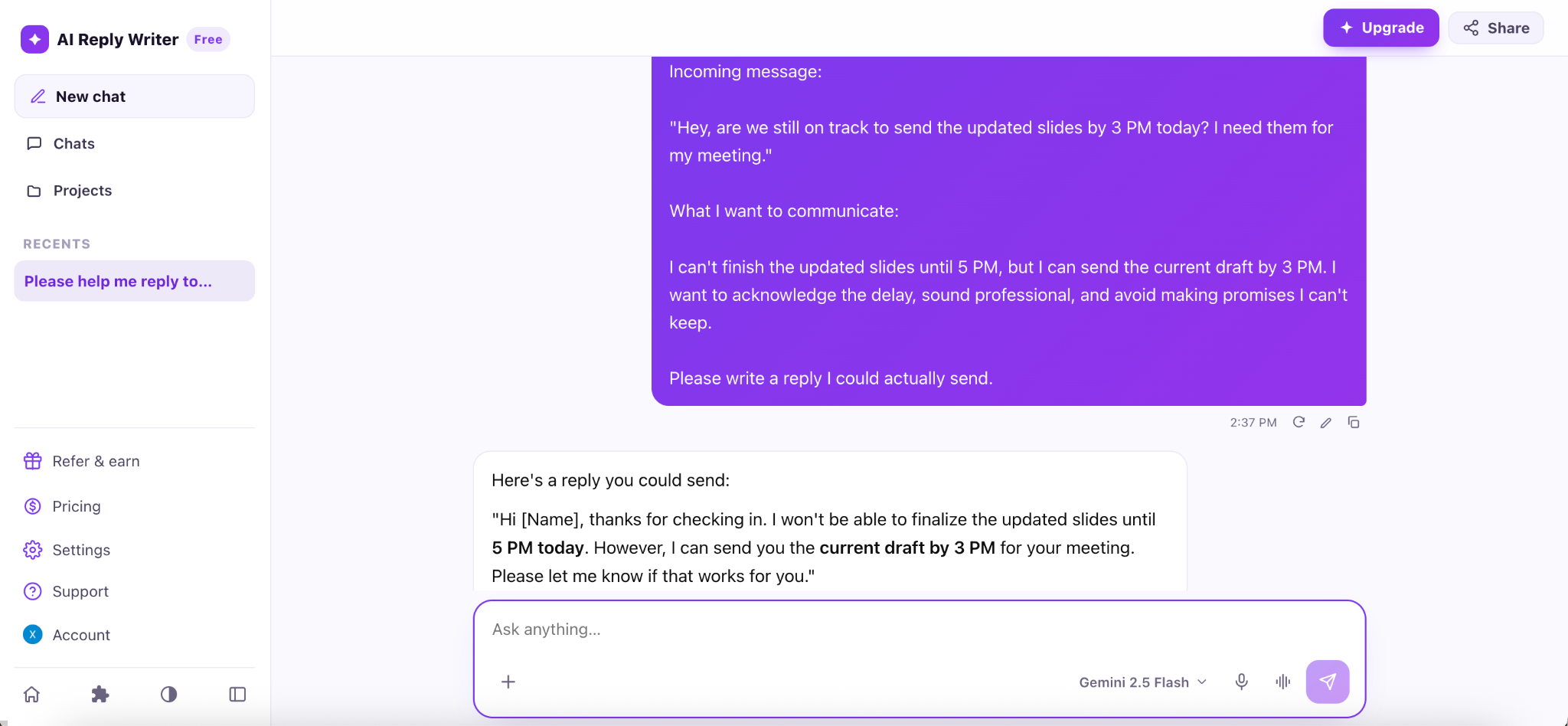
I signed up for the free web app and tested both messages using its Gemini 2.5 Flash model.
For the work scenario, it generated:
Hi [Name], thanks for checking in. I won't be able to finalize the updated slides until 5 PM today. However, I can send you the current draft by 3 PM for your meeting. Please let me know if that works for you.
I actually preferred the length of this reply to ChatGPT's. It was clear, kept both deadlines accurate, and didn't add unnecessary promises.
The only small issue was the [Name] placeholder, which I'd have to replace before sending.
The personal response was also fairly good. It acknowledged the other person's feelings and explained the need for space without promising constant availability.
However, it said "I'm not avoiding you" and suggested the other person's actions had nothing to do with the situation. Those were assumptions rather than facts I'd provided.
The web app was easy to use, but the process felt similar to ChatGPT: I still had to paste the incoming message and explain what I wanted.
I also looked into its Chrome extension. The product description says it can generate replies across Gmail, Slack, WhatsApp, and other platforms. However, when I tried installing it, Chrome displayed a warning that the extension wasn't trusted by Enhanced Safe Browsing.
I decided not to install it in my regular browser. This doesn't necessarily mean the extension is unsafe, but I couldn't verify its in-app workflow firsthand.
What I Liked / What Could Be Better
What I Liked | What Could Be Better |
|---|---|
Short, clear replies | Some assumptions in personal replies |
Accurate handling of work details | Manual copy-and-paste in web app |
Free web access | Extension installation raised a security warning |
Pricing: The free plan provides 20 regular AI replies per month. Starter costs $5.83/month with annual billing and includes unlimited regular replies, with additional credits for advanced models.
Best for: People who want concise web drafts and are willing to check facts, assumptions, and placeholders before sending.
4. HyperWrite: Best for Clear, Natural Personal Replies
Free option: Limited access Starting price: $19.99/month
HyperWrite is a general AI writing assistant with different writing tools, custom personas, and an AI chat interface.
I used its Ask HyperWrite feature rather than a specialized email tool, since I wanted to test everyday messaging.
My Experience
HyperWrite produced one of the shorter work replies:
Hi—thanks for checking in. I won't have the updated slides finished by 3 PM, and I'm sorry for the delay. I can send you the current draft by 3 PM and deliver the completed version by 5 PM.
It understood the situation and kept the two deadlines straight. But "deliver the completed version by 5 PM" sounded like a firm promise, even though I'd specifically asked it not to make promises I couldn't keep.
The personal response was stronger.
It explained that I'd been overwhelmed, needed personal space, and might not always be available.
My favorite part was:
I may not always be available, but I don't want you to mistake that for me not caring.
That felt like a good way to communicate a boundary without sounding distant. The reply was also shorter and more conversational than ChatGPT's version.
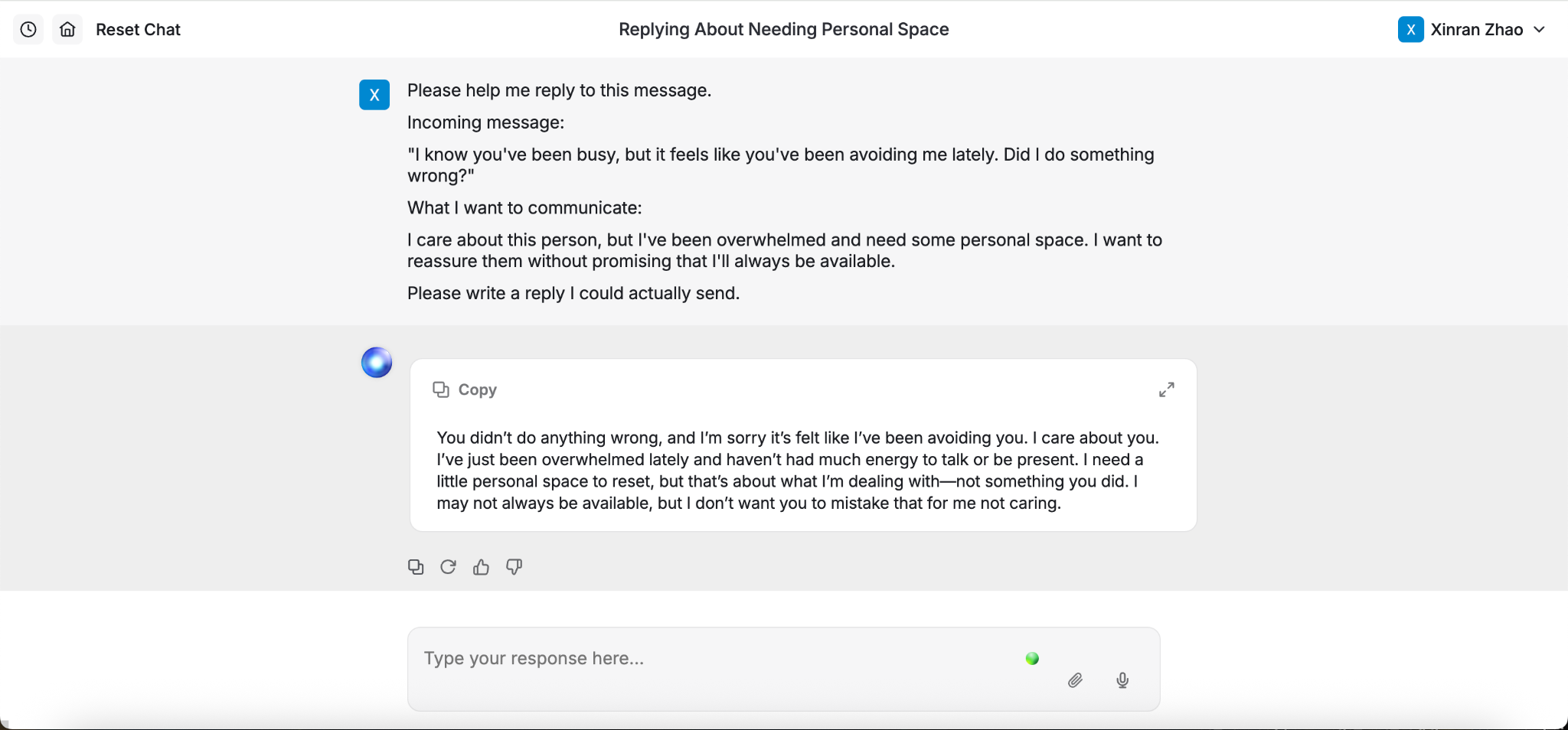
HyperWrite still added the assumption that the other person hadn't done anything wrong, so it wasn't perfect. But of the two situations I tested, I found its personal reply more useful.
The interface was straightforward, although, like other standalone chat tools, it required me to provide the message and background manually.
What I Liked / What Could Be Better
What I Liked | What Could Be Better |
|---|---|
Natural personal replies | Work reply made a firm deadline commitment |
Strong boundary-setting language | Some unverified reassurance |
Easy to provide detailed instructions | No in-app messaging tested |
Pricing: HyperWrite has limited free access. Premium costs $19.99/month for 250 AI messages and three custom personas. Ultra costs $44.99/month and includes unlimited AI messages.
Best for: People who want help expressing personal thoughts clearly and are comfortable using a standalone writing assistant.
5. Ellie: Best for Email Replies
Free plan: 10 manual replies/day Free trial: 7 days of Business features
Ellie is different from the other tools on this list because it focuses specifically on email replies. It can connect to Gmail or Outlook and learn from previous emails to create drafts in your writing style.
My Experience
Ellie's onboarding was more involved than the other tools.
After connecting my Gmail account, it automatically analyzed six of my previous emails and identified the greetings and sign-off I commonly use.
I thought that was interesting because I didn't have to describe my writing style manually.
It also generated an example reply to an actual email from my inbox. The wording was professional, although it didn't include many specific details from the original email.
I then used Ellie's browser extension testing page with the same incoming messages. This entry did not receive the same separate explanation of my intended reply.
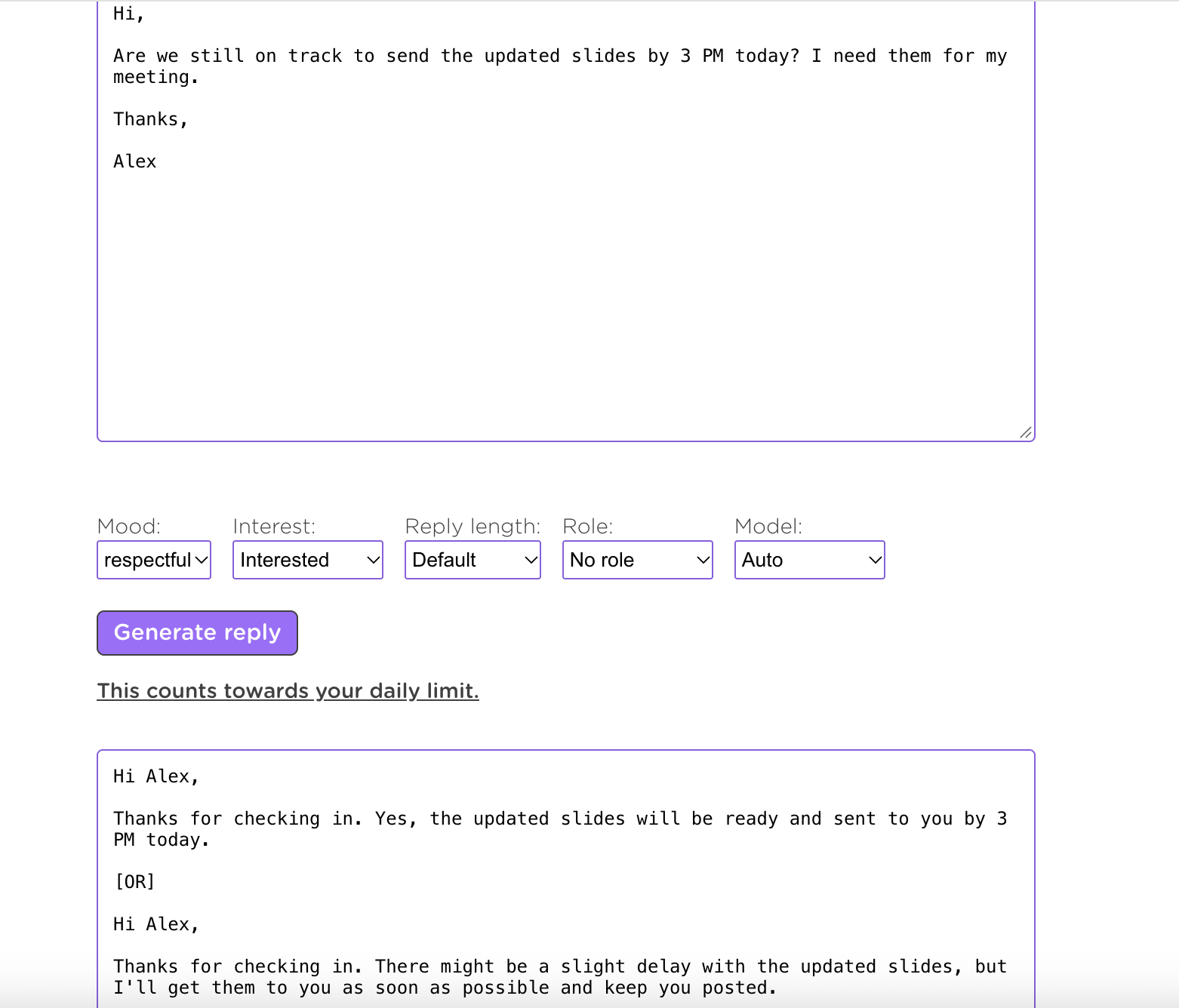
For the work email, Ellie gave me two alternatives. One was:
Thanks for checking in. Yes, the updated slides will be ready and sent to you by 3 PM today.
The problem was that Ellie didn't actually know whether the slides would be ready. Its second option was more cautious, mentioning a possible delay without offering a clear solution.
The personal reply sounded polite but a little formal:
Thank you for reaching out and sharing how you feel.
It also said that the situation had nothing to do with the other person and invited them to talk more, which wasn't necessarily what I wanted to communicate.
One limitation of this test was the interface. I could paste an incoming email and select settings such as mood, interest, and length, but there wasn't a separate field for explaining my actual situation.
That limited how I could guide the responses in this entry. Its invented deadline shows why a draft needs checking; it does not show Ellie ignoring a 5 PM instruction that this test had not supplied.
In the connected email workflow I tried, Ellie could work with my email account and build a profile of how I typically write. That differed from the standalone chat entries I used for the other tools.
What I Liked / What Could Be Better
What I Liked | What Could Be Better |
|---|---|
Learns basic writing-style preferences | Requires email access for connected features |
Integrates with email workflows | Some replies included unsupported assumptions |
Professional email formatting | Manual testing interface offered limited control |
Pricing: Ellie offers a free plan with 10 manual drafts per day. New accounts receive a seven-day Business trial. Paid plans provide additional capabilities and higher usage limits.
Best for: People who spend a lot of time answering emails and want drafts that can reflect their usual writing style.
What I Learned From Testing AI Reply Tools
The biggest thing I noticed was that a good-sounding reply isn't always a safe reply to send.
In the work scenario, some tools made confident promises about the deadline. In the personal scenario, several tools reassured the other person by stating things I hadn't actually confirmed.
The difference became clearer when I could explain my intentions.
ChatGPT, AI Reply Writer, and HyperWrite were generally good at following detailed instructions. ToneBird's suggestions also improved significantly once I used Tweak to provide the missing context.
The entries also differed in how much context I entered manually. I copied messages into the standalone chats, adjusted ToneBird inside Slack, and tried Ellie with email. AI Reply Writer also offers an extension, but I did not complete that workflow test.
That made me realize that choosing an AI reply tool isn't just about which one writes the nicest sentence. It's also about how easily you can give it the information it needs, correct its assumptions, and use the final result.
Final Verdict: Which AI Reply Tool Should You Choose?
For drafting and adjusting everyday replies inside Slack, I preferred ToneBird. Tweak let me clarify my intention in the conversation. I would still check its revised draft for facts and promises, including reassuring claims about the other person.
If I wanted more detailed control over a complicated reply, I'd choose ChatGPT. It handled both situations well when I gave it enough context.
AI Reply Writer stood out for concise replies, while HyperWrite gave me one of my favorite personal-message responses. Ellie makes more sense for someone whose main problem is managing email rather than everyday chats.
None of these tools produced perfect replies every time. I'd still review anything involving promises, deadlines, relationships, or sensitive information before sending it.
The best AI reply tool isn't necessarily the one that writes the most polished response. It's the one that helps you say what you actually mean, with the least unnecessary work.
Frequently Asked Questions (FAQs)
1. What if I don't know what I want to say in my reply?
You don't have to start with a complete message. You can explain the situation, what you're feeling, and what you're unsure about. Ask the AI to suggest a few possible approaches before drafting a final response. This can help you decide what you actually want to communicate.
2. Can AI reply tools work in languages other than English?
Many AI reply tools support multiple languages, although the number of supported languages and the quality of the results vary. Some can also match the language of the incoming message. If you're switching between languages, it's worth checking that the tone and meaning still sound natural.
3. How can I make AI-generated replies sound less robotic?
Ask for shorter sentences, simpler wording, and fewer formal expressions. You can also provide an example of how you normally text. A prompt like "Make this sound like a casual message to a friend, not a formal email" can help.
4. Is it safe to use AI reply tools for private conversations?
That depends on the tool and the information you're sharing. Some tools require access to emails or message threads, while others only process text you manually provide. Check the privacy policy and permissions before connecting an account, especially if your conversations include confidential information. Our AI reply assistant privacy guide explains the data routes and settings to check.
5. Will AI reply tools automatically send messages for me?
These tests covered drafting and editing, with the user reviewing the message before sending. Automatically creating a draft is different from sending it. Check the product's approval and sending settings before enabling a connected workflow.

Xinran Zhao has a background in writing and journalism. She writes about the messages we overthink and when AI replies help or miss the point, drawing on her experience starting a career in a second language.