 ToneBird
6 Best AI Tone Rewriters in 2026
See how ToneBird and AI tone rewriters adjust a workplace message, and what an AI reply generator should preserve when softening your words.
 By Xinran Zhao
We've all written a message that sounded perfectly reasonable in our heads, only to realize it might come across as rude or impatient.
For a quick sentence rewrite without signing up, I would start with Sapling's Professional mode. For comparing suggestions inside Slack, I preferred ToneBird, although its friendliest option did not keep my full request. The other entries below cover the particular modes I tried.
AI tone rewriters are supposed to help with that. But do they actually understand what you're trying to say, or do they just make everything sound more polite?
I tested six AI writing tools using the same slightly irritated message to see how they handled tone, meaning, and everyday usability. Some gave me genuinely helpful rewrites. Others made the message friendlier but changed what I was trying to say.
Best AI Tone Rewriters at a Glance
Tool | Best For | Free Option | Paid plan shown |
|---|---|---|---|
ToneBird | Comparing suggestions inside Slack | 15 drafts/day | $10/mo, billed monthly |
Sapling | Professional mode for a single sentence | Free web tool | $12/mo* |
Grammarly | Professional writing and tone detection | Limited free plan | $12/mo* |
QuillBot | Basic paraphrasing in free Standard mode | Free Standard mode | $8.33/mo* |
Wordtune | Regular Rewrite alternatives | 10 rewrites/day | $6.99/mo* |
Copy.ai | Softer message variations | Free web tool | $29/mo for Chat |
Annual billing required for the marked starting prices. Prices reflect information checked in October 2026. Copy.ai's Chat subscription is separate from its free rewriting tool.
How I Tested These AI Tone Rewriters
I wanted to use a sentence that was more challenging than a basic grammar correction, so I chose:
I already sent this yesterday. Please check before asking me again.
My goal was to make it sound professional, warm, and less irritated without changing the meaning.
The important part was keeping both ideas: the message had already been sent yesterday, and the recipient should check before asking again.
I looked at five things: tone accuracy, meaning preservation, naturalness, ease of use, and price.
I used the same sentence across all six tools, but the controls differed. Sapling had named tones, Grammarly offered a tone suggestion, QuillBot was tested in Standard, and Wordtune in regular Rewrite. I compare the outputs from those entries; they do not establish how every tone mode or paid plan performs.
Since this article focuses on everyday messaging, I also considered how easily each tested entry fits into a conversation. I discuss that convenience separately from whether its wording kept both parts of my message.
Disclosure: This article was written for ToneBird, which is also included in the comparison. All tools were evaluated based on my actual testing experience, including the limitations I encountered.
1. ToneBird: Best for Everyday Messaging
Free plan: 15 drafts per day. Standard: $10/month, billed monthly.
ToneBird let me compare suggestions inside Slack. It is designed to help with replies in the apps where conversations happen, with features for keeping track of people and context. Other tools also offer extensions; this review covers the specific entries I used.
My Experience
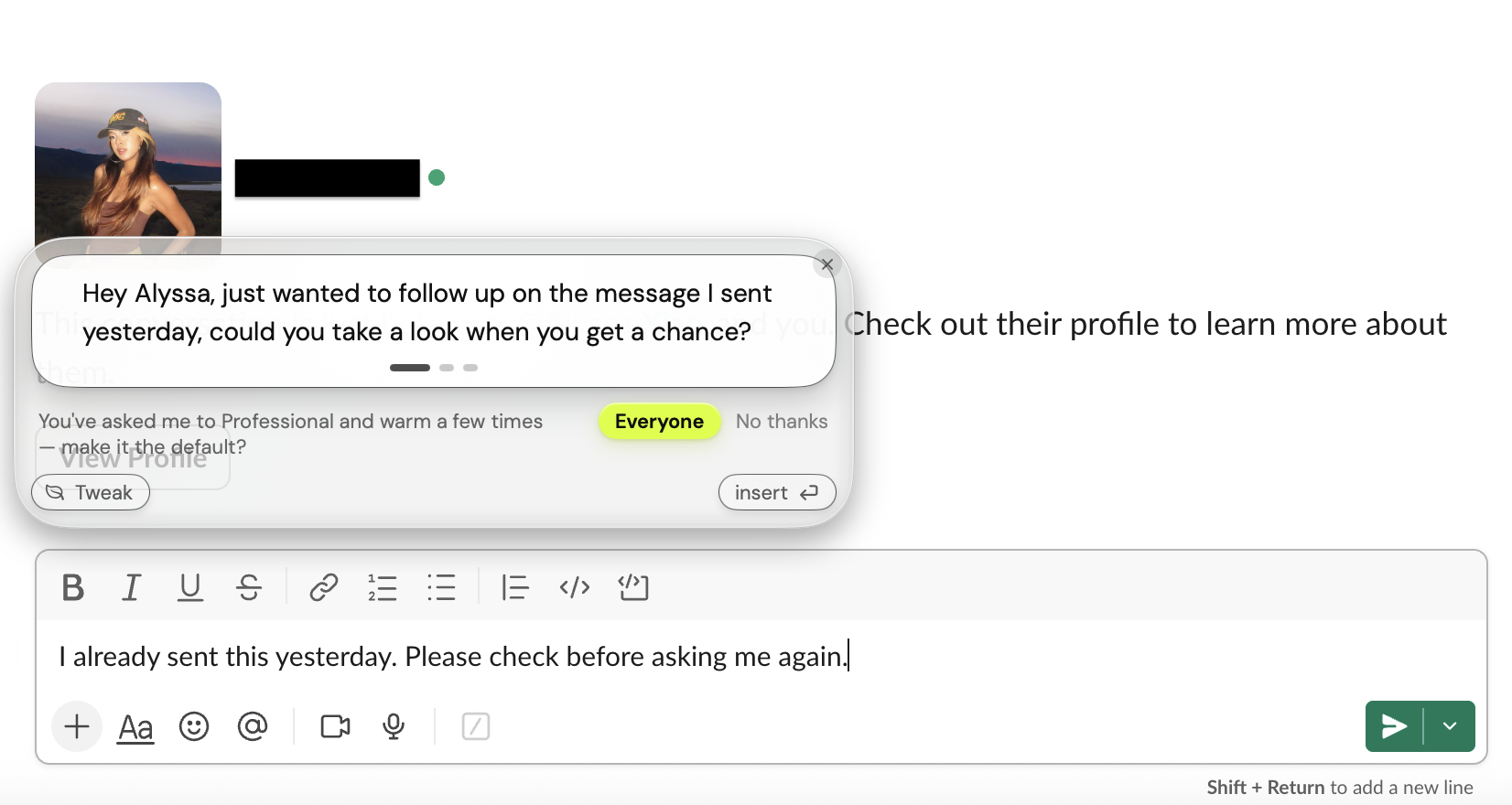
I tested ToneBird directly in a Slack conversation, which was convenient because I didn't have to switch to another tab.
After selecting my original sentence, ToneBird showed three different suggestions. The first one was:
Hey Alyssa, just wanted to follow up on the message I sent yesterday, could you take a look when you get a chance?
I liked that it included the recipient's name and sounded like something I'd actually send to a coworker. It was much friendlier than the original message and still mentioned that I'd sent it yesterday.
However, it also removed the part about checking before asking again.
I tried the other suggestions too. One said:
Hey, I actually sent this over yesterday, could you take a look before checking in again?
This kept more of the original meaning, but the word "actually" made it sound slightly defensive. The third option was even more direct and used an exclamation mark, which didn't really help with the irritated tone.
What stood out to me was having different options right inside the conversation. I could see which version felt appropriate without going back and forth between tools.
Still, I wouldn't use every suggestion as is. The friendliest version wasn't necessarily the most accurate, and a couple of them needed punctuation edits.
ToneBird also offers relationship memory and conversation context features. Those are useful distinctions in its product design, although this particular test didn't establish how much previous conversation history influenced the results.
What I Liked
- Suggestions appeared directly in Slack.
- Three versions gave me different ways to approach the message.
- All three kept the detail about sending the message yesterday.
- The first suggestion felt personalized and conversational.
What Could Be Better
- The suggestions varied in how well they preserved the original request.
- Some wording was too direct or needed minor editing.
Pricing: ToneBird's Free plan includes 15 drafts per day and 30 contacts. On monthly billing, Standard is $10/month for 100 daily drafts, while Pro is $40/month for 1,000 daily drafts. Reply generation and message organizing share the same daily allowance.
Best for: People who write frequent messages and want AI help within their existing conversations instead of using a separate rewriting website.
2. Sapling: Best Standalone Tone Rewriter
Free option: Yes, no signup required for the web tool Starting price: $12/month billed annually
Sapling was probably the simplest tool to test. I opened its free Sentence Rewriter and could immediately choose from several tones, including Professional, Friendly, Empathetic, and Diplomatic.
My Experience
I started with Friendly, which gave me:
I've already sent this over yesterday, so could you take a quick look before reaching out again? Thanks so much!
It kept the important detail about yesterday, which I appreciated. But the present perfect in "I've already sent" did not fit the finished past time "yesterday" here. "Thanks so much!" also felt a little too enthusiastic for this work message.
I then switched to Professional:
I sent this yesterday. Could you please review it before requesting it again?
I preferred this one. It was concise, professional, and less irritated without sounding overly friendly.
The only issue was "requesting it again," which slightly narrowed the original meaning by implying that the recipient wanted the same item resent.
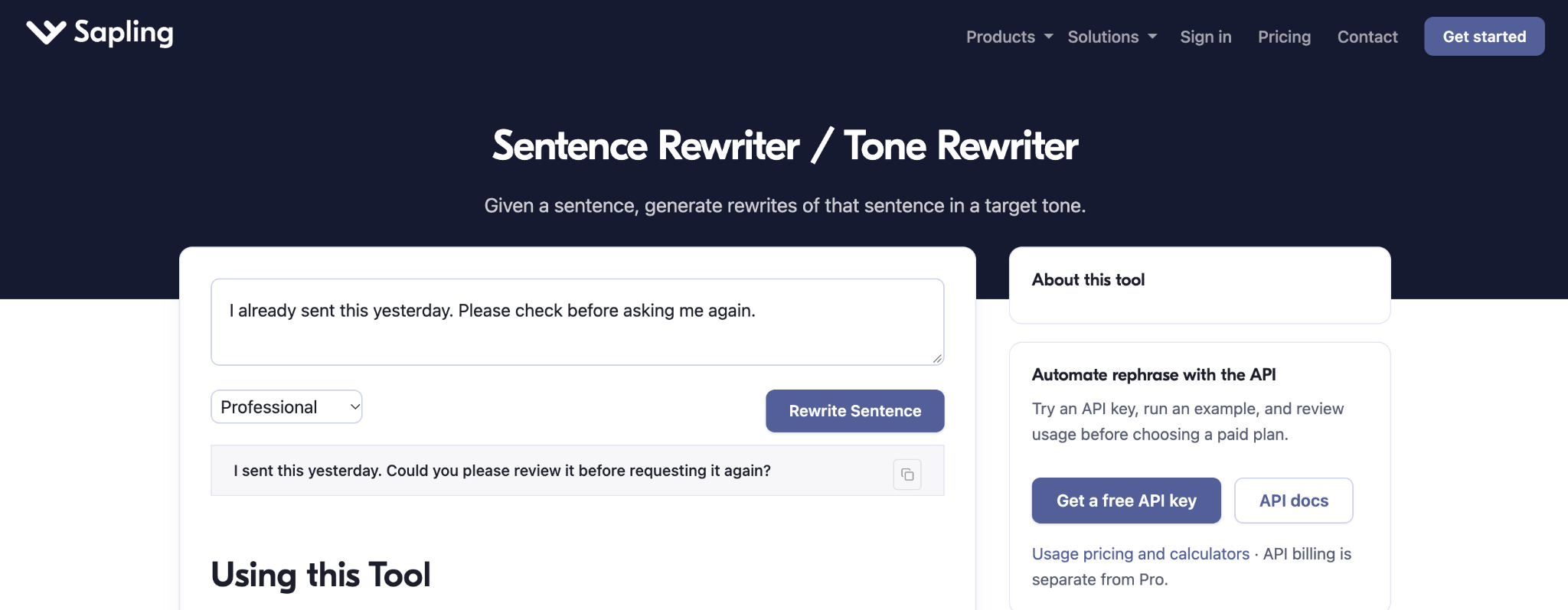
Overall, Sapling produced one of the cleanest sentence-level results in my test. I also liked that I could try different tones without registering.
The free tool is enough for occasional sentence rewrites. According to Sapling's pricing page, the Pro plan costs $25/month, or $12/month with annual billing, and there's a one-month trial available.
What I liked: Easy to access, several tone options, and good preservation of the main context.
What I didn't like: Some awkward wording in Friendly mode and small meaning changes in Professional mode.
Best for: Anyone who wants to rewrite individual sentences quickly without signing up or navigating a full writing platform.
3. Grammarly: Best for Professional Tone Detection
Free plan: Yes, limited assistance Starting price: $12/month billed annually
Grammarly is more than a tone rewriter. It combines grammar checking, writing suggestions, and AI rewriting in one editor.
My Experience
I pasted the test sentence into Grammarly's editor, and it immediately identified a tone problem.
Its suggestion was to "Soften tone and add courtesy."
That was a useful diagnosis of the tone problem. The screenshot labels the suggestion as a Pro feature offered as a free sample, so I would check the plan requirements before relying on it regularly.
The suggested new wording was:
Could you please check your inbox before reaching out again?
The new wording sounded professional, but introduced an inbox I had not specified. Before accepting a change like this, I would check the complete message for both the original fact and the request.
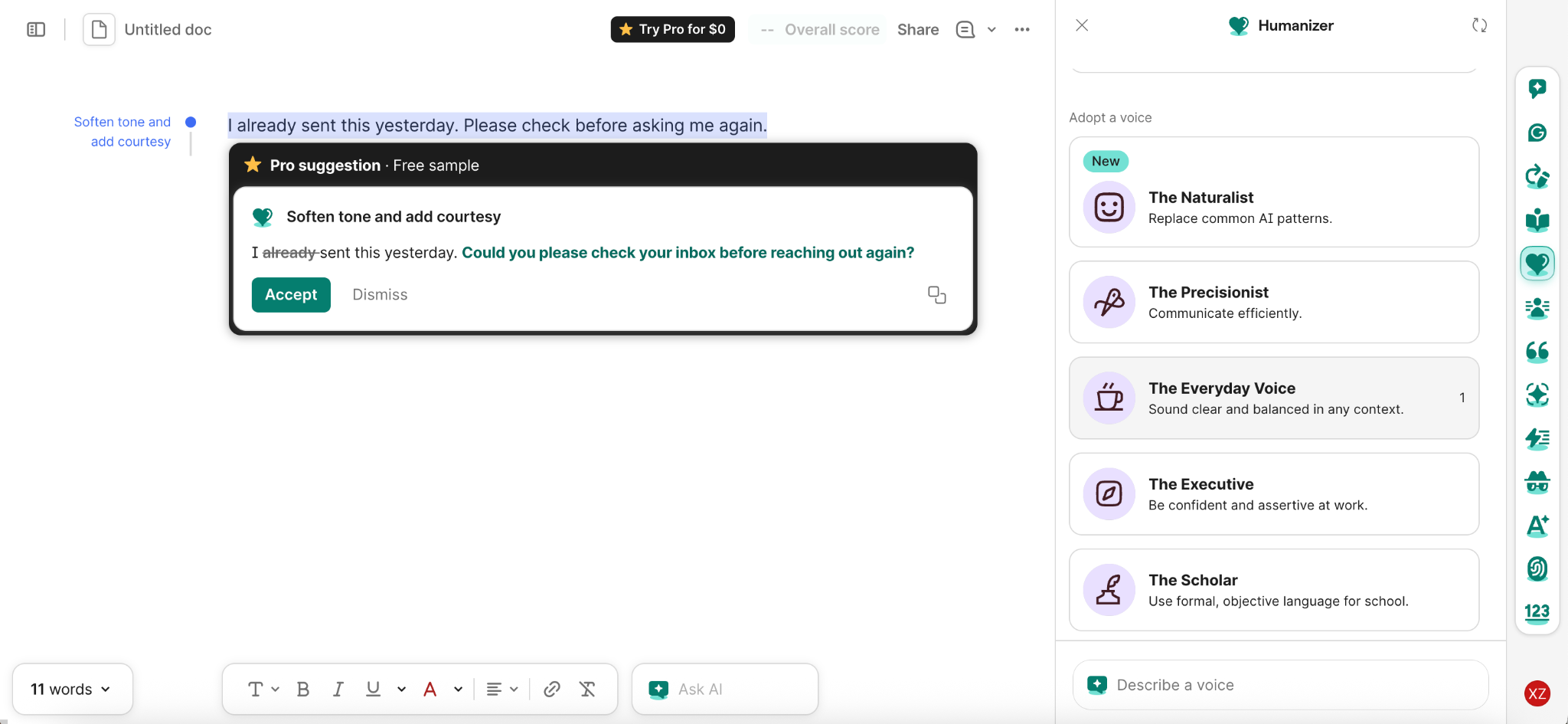
Grammarly's Pro plan includes full-sentence rewrites and advanced tone adjustments, starting at $12/month with annual billing.
What I liked: Clear tone detection and professional-sounding suggestions.
What I didn't like: The suggestion introduced an inbox context I had not provided.
Best for: Professional emails and writing where you want help spotting tone issues alongside grammar mistakes.
4. QuillBot: Best for Basic Paraphrasing
Free plan: Yes Starting price: $8.33/month billed annually
QuillBot offers several paraphrasing modes, although its free version mainly gives you access to Standard and Fluency.
My Experience
I used Standard mode with the same sentence. Here's what it generated:
This was already sent yesterday. Before you ask me again, please make sure.
It kept the fact that the message had already been sent yesterday.
But the second sentence sounded unfinished. "Please make sure" didn't clearly explain what the recipient should do, and the irritated tone hadn't really improved.
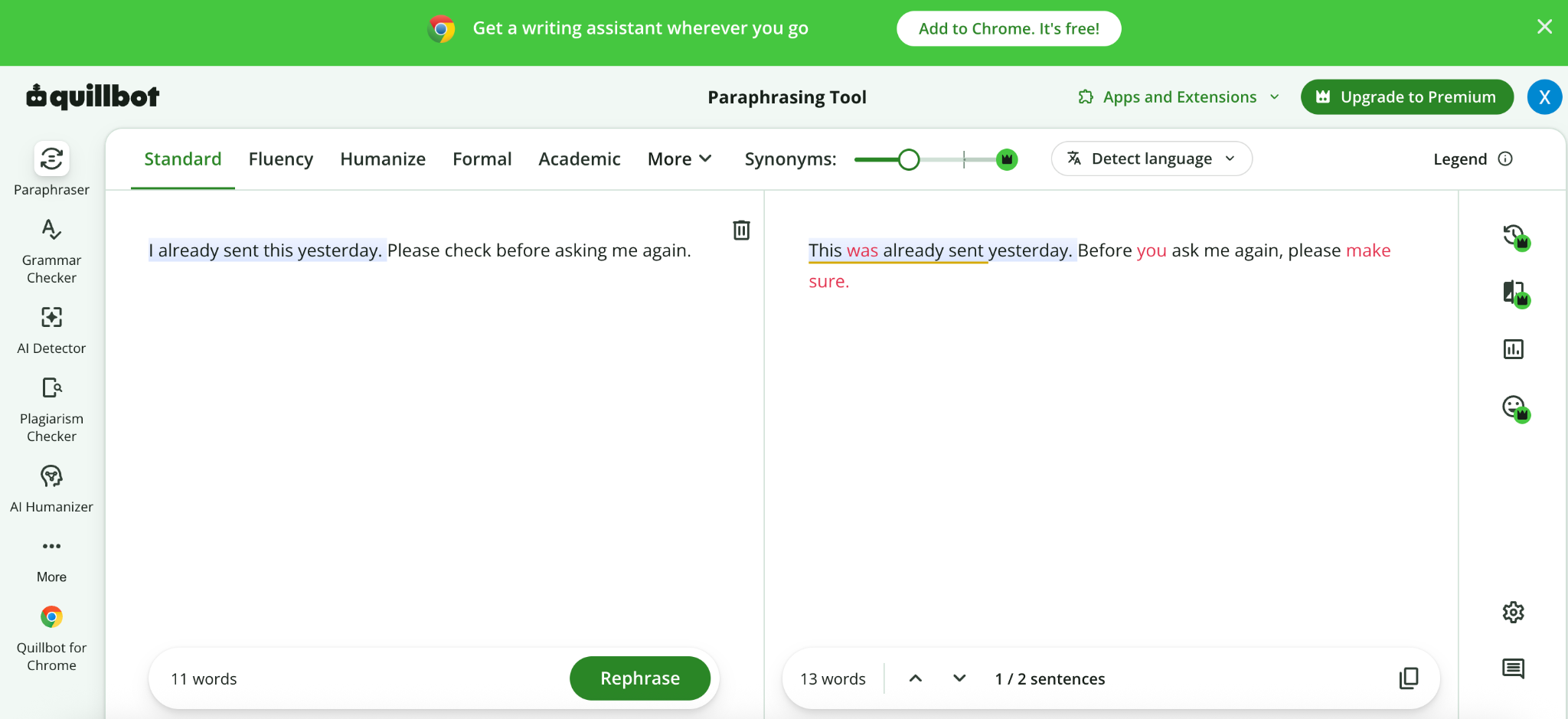
The interface itself was easy to use. I liked seeing the input and output next to each other, but the result felt more like paraphrasing than a meaningful tone adjustment.
QuillBot's free version offers Standard and Fluency modes with a word limit. Premium includes other modes, such as Formal and Custom, which I did not test. This result describes Standard rather than all of QuillBot's tone controls.
What I liked: Preserved the main factual detail and had a straightforward interface.
What I didn't like: The output sounded unfinished and didn't really soften the tone.
Best for: Trying basic rewording in Standard mode, with a separate check that the request is complete and the tone suits the recipient.
5. Wordtune: Best for Quick Rewrite Alternatives
Free plan: 10 rewrites and AI suggestions per day Starting price: $6.99/month billed annually
Wordtune gives you several rewriting options, including Rewrite, Formal, Casual, Expand, and Shorten.
My Experience
After signing up, I used its regular Rewrite feature. The interface was easy to figure out, and it generated several options almost instantly. I did not test Formal or Casual, so the observations below apply to regular Rewrite.
One suggestion was:
I would appreciate it if you checked before asking again.
That sounded more polite. But another said:
Don't ask me again until you've checked.
This was actually more confrontational than my original sentence.
Most of the suggestions also removed the fact that I'd already sent the message yesterday.
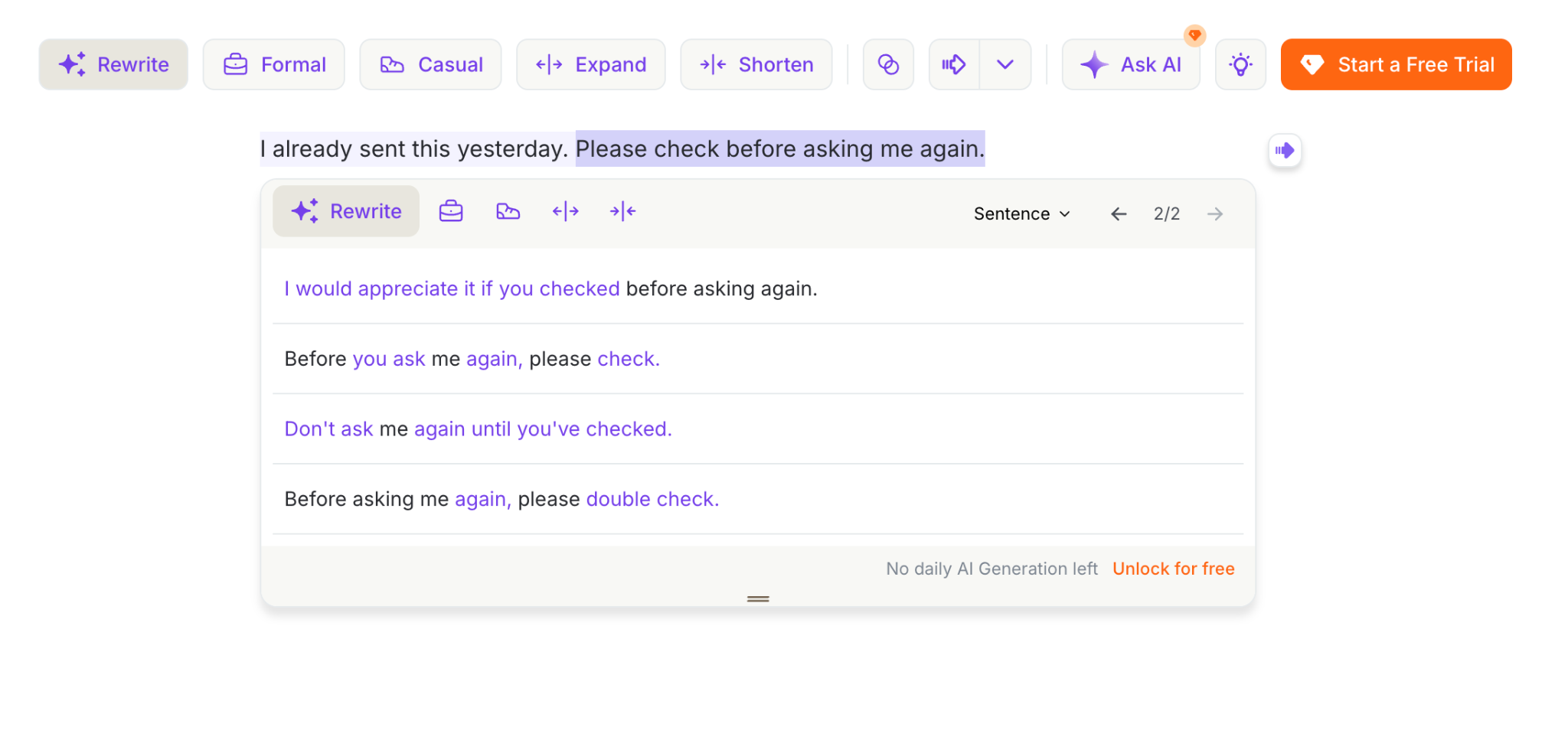
I liked how quickly Wordtune gave me different options. However, I had to compare them carefully because not every suggestion made the message better.
The free plan includes 10 daily rewrites and AI suggestions. Wordtune's Advanced plan starts at $6.99/month with annual billing and provides more daily usage.
What I liked: Fast suggestions, easy interface, and multiple ways to phrase a sentence.
What I didn't like: Inconsistent tone and missing context.
Best for: Quickly exploring alternative wording when you're willing to review the suggestions yourself.
6. Copy.ai: Best for Softer Message Variations
Free option: Standalone Sentence Rewriter Paid Chat plan: $29/month
Copy.ai has a broader platform for AI content creation and business workflows, but I focused on its rewriting tools for this comparison.
My Experience
I had a harder time getting started with Copy.ai than with most of the other tools.
After signing up, the main workspace mostly showed paid upgrade options. I then found its free Professional Tone Rewriter, but submitting my sentence led to a thank-you message instead of an immediate rewrite.
Eventually, I tried its separate Sentence Rewriter and got this result:
I believe I sent this over yesterday — could you take a quick look? Happy to resend if needed!
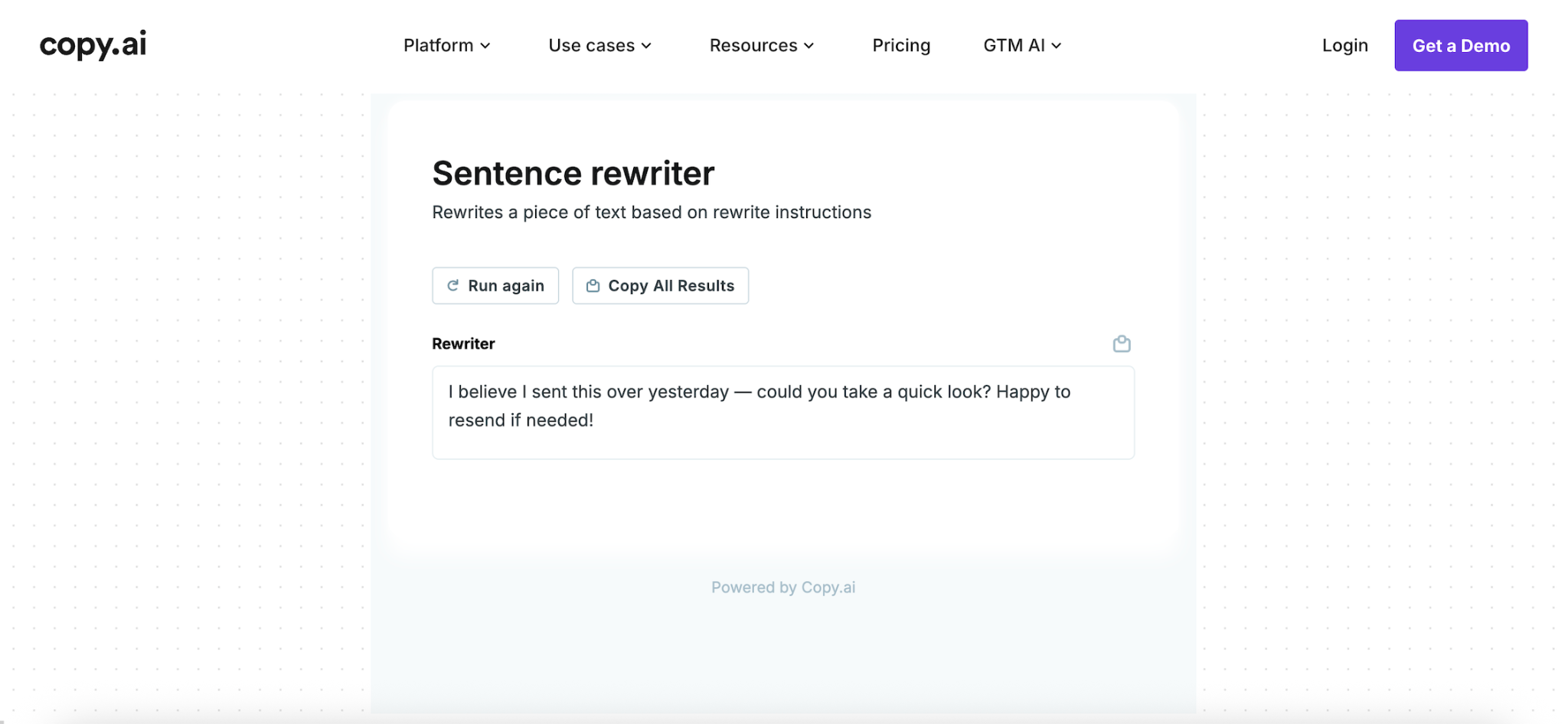
I thought this sounded friendly and natural, but it changed the meaning more than I wanted.
"I believe" made the sender sound uncertain about something they'd originally stated as a fact. It also added an offer to resend the message, which wasn't part of my original request.
I can see this being useful if you're open to changing how you approach a conversation. For a rewrite that needs to stay faithful to the original, I'd be more careful.
The standalone Sentence Rewriter is free, while Copy.ai's broader workspace offers paid plans. The Chat plan was listed at $29/month during my test.
What I liked: Natural, polite output and an accessible standalone tool.
What I didn't like: Confusing entry points and a rewrite that changed the sender's meaning.
Best for: Making messages sound friendlier when you're comfortable with more substantial changes.
What About TextCortex?
I also registered for TextCortex and went through its onboarding.
Compared with the other tools, the process was more involved. It asked about my role, industry, and intended use cases before setting up a workspace focused on AI agents and integrations.
Although the site advertised a free plan, the comparable rewriting workflow I tried led to a card-required trial.
I couldn't complete the same test without entering payment details, so I left TextCortex out of the final ranking rather than evaluating its writing quality without an actual result.
What I Learned From Testing AI Tone Rewriters
The biggest thing I noticed was that making a sentence sound nicer doesn't always mean making it better.
Grammarly identified the tone problem, but introduced an inbox I had not mentioned. Copy.ai produced a friendly message, but added an offer I had not made. QuillBot Standard kept the fact that it was sent yesterday, but left the request unfinished.
Sapling did particularly well when I just needed a single sentence rewritten. ToneBird offered a different advantage by letting me compare suggestions directly in a conversation.
I also learned that having multiple rewrite options is helpful, but only when you read them carefully. Wordtune and ToneBird both gave me suggestions with noticeably different levels of directness.
Final Verdict: Which AI Tone Rewriter Should You Choose?
For comparing suggestions while writing in Slack, I preferred ToneBird. I would check both original requirements before inserting a version: its friendliest suggestion kept yesterday but dropped the request to check before asking again.
If I only needed to rewrite one sentence on a website, I'd choose Sapling. Its Professional mode gave me one of the strongest individual results in this test.
Grammarly is worth considering when you want help spotting tone issues alongside grammar. For general rephrasing, I would treat the QuillBot Standard and Wordtune Rewrite results here as starting points that still need a tone and meaning check.
Whichever tool you choose, I'd still read the final suggestion before sending it. A message can sound perfectly friendly and still say something different from what you intended.
Frequently Asked Questions (FAQs)
1. How do I tell AI exactly what tone I want?
Be specific about who you are writing to and how you want to come across. For this example, a request you can try is: "Make this professional and warm. Keep that I sent it yesterday and that they should check before asking again. Do not add an apology or an offer to resend."
2. How can I make a message sound firm without being rude?
Focus on what you need rather than what the other person did wrong. You can ask AI to make your message more direct and respectful while keeping your boundaries clear. Being polite doesn't mean you have to agree to something or apologize unnecessarily.
3. How do I make AI-rewritten messages sound more like me?
Give the AI examples of how you normally write, or tell it which expressions you wouldn't use. If you usually send short, casual messages, ask it to avoid overly formal phrases. You can also make small edits afterward so the final message feels like something you'd naturally say.
4. Can AI tone rewriters help non-native English speakers?
Yes, especially when you're unsure whether a phrase sounds too direct, awkward, or formal in English. They can suggest more natural expressions and help you understand different ways to phrase a message. Just remember that tone expectations can vary across cultures and situations.
5. Is it safe to paste personal conversations into an AI tone rewriter?
That depends on the tool's privacy practices. Before uploading private messages, check how the service handles, stores, and uses your text. It's also a good idea to remove sensitive information, such as phone numbers, addresses, or confidential work details, unless you're confident the tool is appropriate for that information.

Xinran Zhao has a background in writing and journalism. She writes about the messages we overthink and when AI replies help or miss the point, drawing on her experience starting a career in a second language.