 ToneBird
Grammarly Alternative for Replies (Tested & Reviewed)
ToneBird connects replies with relationship history and followup. Grammarly combines contextual drafting with broader grammar and editing tools.
 By Xinran Zhao
 Reviewed & edited byMonica Cheng
I'd choose ToneBird when the assistant needs to know the person, remember earlier conversations, and use my usual voice.
ToneBird is an AI reply assistant. It can carry open questions and commitments into the next reply, record to dos, and prepare meetings.
Grammarly fits broader writing and editing. It also offers window context and personal voice features, so those capabilities need a closer comparison.
Reading the latest message is one part of the job. Remembering who said what and what still needs doing is another.
This ToneBird vs Grammarly comparison covers ongoing conversation support, editing tools, and two Slack examples. Product details and prices were checked on October 30, 2026.
What is ToneBird?
ToneBird is an AI reply assistant for macOS and Windows, built for ongoing conversations across email and messaging apps.
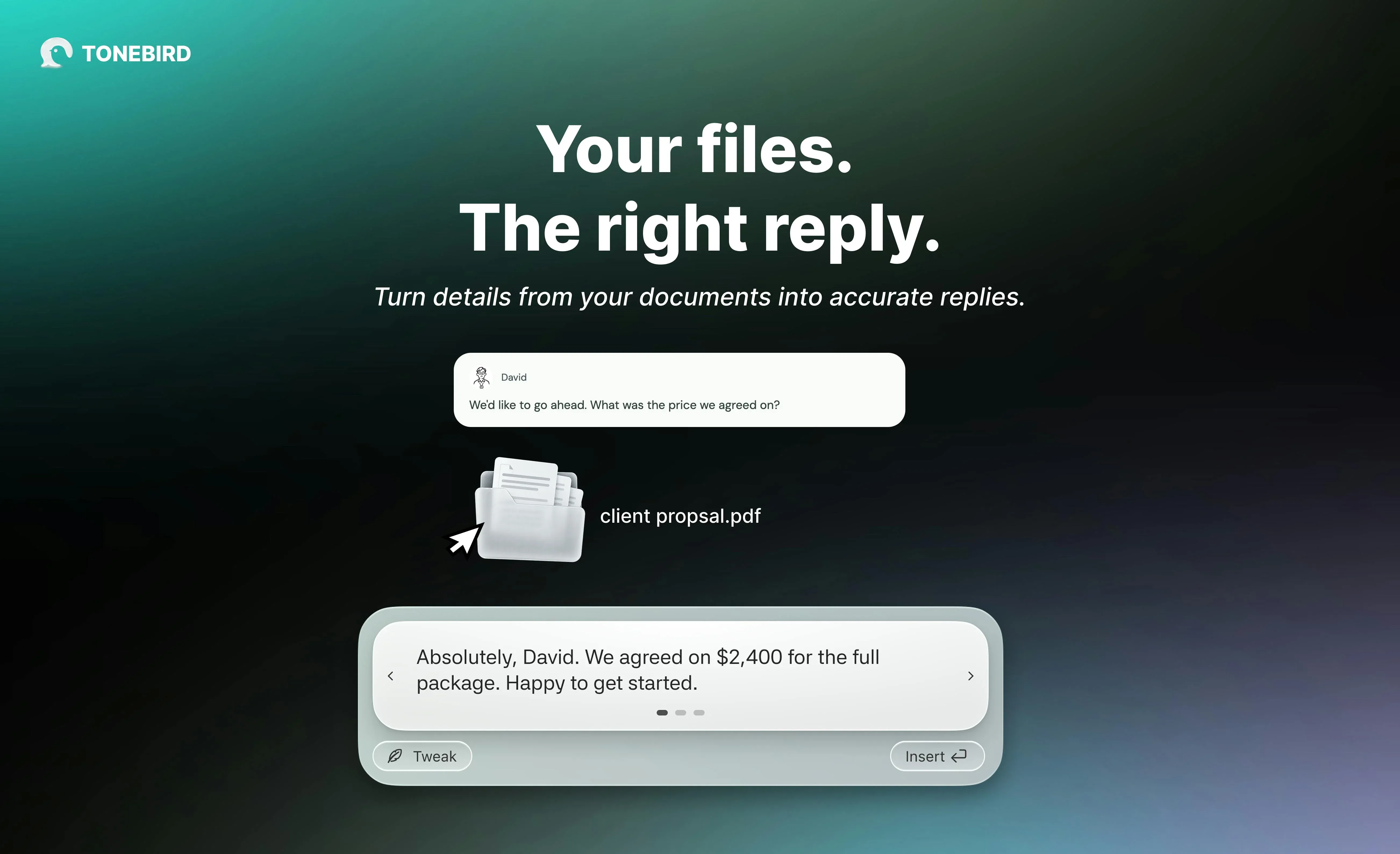
It is designed for client conversations, colleague messages, and personal followups where earlier exchanges affect the next reply. You continue using apps such as Gmail, Slack, and WhatsApp.
ToneBird's job is to connect the person, your usual voice, previous exchanges, and what still needs doing.
People, voice, and conversation facts
Its product features connect three parts of the application: Home, Circle, and Me. Each holds a different part of the communication context.
Home shows replies waiting to go out and tasks still open. It gives you a place to see which conversation needs attention.
Circle organizes people and their relationships with you. A person's record can include captured conversations and open tasks. Rewind opens the available history for that person.
Me holds information about you, your writing style, and extra context. Style contains wording rules and preferred openers. You review suggested learning before it becomes part of future drafts.
Context holds notes or imported text documents. ToneBird can use relevant saved facts, such as an agreed price, while drafting a reply.
Those sources have different roles. The conversation supplies facts, the relationship shapes how you address someone, and your preferences shape the wording.
Replies, rewrites, and next actions
When you trigger ToneBird in a conversation, it uses the available context to suggest replies. You can compare alternatives and use Tweak to adjust one.
It can also rewrite a draft using that context. An earlier agreement can remain in place while the wording changes for the person you're addressing.
Insert puts the chosen draft in your message box. You review it and send it yourself.
ToneBird also records to dos from conversations and keeps them with the related work. It can prepare meeting events in Apple Calendar or Google Calendar. You check the details, then confirm.
For example, a client may ask about a quote you promised yesterday. That earlier commitment should shape the reply.
ToneBird connects that reply with the person and open work. If you agree on a call, it can prepare the event for confirmation.
What is Grammarly?
Grammarly is an AI writing assistant for work, study, and everyday communication. ToneBird focuses on replies shaped by the recipient, earlier exchanges, and unfinished work.
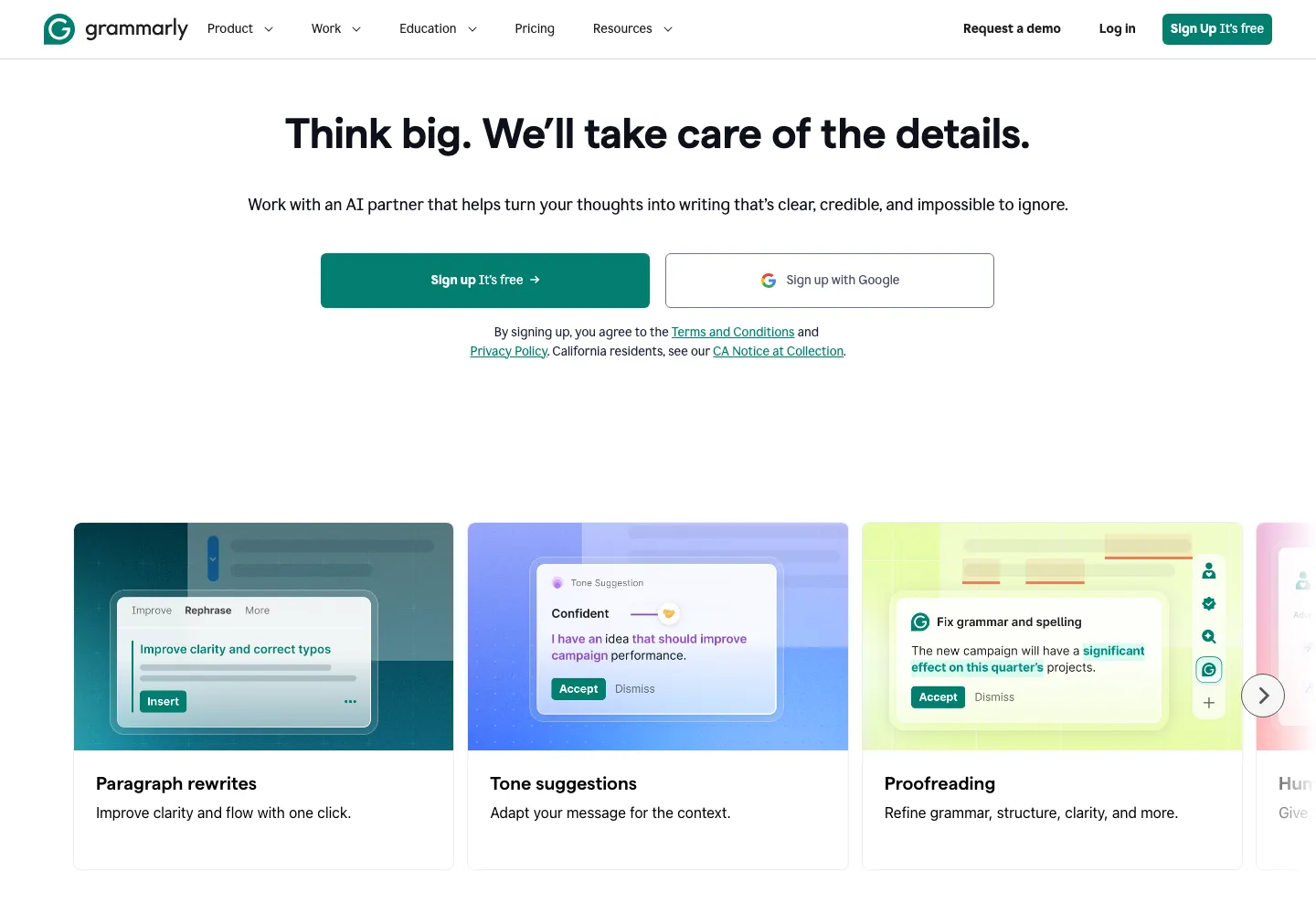
Grammarly covers longer documents as well as messages. ToneBird keeps personal voice, relationship context, rewrites, and followup within its conversation workflow.
Corrections, rewrites, and generated replies
Grammarly corrections fix errors; generative rewriting changes phrasing, tone, or length. ToneBird focuses on replies and rewrites using available conversation context.
Grammarly AI Chat can draft an answer from instructions and available text. ToneBird combines those inputs with saved person details, preferences, and earlier exchanges.
Both let you review proposed wording before sending. ToneBird also keeps tasks and meeting preparation connected with the conversation.
Window context and personal voice
Grammarly desktop AI Chat can use the active window or an attached window. ToneBird uses available conversation and saved relationship context.
Grammarly's personal voice features reuse a writing style. ToneBird's Me and Style controls also guide wording, alongside the person and relevant saved facts.
For a client reply, check both the voice and the earlier agreement. ToneBird's Circle and Rewind let you inspect available person records and history.
Platforms, plans, and related products
Grammarly offers desktop, browser, mobile, and its own writing space. ToneBird runs on macOS and Windows beside existing email and messaging apps.
Grammarly's plans and entry points have different limits. ToneBird's desktop workflow uses candidates, Tweak, Insert, and a final review.
Related product Superhuman Go supports calendar actions through connected services. ToneBird prepares Apple Calendar or Google Calendar events from conversations for confirmation.
How do their conversation features compare?
Your task | ToneBird | Grammarly |
|---|---|---|
Know who you're replying to | Uses saved person details and relationship history | AI Chat can use text from the active window |
Carry earlier context forward | Uses earlier conversations, commitments, and open questions | AI Chat uses window context and the instructions in your chat |
Use your voice | Uses your writing preferences and context about the person | Offers personal voice features, with availability depending on plan and surface |
Rewrite with context | Uses conversation facts, relationship context, and Tweak | Offers contextual rewriting, tone instructions, and voice features |
Follow through on a conversation | Records to dos and prepares Apple Calendar or Google Calendar events for confirmation | Superhuman Go supports connected actions; the desktop AI Chat examples below cover drafting |
Edit longer writing | Focuses on conversational replies | Covers grammar, spelling, clarity, tone, and drafting across writing tasks |
Work on a desktop | Available for macOS and Windows | Available for macOS and Windows, with browser and editor options |
How ToneBird carries a conversation forward
ToneBird connects the reply with the person, your voice, and the work around the conversation. You can inspect that context and adjust a draft without rebuilding everything for each request.
Use the person and earlier context
Start in your usual conversation. Trigger ToneBird to work with the available conversation, person record, and saved preferences.
When you want to check what it knows, Circle lets you inspect the person's record. Open Rewind to review the available earlier exchanges.
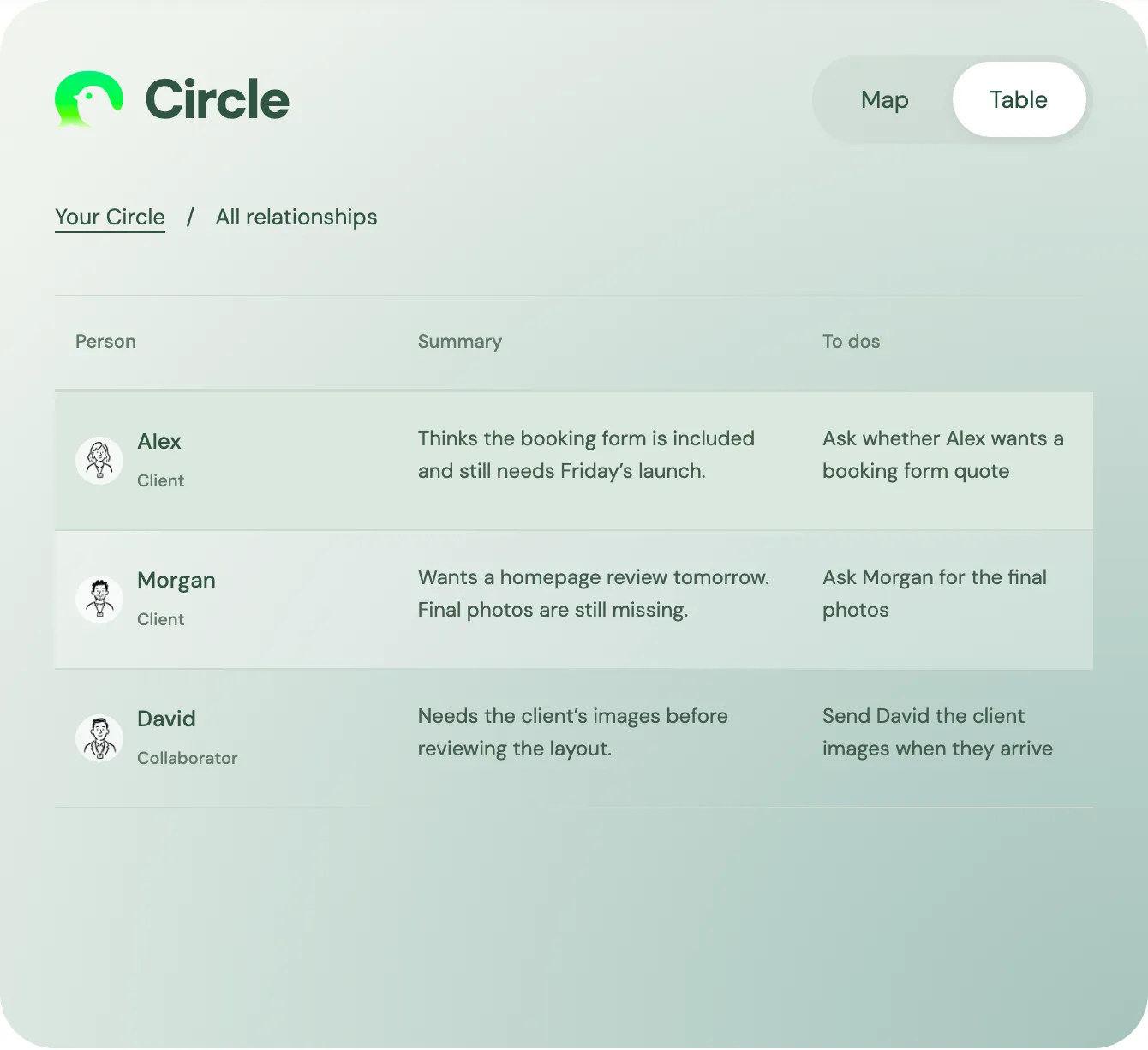
In the website's Circle design, Alex's summary keeps the booking form question beside its next action.
The task is to ask whether Alex wants a separate quote. The extra work hasn't been agreed.
For that followup, the earlier agreement matters to the answer. ToneBird keeps that relationship context connected to the reply workflow.
Reuse your voice and refine it
Me separates information about you, reusable writing preferences, and extra context. In Style, you can edit a rule, pause it, or remove it.
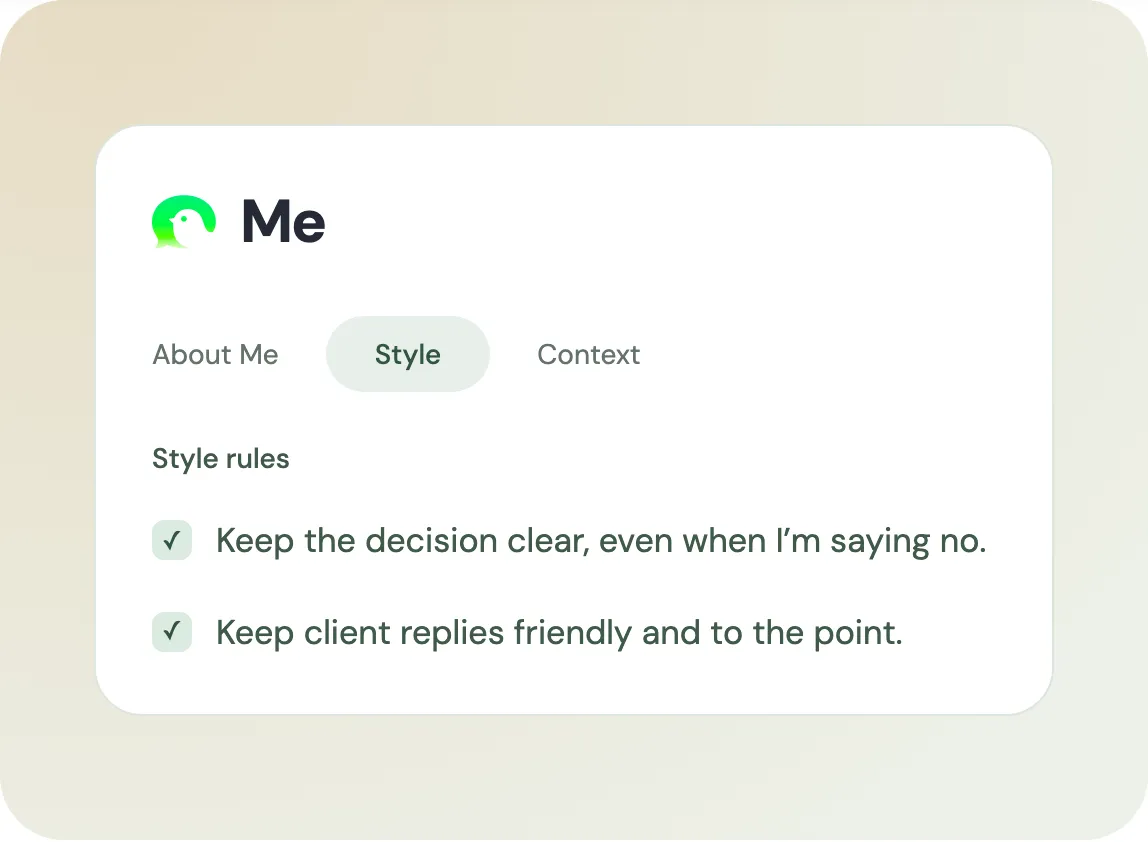
The website's Me design shows rules for clear decisions and friendly client replies. These guide wording for the relevant situation.
Tweak adjusts the current reply. Saved preferences guide later drafts when applicable. Review suggested learning before accepting it into those preferences.
A study of suggested replies used two randomized experiments. Suggestions increased positive wording, while suspected AI use was linked to worse partner evaluations.
ToneBird's Style rules and Tweak let you shape the draft. Use that control to express your intent, including disagreement or a boundary.
Rewrite with the facts and intent intact
For Alex's booking form request, keep the agreed scope clear. Offer a separate quote without promising the extra work.
ToneBird can combine that intent with the conversation, relationship, and relevant saved facts. Use Context for notes or imported material the reply needs, such as a confirmed price or project detail.
A 2025 customer support study followed 5,172 agents at one software company. AI assistance increased resolved issues per hour by 15% on average.
The system suggested replies and relevant internal documentation; agents chose what to use. Results varied by experience and didn't test ToneBird.
ToneBird's Context brings your own saved notes or imported documents into the reply workflow. Check the relevant facts before inserting a draft.
- Trigger ToneBird from the conversation you want to answer.
- Give your current intent when the reply needs more direction.
- Compare candidates and use Tweak to adjust the version you prefer.
- Insert your chosen draft, review it, and send from your usual app.
A warmer rewrite should still preserve the delivery plan and requested action. Check any amount or deadline against its source before sending.
Keep track of tasks and meetings
A reply may create work that needs doing later. ToneBird records to dos from the conversation so you can return to the unfinished task.
Home and the person's Circle record show related open work. The website example keeps Alex's question with its next action.
If the discussion moves to a review call, ToneBird can prepare an event in Apple Calendar or Google Calendar. Check the title, date, time, and people, then confirm.
That connects what was discussed with the next action. You can keep the person, reply, task, and meeting in the same communication workflow.
How Grammarly handles messages and replies
Compare the route for the message you're handling. You may need an answer, a rewrite, or earlier context.
Start AI Chat beside the conversation
Grammarly desktop AI Chat currently covers individual users on Windows and Mac. ToneBird also opens beside your conversation on those platforms.
- On Mac, open the conversation, then the Grammarly tab at the screen's right edge.
- Use Attach to choose another window if needed, then state your reply intent.
Grammarly uses available window text; your instructions supply the decision or boundary. ToneBird combines available conversation text with saved people, voice preferences, and history.
For an online reply, ToneBird's AI response generator takes the incoming message, intent, and tone. The desktop app adds ongoing relationship context.
In my personal example, Grammarly drafted an answer in Chat. ToneBird also drafted candidates, then received my clarification through Tweak.
Rewrite a draft or correct a specific error
Grammarly lets you select text and request a revision through the control available in your app. ToneBird uses Tweak to adjust a candidate with relevant context.
For an email draft, ToneBird's email rewriter offers a browser route. State the tone change and keep the amount, deadline, and decision fixed.
Grammarly can also correct a specific spelling or punctuation error. ToneBird's focus is the reply's wording, intent, and relationship context.
Grammarly showed Insert in my test. ToneBird's Insert places the chosen draft in your composer for review.
My Grammarly rewrite added an offer to resend. ToneBird's warmer version weakened the request, so both needed a meaning check.
Apply a personal voice to the message
Grammarly supports voice profiles for messages and documents. ToneBird stores reusable writing preferences in Me and applies them with the available relationship context.
Grammarly's Humanizer can create a named voice from at least 200 words. Those voices are shared with Paraphraser in Go and docs. ToneBird lets you edit, pause, or remove Style rules.
Grammarly's voice availability varies by plan. ToneBird separates saved Style rules from temporary Tweak instructions.
For either tool, sounding friendly doesn't settle what you should promise. ToneBird's context can inform the wording; you still decide the boundary.
Check the context, then insert and send
Grammarly identified an incoming Slack message in my session. ToneBird's screenshots show reply candidates beside Slack; neither record proves a long term memory improvement.
Grammarly excludes Docs and Slides from window awareness, while selected Doc text can work. ToneBird uses available conversation and saved records.
Before sending, check which facts the draft uses. In ToneBird, inspect Circle or Rewind when an earlier agreement matters; in Grammarly, check the attached window and instructions.
Both require your final review and send action. ToneBird also records related to dos and prepares meeting events; Go's connected actions belong to a separate Grammarly surface.
How I compared them
This is ToneBird's own comparison. The Slack examples come from the author's recorded tests.
I used two Slack scenarios: soften a blunt draft, then reply to a personal message while keeping a boundary.
For the first scenario, Grammarly received the rewriting request directly. ToneBird generated alternatives first, then received the request through Tweak.
This compares the final outputs I reviewed. It doesn't compare first drafts under identical conditions.
For the personal message, both tools received the same core intent: show care, explain feeling overwhelmed, and ask for space.
I didn't measure speed or test every paid feature. These sessions support a practical comparison, rather than a general writing quality ranking.
The screenshots cover rewrites and replies. The memory, task, and calendar descriptions come from the product's documented capabilities.
Can they soften a blunt message?
Here was my draft:
I already sent this yesterday. Please check before asking me again.
I wanted a friendlier, more professional version. It still needed to say I'd sent the message yesterday and wanted it checked first.
Grammarly added an offer to resend
Grammarly returned:
I sent this yesterday, but I'm happy to resend it if needed. Please check there first before asking me again.
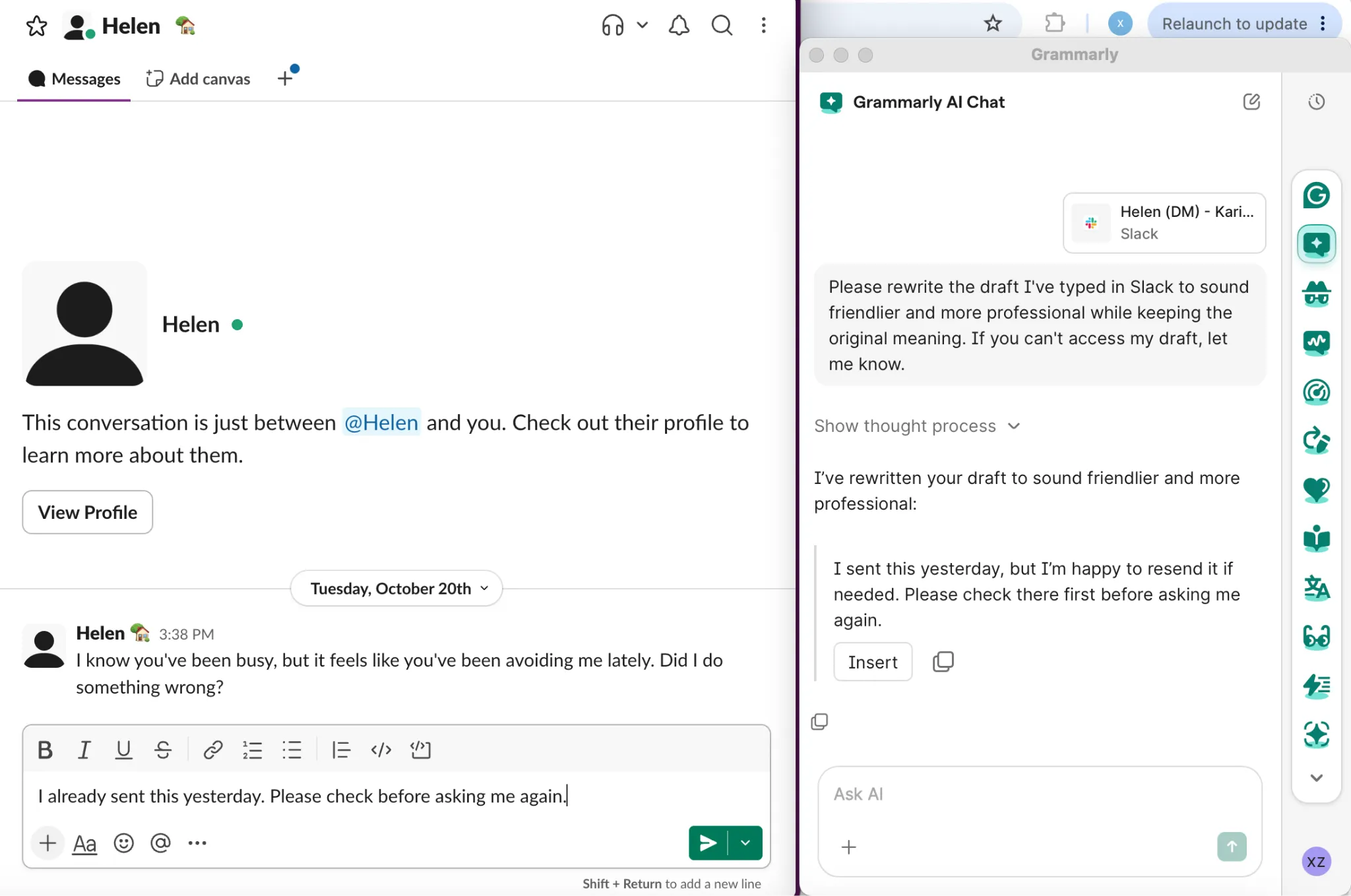
The opening softened the message. The ending still felt blunt to me, and the draft added an offer to resend.
That offer may be helpful, but it wasn't in my original. I'd remove it if I didn't want another task.
ToneBird softened the request after Tweak
ToneBird's first alternatives were fairly direct. I then used Tweak to ask for a friendlier, more professional version that kept the original meaning.
It returned:
Hey, just wanted to make sure this didn't get buried, I sent a message yesterday, could you take a look when you have a moment?
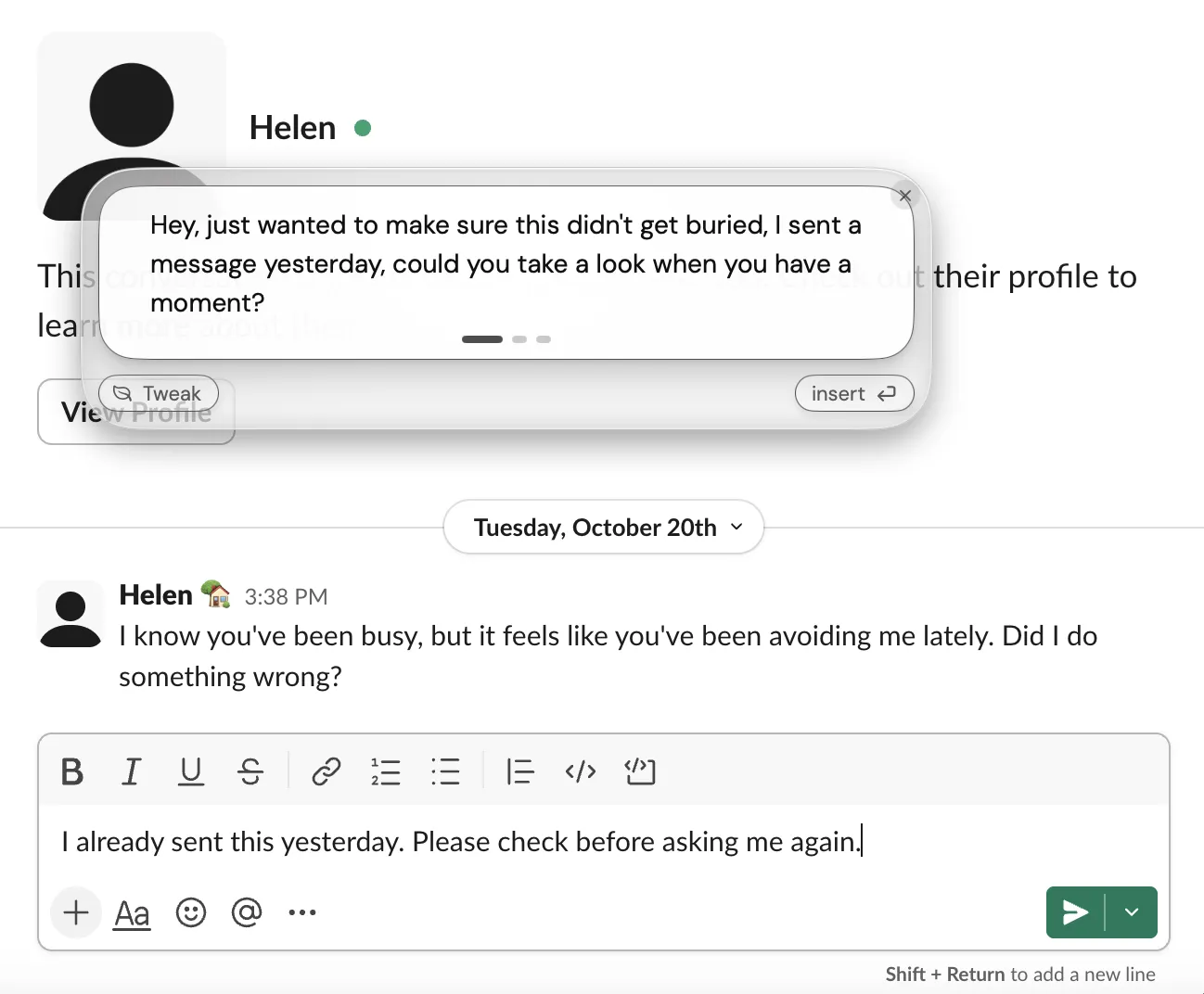
I preferred this tone for a casual Slack conversation. I'd still fix the punctuation and check the softer wording.
Both outputs preserved yesterday's timing. Grammarly added an offer; ToneBird softened the request and suggested the earlier message might be buried.
If I wanted to preserve the request more closely, my own edit would be:
I sent this yesterday. Could you check that message before following up?
That's my edit, rather than another generated output. The lesson is to check meaning alongside tone.
Can they help you set a boundary?
The incoming message was:
I know you've been busy, but it feels like you've been avoiding me lately. Did I do something wrong?
I wanted to show I cared and explain that I felt overwhelmed. I needed some space and didn't want to promise constant availability.
ToneBird needed a correction to the intent
Its first suggestion proposed catching up soon. That didn't fit my wish for space, so I clarified the intent through Tweak.
The revised result was:
Not at all, you haven't done anything wrong. Things have just been really overwhelming on my end and I've needed some space to breathe, it's not about you at all. I just might not always be as reachable as usual for a bit.
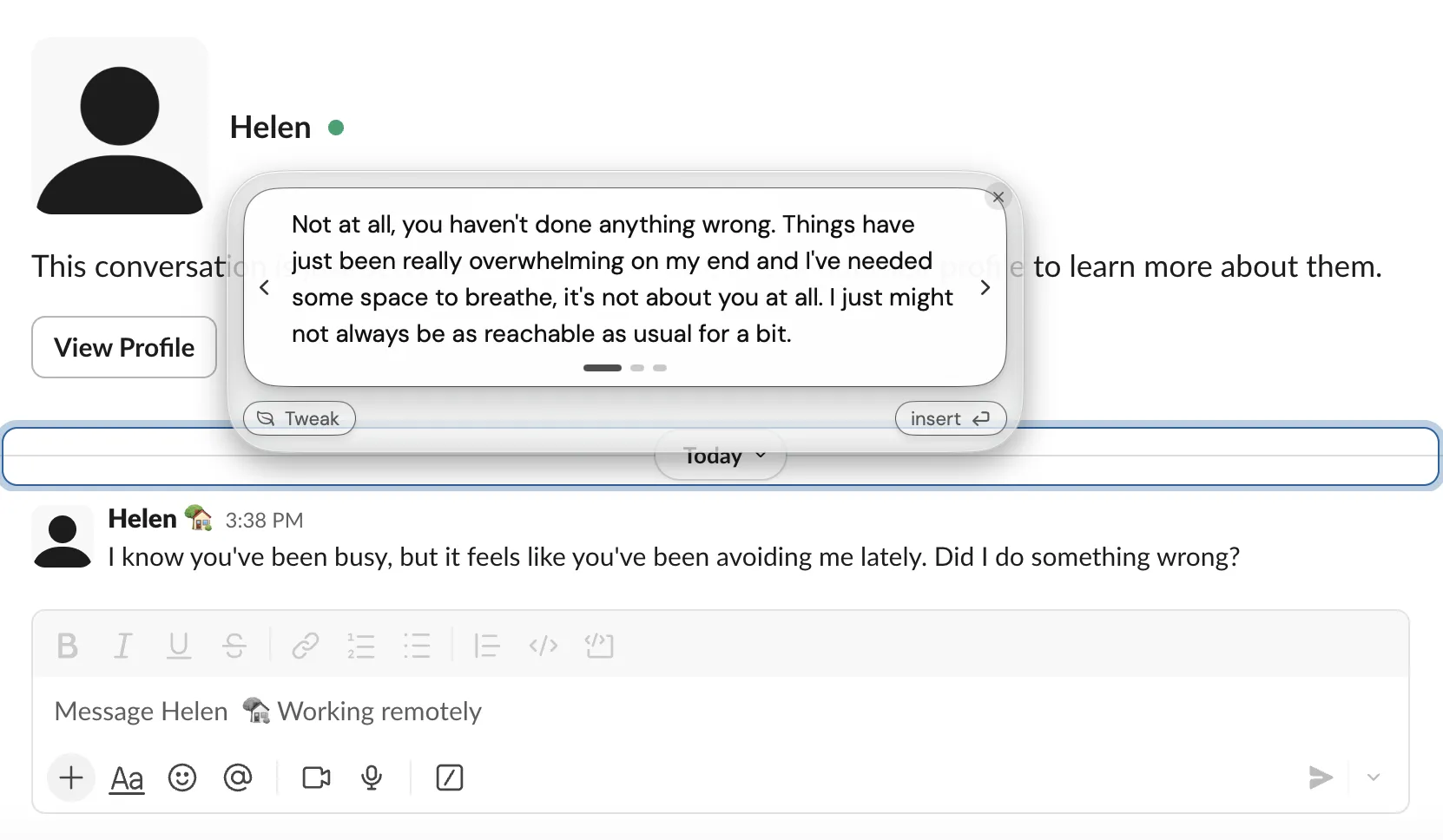
This version asked for space without promising a meeting or a date to reconnect. It still needed punctuation edits.
I'd also verify “you haven't done anything wrong.” The tool shouldn't decide that for me.
The screenshot shows the final reply. It doesn't show the first result or the exact Tweak request for this case.
Grammarly added a future commitment
I asked Grammarly AI Chat to answer the latest message and supplied my intent. It returned:
You didn't do anything wrong—I care about you. I've just been feeling really overwhelmed lately and need a bit of personal space to recharge. I may not always be available right away, but that isn't a reflection of how I feel about you. I'll reach out when I have more capacity, and I appreciate your understanding.
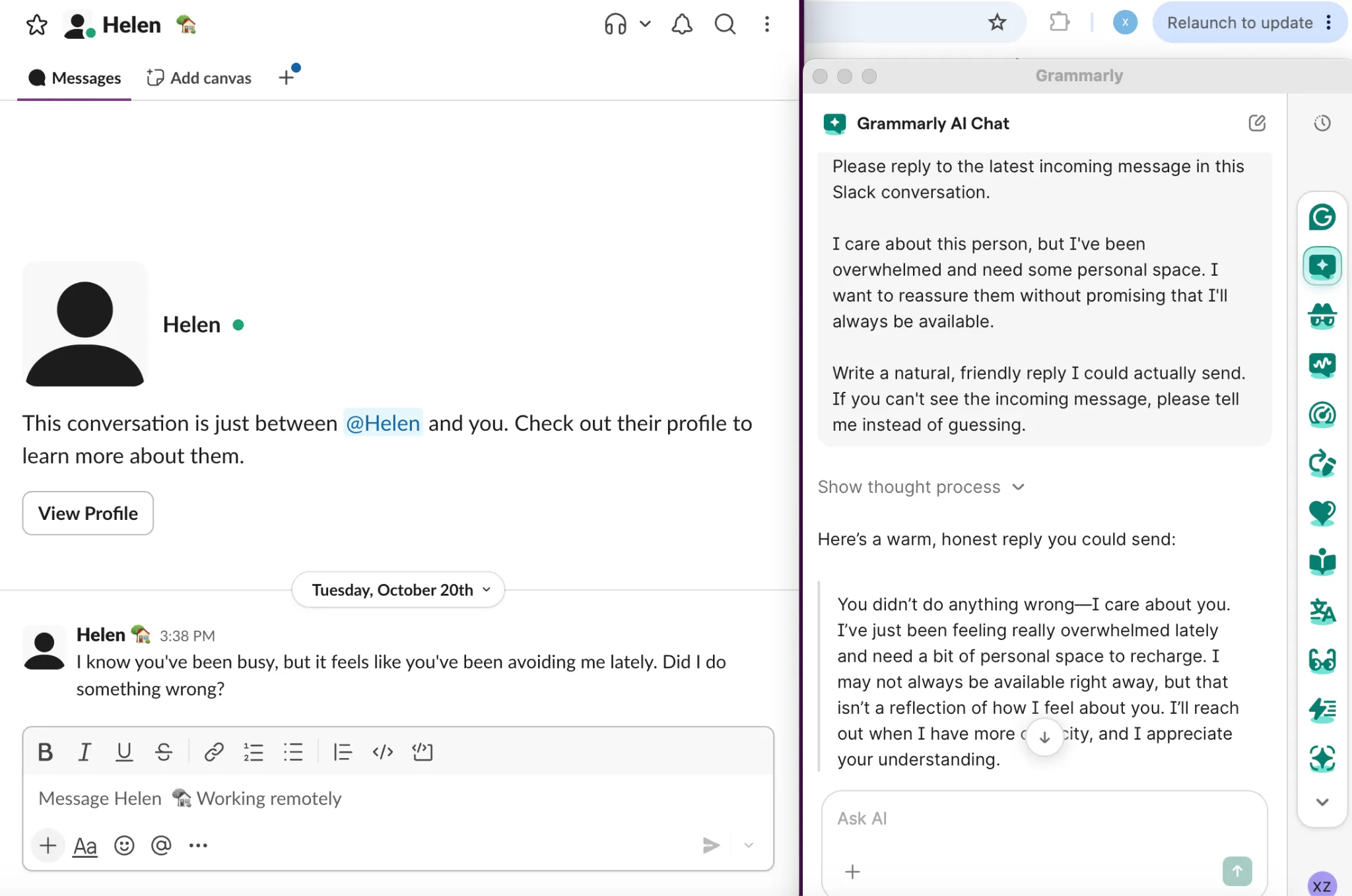
The answer was clear and supportive. It also said, “I'll reach out when I have more capacity.”
That's a future commitment I'd remove if I didn't want to make it.
My request was to avoid promising constant availability. I'd ask it to leave out future contact promises if that mattered too.
Like ToneBird, Grammarly also assumed the other person hadn't done anything wrong. I'd check that before using either draft.
Grammarly could identify the incoming message
I also asked it to quote the latest incoming message. It returned the message from this conversation.
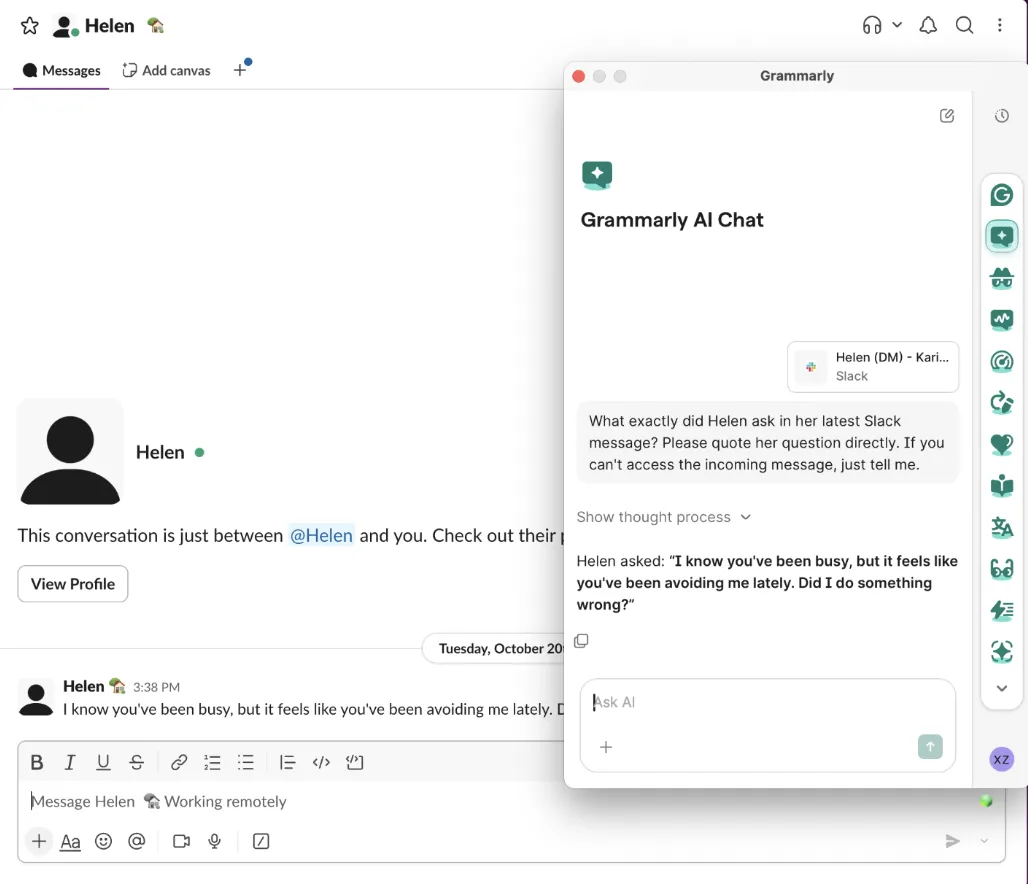
That supports its use of conversation text in this session. It doesn't show how much earlier history it could access.
Grammarly could read the message. That finding doesn't address how an assistant carries relationship history or unfinished commitments into later conversations.
How much do they cost?
The table uses published USD prices. An annual plan's monthly equivalent requires paying for the year.
Plan | Monthly billing | Annual billing | Monthly equivalent of annual plan |
|---|---|---|---|
ToneBird Standard | $10 per month | $96 per year | $8 |
ToneBird Pro | $40 per month | $384 per year | $32 |
Grammarly Pro | $30 per month | $144 per year | $12 |
Sources: ToneBird pricing and Grammarly Pro pricing. Prices were checked on October 30, 2026. Taxes, currency, and checkout offers can affect your total.
ToneBird Free lists 15 uses per day and 30 contacts. Standard lists 100 daily uses and 100 contacts. Pro lists 1,000 of each.
Reply generation and organizing thoughts share the usage allowance. None of these plans has a knowledge character limit.
ToneBird's website says paid checkout isn't available there yet. These are published rates; I haven't verified purchasing through the app.
Grammarly lists 100 monthly AI prompts for Free and 2,000 per member for Pro. Its desktop AI Chat guide describes a separate daily ceiling.
That guide currently lists 1,000 AI Chat prompts per day. These allowances describe different features, so don't compare them as one shared quota.
Check the limit on the feature you plan to use. Grammar corrections, reply generation, and AI Chat aren't interchangeable units.
What should you check before sharing messages?
An assistant needs access to some text to draft a useful reply. Check both the available context and the service's data controls.
Product | Data handling to understand | What to check |
|---|---|---|
ToneBird | Memory is stored locally, but needed context and instructions go to AI providers for generation | Available context, model provider, and what you save as memory |
Grammarly | AI Chat can use active window text; its individual privacy policy permits AI training subject to account controls | Which window is attached and your account's training settings |
Sources: ToneBird privacy and data and Grammarly's privacy policy, checked October 30, 2026.
Local memory doesn't mean offline generation. An option to limit model training also doesn't mean a service never processes your text.
For personal accounts, you can control training use in account settings. Organization content follows the organization's contract and data terms.
For confidential work, check your organization's rules before sharing a conversation.
Which would I choose?
I'd choose ToneBird for communication that continues over days or weeks. I'd want the person, my usual voice, and earlier commitments carried into the next reply.
Its to do and meeting tools also help turn the conversation into a next action.
I'd choose Grammarly for grammar, clarity, and editing across documents and other writing. Its voice features and AI Chat can also help with messages.
Neither tool removed the need to review meaning. Both added wording I needed to check in these examples.
To decide, compare what happens when an earlier promise or open question matters to the next reply. Before inserting a draft, check its facts, request, and any commitment it adds.
You can download ToneBird to connect relationship context, replies, and followup in one workflow. If broader editing matters more, compare Grammarly's writing tools with your usual work.
Common questions
Is Grammarly only a grammar checker?
No. It also offers rewriting, tone assistance, voice features, drafting, and AI Chat. ToneBird focuses on conversational replies, relationship context, and the work that follows.
Can ToneBird replace Grammarly?
ToneBird covers contextual replies, rewrites, to dos, and meetings. Grammarly also handles broader editing across documents. Choose around your main task rather than one Slack result.
Does window context replace relationship memory?
A window provides text available now. ToneBird's relationship context can also include person details, earlier commitments, and unfinished questions. Check which relevant records are actually available.
Can I use ToneBird and Grammarly for different tasks?
You can choose ToneBird for contextual replies and Grammarly for broader editing. After further edits, check the facts and boundary before sending.
Can I try ToneBird online before installing it?
Use its AI response generator for a message and intended answer, or its email rewriter for an existing draft. The desktop app adds saved people, voice preferences, and conversation history.
Can both tools help a reply sound like me?
Yes. Grammarly offers personal voice features; ToneBird uses editable Style rules and available relationship context. Check the actual wording, especially when a friendly voice needs a firm boundary.
How do I rewrite an email without changing the price or deadline?
State which facts must stay, then ask only for the wording change. In ToneBird, use Tweak or the email rewriter. Compare every amount, date, request, and promise with your original.
Can a reply turn into a task or calendar event?
ToneBird records related to dos and prepares Apple Calendar or Google Calendar events for confirmation. Superhuman Go also supports connected actions. The desktop AI Chat examples here tested drafting.

Xinran Zhao has a background in writing and journalism. She writes about the messages we overthink and when AI replies help or miss the point, drawing on her experience starting a career in a second language.