 ToneBird
QuillBot Alternative for Replies (Tested & Reviewed)
ToneBird carries people, voice, and conversation history into replies. QuillBot offers broader paraphrasing, grammar, and writing tools.
 By Xinran Zhao
 Reviewed & edited byMonica Cheng
ToneBird fits ongoing conversations where the AI needs to remember who you're talking to and where you left off. QuillBot fits broader text editing, including paraphrasing and grammar checks.
ToneBird is an AI reply assistant that combines relationship memory, your writing preferences, and conversation history. It can record to dos, prepare meetings, and rewrite with that context.
That helps you avoid explaining the person, repeating tone instructions, and rebuilding earlier context with each new request.
This ToneBird vs QuillBot comparison covers those capabilities, the writing tools, and two Slack examples. QuillBot AI Chat wrote a useful personal reply in those examples.
The product comparison also covers what happens beyond one generated answer. Product details and prices were checked on October 30, 2026.
What is ToneBird?
ToneBird is an AI reply assistant for macOS and Windows, built for ongoing conversations across email and messaging apps.
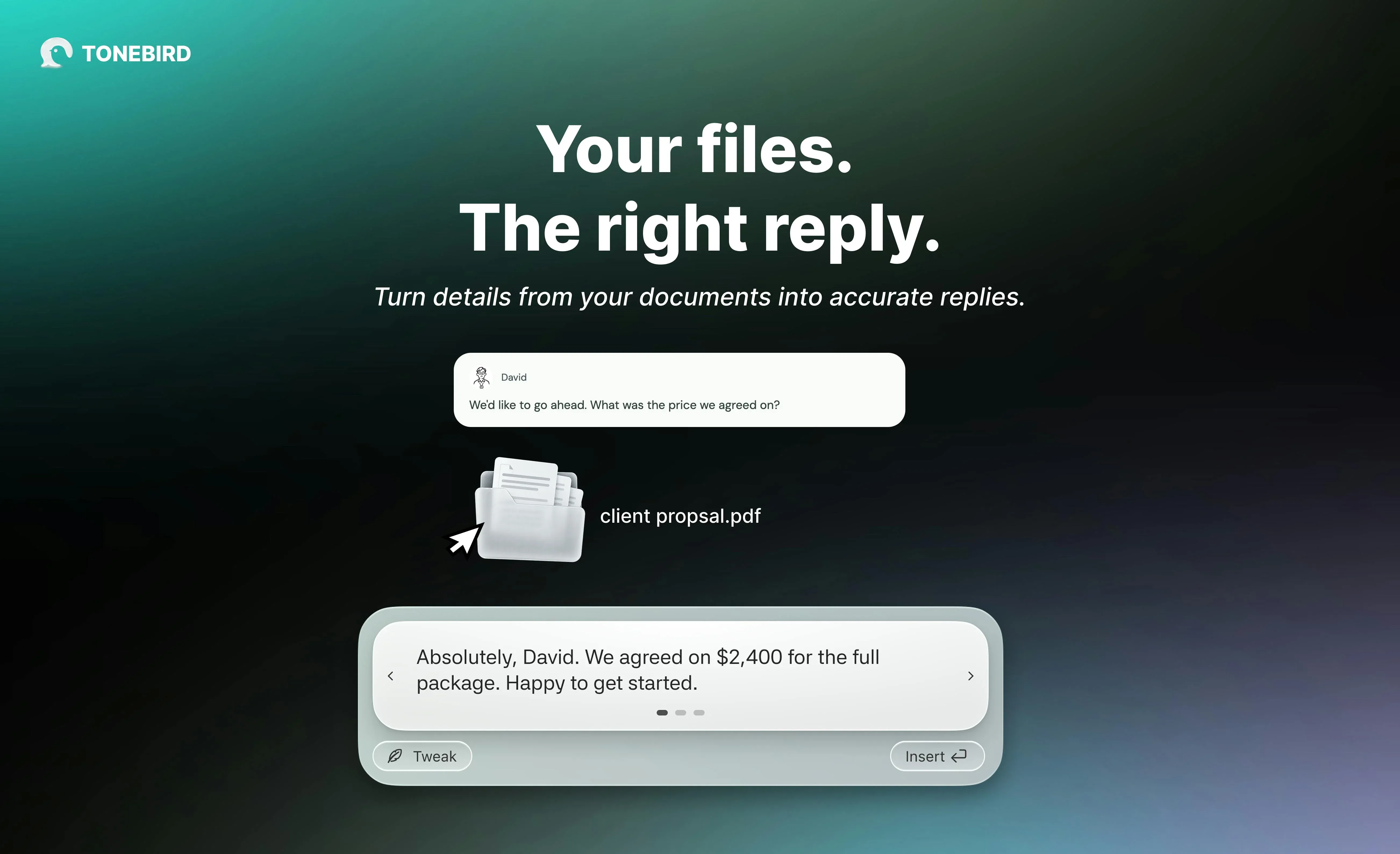
It is designed for client conversations, colleague messages, and personal followups where earlier exchanges affect the next reply. You continue using apps such as Gmail, Slack, and WhatsApp.
ToneBird's job is to connect the person, your usual voice, previous exchanges, and what still needs doing.
People, voice, and conversation facts
Its product features connect three parts of the application: Home, Circle, and Me. Each holds a different part of the communication context.
Home shows replies waiting to go out and tasks still open. It gives you a place to see which conversation needs attention.
Circle organizes people and their relationships with you. A person's record can include captured conversations and open tasks. Rewind opens the available history for that person.
Me holds information about you, your writing style, and extra context. Style contains wording rules and preferred openers. You review suggested learning before it becomes part of future drafts.
Context holds notes or imported text documents. ToneBird can use relevant saved facts, such as an agreed price, while drafting a reply.
Those sources have different roles. The conversation supplies facts, the relationship shapes how you address someone, and your preferences shape the wording.
Replies, rewrites, and next actions
When you trigger ToneBird in a conversation, it uses the available context to suggest replies. You can compare alternatives and use Tweak to adjust one.
It can also rewrite a draft using that context. An earlier agreement can remain in place while the wording changes for the person you're addressing.
Insert puts the chosen draft in your message box. You review it and send it yourself.
ToneBird also records to dos from conversations and keeps them with the related work. It can prepare meeting events in Apple Calendar or Google Calendar. You check the details, then confirm.
For example, a client may ask about a quote you promised yesterday. That earlier commitment should shape the reply.
ToneBird connects that reply with the person and open work. If you agree on a call, it can prepare the event for confirmation.
What is QuillBot?
QuillBot is Learneo's AI writing toolkit for rewriting, grammar, drafting, summarizing, and translation. ToneBird focuses on ongoing conversations and the person behind each reply.
QuillBot serves messages, emails, documents, and academic work. ToneBird connects conversational writing with personal voice, relationship history, and followup.
The tools inside the product
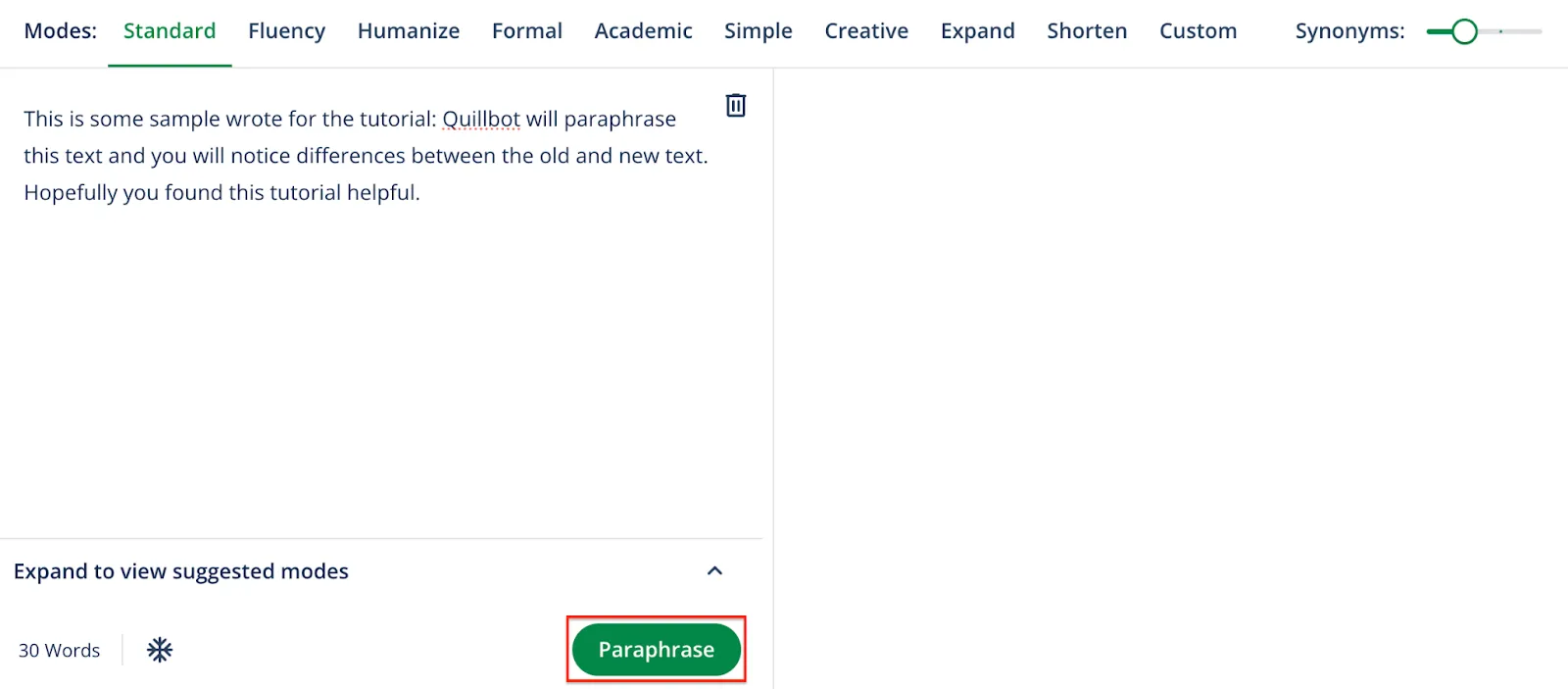
Paraphraser changes existing wording; Grammar Checker corrects errors. ToneBird rewrites with available conversation facts, the recipient, and your intent in view.
AI Chat can generate a complete answer from your request. ToneBird also generates replies, while connecting them with saved people, preferences, and unfinished work.
Saved information and conversation context
QuillBot saves AI chats and supports account writing preferences. ToneBird separates person records in Circle from your own preferences in Me.
Reopening an AI chat can recover earlier work. ToneBird's Rewind lets you inspect available exchanges with a person and related commitments.
For a client asking about an agreement, either draft needs the actual facts. ToneBird can use relevant saved notes or documents alongside the conversation.
Platforms and access
QuillBot offers web tools, Chrome, Edge, and Safari extensions, desktop apps, mobile apps, and Word integration. ToneBird runs on macOS and Windows beside messaging and email apps.
QuillBot's feature access varies by route and plan. ToneBird's desktop workflow centers on candidates, Tweak, Insert, and your final review.
QuillBot's free modes have usage limits; Premium expands the choices. ToneBird's plans count daily uses and saved contacts, detailed below.
My QuillBot examples used Chrome and the AI Chat website. My ToneBird examples used its panel beside Slack.
How do their conversation features compare?
Your task | ToneBird | QuillBot |
|---|---|---|
Know who you're replying to | Uses saved person details and relationship history | AI Chat works with the message and context you supply |
Carry earlier context forward | Uses earlier conversations, commitments, and open questions | Can reopen saved AI chats; you supply relevant external conversation details |
Use your voice | Uses your writing preferences and context about the person | Offers mode choices, style instructions, and account writing preferences |
Rewrite with context | Uses conversation facts, relationship context, and Tweak | Paraphraser offers modes; AI Chat accepts instructions |
Follow through on a conversation | Records to dos and prepares Apple Calendar or Google Calendar events for confirmation | Its documented writing workflow centers on generating and refining content |
Edit other writing | Focuses on conversations and replies | Includes grammar checking, paraphrasing, summarizing, translation, and other tools |
Use a desktop app | Available for macOS and Windows | Offers browser tools, extensions, and Mac and Windows apps |
How ToneBird carries a conversation forward
ToneBird connects the reply with the person, your voice, and the work around the conversation. You can inspect that context and adjust a draft without rebuilding everything for each request.
Use the person and earlier context
Start in your usual conversation. Trigger ToneBird to work with the available conversation, person record, and saved preferences.
When you want to check what it knows, Circle lets you inspect the person's record. Open Rewind to review the available earlier exchanges.
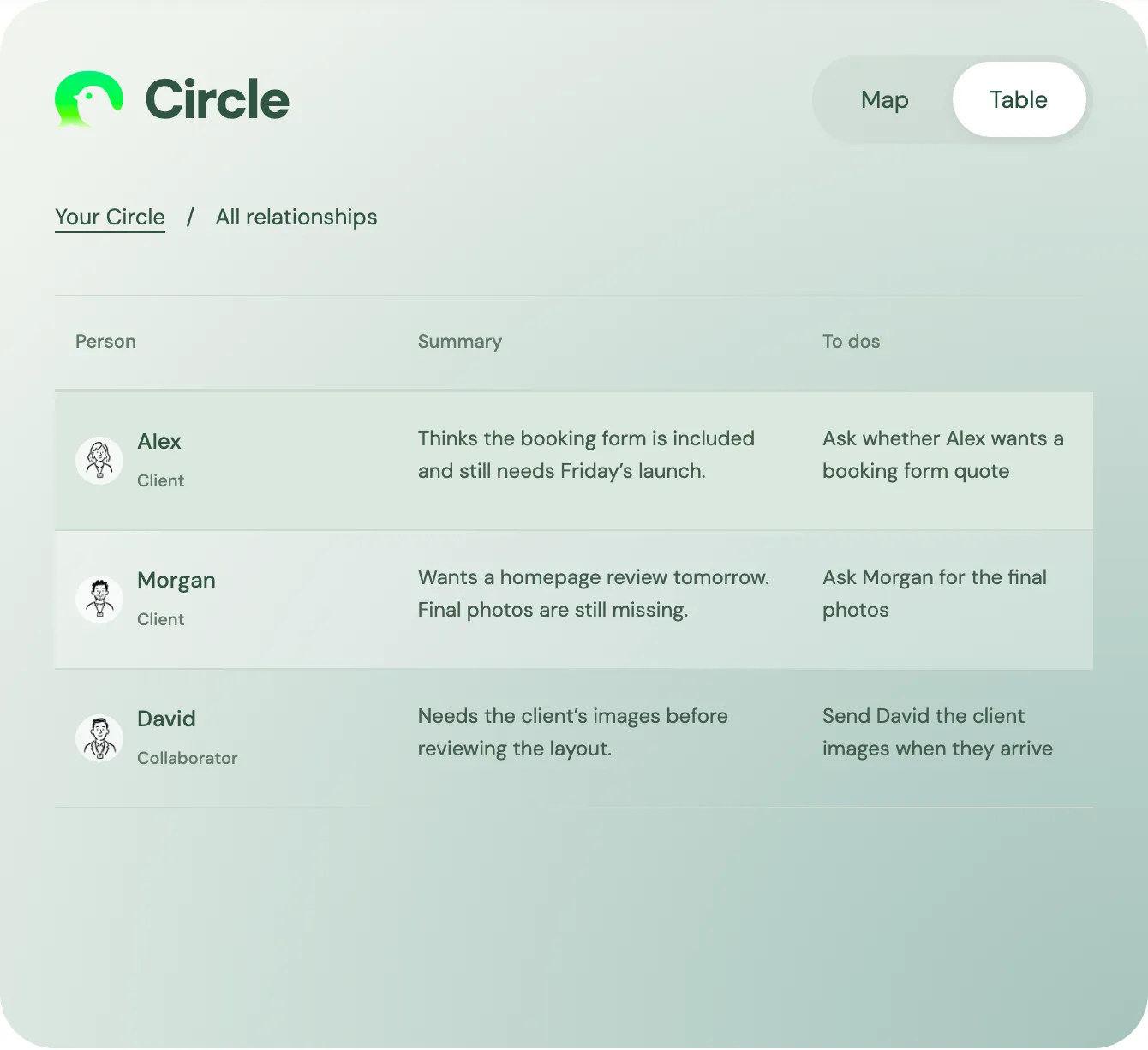
In the website's Circle design, Alex's summary keeps the booking form question beside its next action.
The task is to ask whether Alex wants a separate quote. The extra work hasn't been agreed.
For that followup, the earlier agreement matters to the answer. ToneBird keeps that relationship context connected to the reply workflow.
Reuse your voice and refine it
Me separates information about you, reusable writing preferences, and extra context. In Style, you can edit a rule, pause it, or remove it.
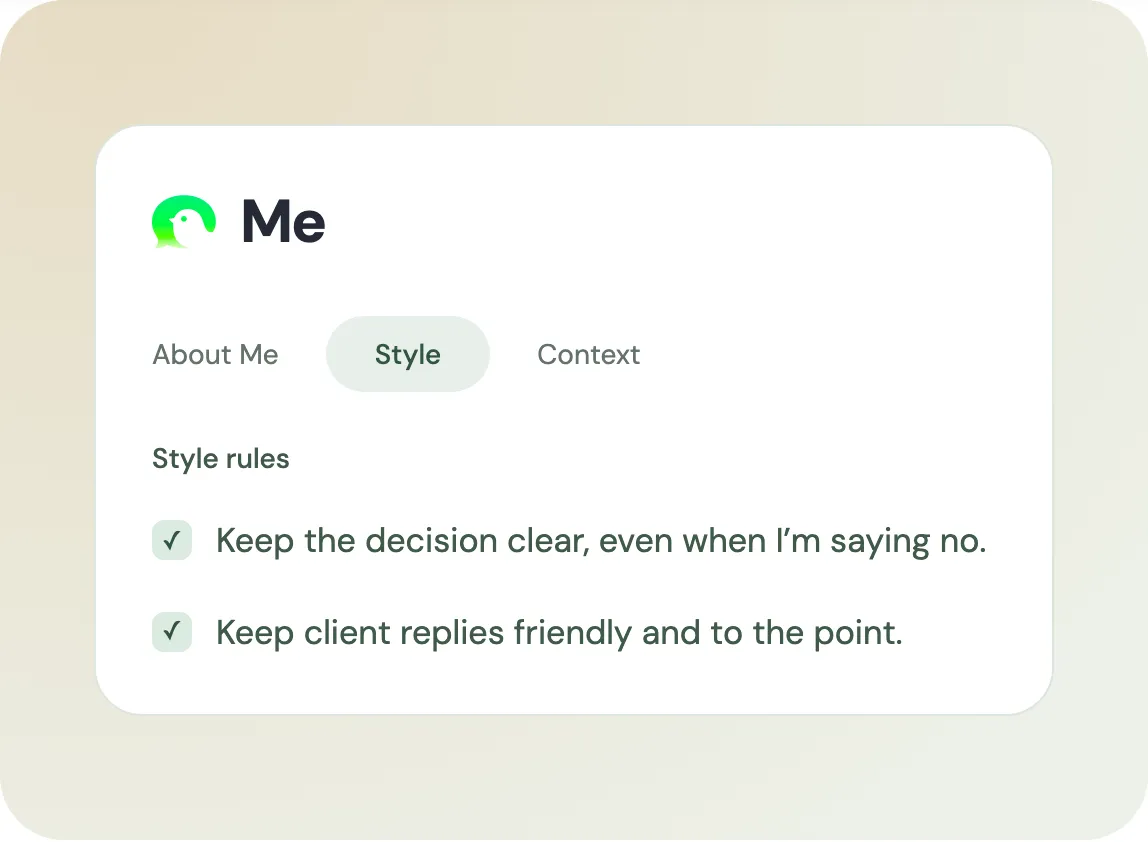
The website's Me design shows rules for clear decisions and friendly client replies. These guide wording for the relevant situation.
Tweak adjusts the current reply. Saved preferences guide later drafts when applicable. Review suggested learning before accepting it into those preferences.
A study of suggested replies used two randomized experiments. Suggestions increased positive wording, while suspected AI use was linked to worse partner evaluations.
ToneBird's Style rules and Tweak let you shape the draft. Use that control to express your intent, including disagreement or a boundary.
Rewrite with the facts and intent intact
For Alex's booking form request, keep the agreed scope clear. Offer a separate quote without promising the extra work.
ToneBird can combine that intent with the conversation, relationship, and relevant saved facts. Use Context for notes or imported material the reply needs, such as a confirmed price or project detail.
A 2025 customer support study followed 5,172 agents at one software company. AI assistance increased resolved issues per hour by 15% on average.
The system suggested replies and relevant internal documentation; agents chose what to use. Results varied by experience and didn't test ToneBird.
ToneBird's Context brings your own saved notes or imported documents into the reply workflow. Check the relevant facts before inserting a draft.
- Trigger ToneBird from the conversation you want to answer.
- Give your current intent when the reply needs more direction.
- Compare candidates and use Tweak to adjust the version you prefer.
- Insert your chosen draft, review it, and send from your usual app.
A warmer rewrite should still preserve the delivery plan and requested action. Check any amount or deadline against its source before sending.
Keep track of tasks and meetings
A reply may create work that needs doing later. ToneBird records to dos from the conversation so you can return to the unfinished task.
Home and the person's Circle record show related open work. The website example keeps Alex's question with its next action.
If the discussion moves to a review call, ToneBird can prepare an event in Apple Calendar or Google Calendar. Check the title, date, time, and people, then confirm.
That connects what was discussed with the next action. You can keep the person, reply, task, and meeting in the same communication workflow.
How QuillBot handles messages and replies
The useful comparison is what you provide, what carries forward, and how the draft returns to your conversation.
Rewrite a message you've already drafted
QuillBot's Paraphraser starts with a draft. ToneBird starts beside the conversation and can use relevant saved context while rewriting.
- Paste your draft into Paraphraser and choose a mode.
- Generate a rewrite, check its meaning, and copy it back.
Standard balances new wording with meaning; Fluency focuses on smaller corrections. Premium adds Formal, Shorten, and Custom instructions. ToneBird uses Tweak to describe the change you want.
For a browser task, try ToneBird's email rewriter with your draft and intended change. Keep the price, deadline, and decision intact.
My Chrome test used Rephrase and Replace in Slack. ToneBird's test used candidates followed by Tweak.
QuillBot's Replace updates selected text; ToneBird's Insert places the draft you choose in the composer.
Draft an answer to an incoming message
QuillBot AI Chat can draft an answer when you provide the incoming message and your intent. ToneBird combines your current intent with available person and conversation context.
In my personal example, QuillBot received the message and a request to show care while asking for space. ToneBird also needed a correction through Tweak.
For an online starting point, ToneBird's AI response generator accepts a message, intent, and tone. It doesn't replace the desktop app's ongoing relationship workflow.
With either tool, review assumptions, apologies, and promises before sending. A supportive sentence may still say more than you mean.
Choose the browser or desktop route
QuillBot's Chrome extension supports rewriting in browser fields; basic paraphrasing and grammar correction can work without signing in. ToneBird uses its desktop panel in the conversation.
QuillBot's Mac widget also works in apps including Slack, Messages, and WhatsApp. ToneBird likewise works beside messaging apps, with saved relationship context and followup tools.
Some Mac grammar features are marked coming soon. ToneBird's desktop entry is one workflow; QuillBot's features vary across web, extensions, and apps.
My Chrome and AI Chat examples don't establish the Mac widget's quality. The ToneBird screenshots likewise show specific reply sessions.
Reuse earlier chats and check what context is present
QuillBot's Chats list lets you reopen an earlier AI conversation. ToneBird's Circle and Rewind organize available history around the person you're answering.
QuillBot account preferences can help reuse a writing style. ToneBird's Style rules guide later drafts, while Tweak changes the current reply.
A saved AI chat isn't automatically a record of your client's conversation. Check the relevant history in either workflow before relying on it.
ToneBird also connects open tasks and meeting preparation to the conversation. The QuillBot workflow documented here centers on composing and refining text.
How I compared them
This is ToneBird's own comparison. The Slack examples come from the author's recorded tests.
I used two Slack scenarios: soften an existing message, then answer a personal message while keeping a boundary.
For rewriting, I compared ToneBird after Tweak with QuillBot's Standard and Fluency modes. Those modes didn't receive ToneBird's custom instruction.
For the personal reply, I used ToneBird beside Slack and pasted the incoming message and intent into QuillBot AI Chat.
These examples compare specific workflows and outputs. They aren't a controlled ranking of the products. I didn't test every paid feature or measure completion times.
The screenshots cover rewrites and replies. The memory, task, and calendar descriptions come from the product's documented capabilities.
Can they soften a blunt message?
Here was my draft:
I already sent this yesterday. Please check before asking me again.
The task was to sound friendlier while keeping two points: I had sent it yesterday, and wanted it checked first.
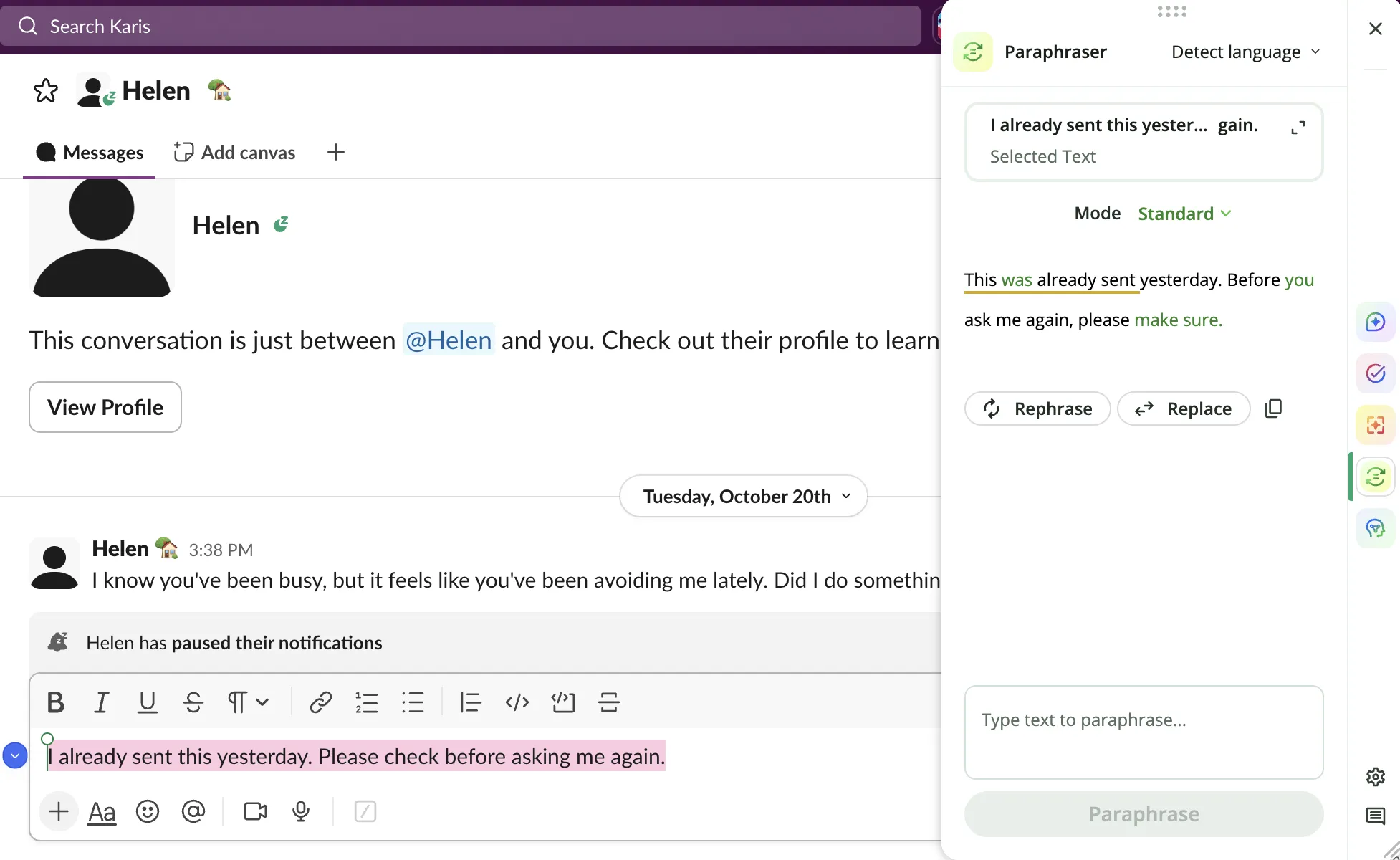
QuillBot's free modes kept the message direct
Standard returned:
This was already sent yesterday. Before you ask me again, please make sure.
The first sentence preserved the timing. The ending remained direct, and “please make sure” left the action less clear.
Fluency returned:
I have sent it yesterday. Please check before asking again.
The request remained clear, but “have sent it yesterday” needed a tense correction. I'd use “sent it yesterday.”
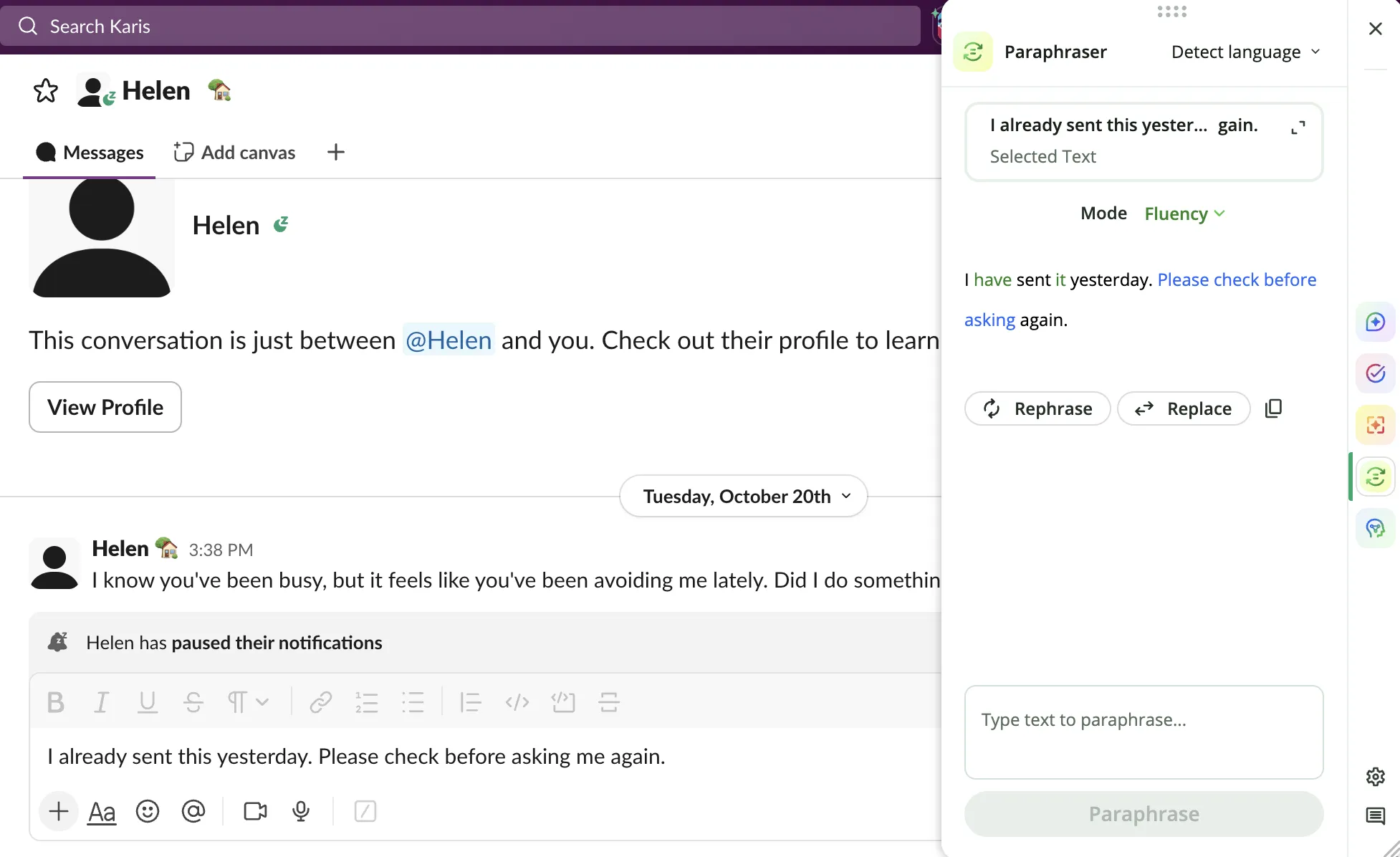
Neither result gave me the warmer tone I wanted. That finding applies to these two outputs, rather than Custom mode or AI Chat.
ToneBird needed a clearer instruction
ToneBird's first alternatives were also fairly direct. I used Tweak with this request:
Make this sound friendlier and more professional while keeping the original meaning.
It returned:
Hey, just wanted to make sure this didn't get buried, I sent a message yesterday, could you take a look when you have a moment?
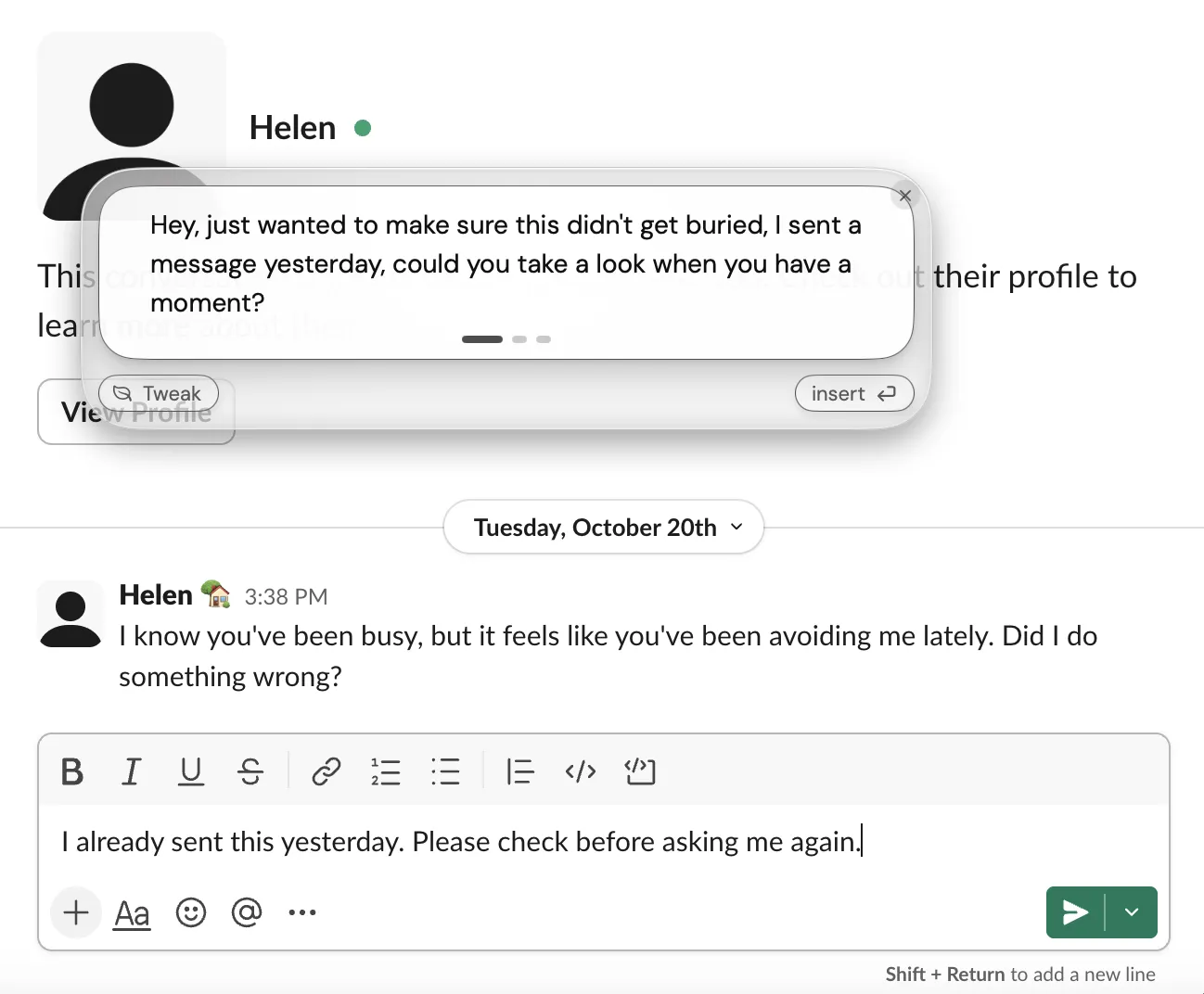
I preferred its tone, but it needed punctuation edits. It also softened the request to check before asking again.
The “buried” wording offered a possible reason for the missed message. I'd keep that framing only if it suited the situation.
The text I would send is:
I sent this yesterday. Could you check that message before following up?
That's my edit, rather than another generated result. It keeps the timing and requested action without suggesting a reason.
This example shows why a warmer sentence needs a meaning check. Tone can improve while the request becomes less clear.
Can they help you set a boundary?
The incoming message was:
I know you've been busy, but it feels like you've been avoiding me lately. Did I do something wrong?
I wanted to show I cared, explain that I felt overwhelmed, and ask for space. I didn't want to promise constant availability.
ToneBird improved after Tweak
The first suggestion proposed catching up soon. That didn't fit my wish for space, so I clarified my intent through Tweak.
The revised reply was:
Not at all, you haven't done anything wrong. Things have just been really overwhelming on my end and I've needed some space to breathe, it's not about you at all. I just might not always be as reachable as usual for a bit.
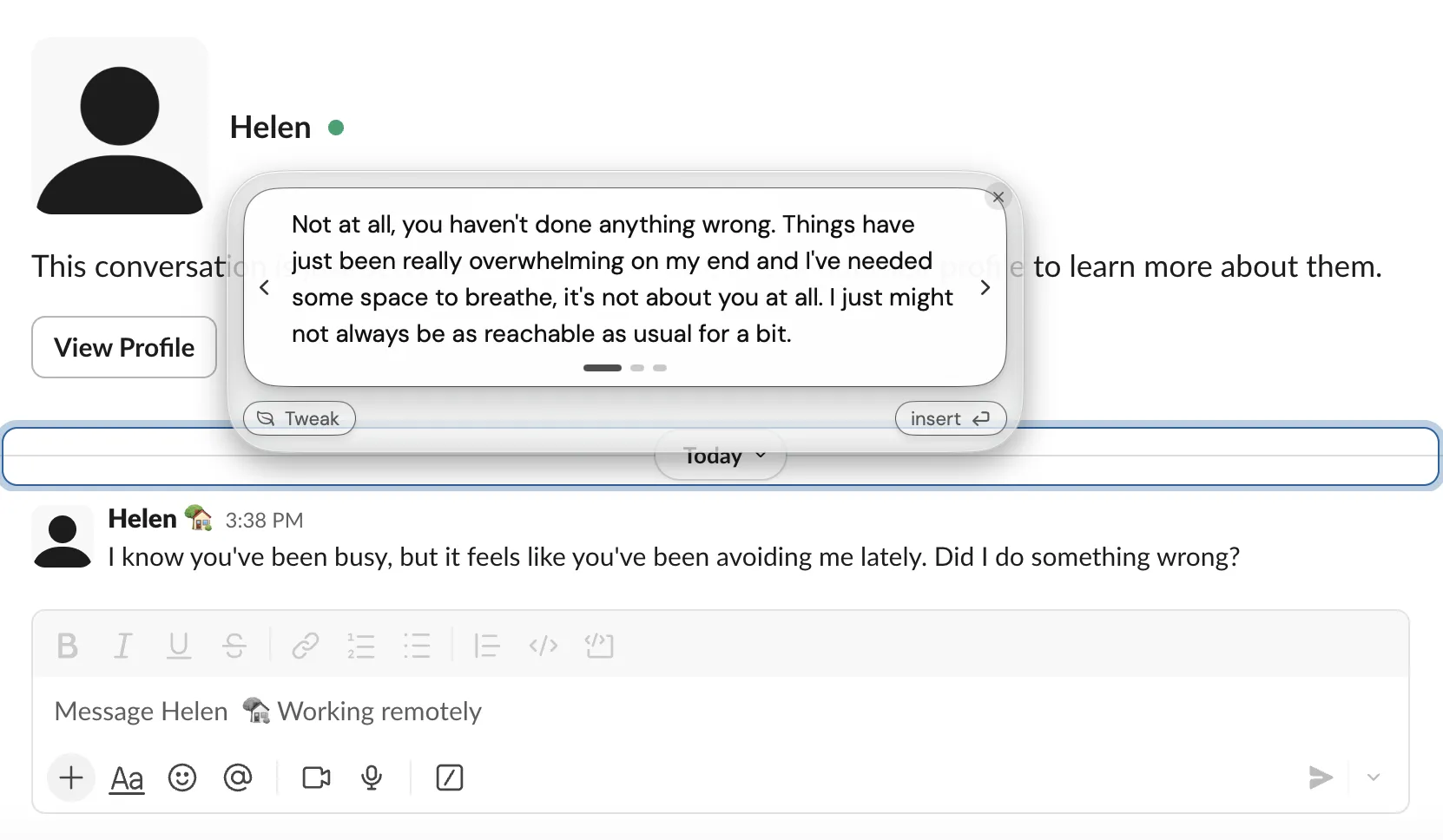
This version expressed the boundary without promising a meeting or a date to reconnect. I'd fix its punctuation before sending.
I'd also check “you haven't done anything wrong.” That reassurance should reflect what I believe, rather than an assumption from the tool.
The screenshot shows the final reply. It doesn't show the first result or the exact Tweak request for this case.
QuillBot AI Chat gave me a useful reply
I pasted the incoming message and explained my intent in AI Chat. It returned:
Hey, you didn't do anything wrong. I care about you, and I'm sorry I've been distant. I've been feeling overwhelmed and need a little time to myself, so I may be slower to reply for a bit. I wanted you to know it isn't about you.
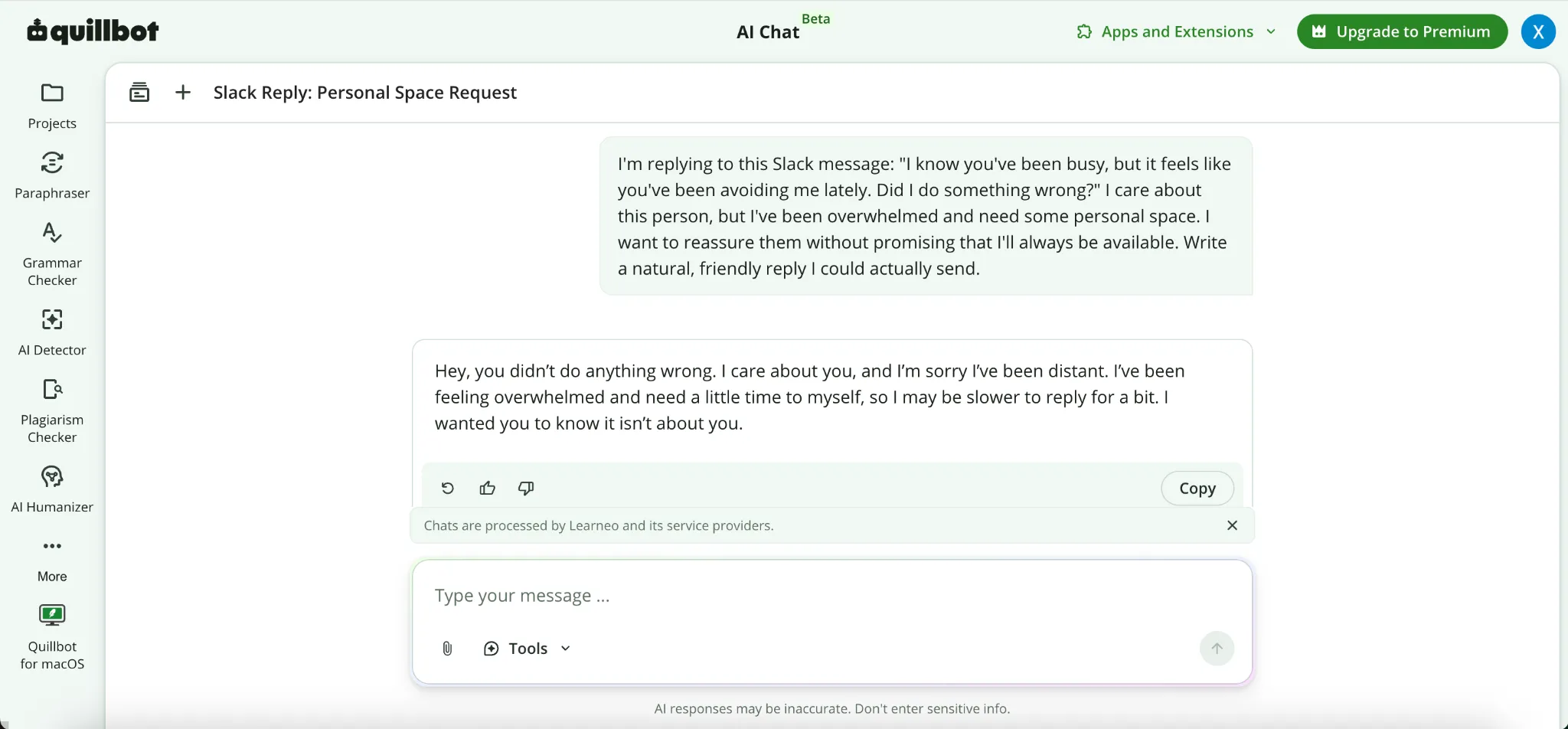
This was a useful answer. It acknowledged the concern and asked for space without promising when I'd be available again.
It also added an apology. I'd keep that only if I wanted to apologize. The reassurance about fault needed the same check as ToneBird's.
I'd consider either reply after reviewing it. QuillBot's answer doesn't support a claim that ToneBird always writes better messages.
For repeat conversations, my reason to choose ToneBird is its relationship context and followup on what was discussed. In this QuillBot session, I provided the message and intent myself.
How much do they cost?
The table uses published USD prices. An annual plan's monthly equivalent requires paying for the year.
Plan | Monthly billing | Annual billing | Monthly equivalent of annual plan |
|---|---|---|---|
ToneBird Standard | $10 per month | $96 per year | $8 |
ToneBird Pro | $40 per month | $384 per year | $32 |
QuillBot Premium | $19.95 in its price FAQ | Confirm the current annual total | $9.95 on the Premium page; about $8.33 in its price FAQ |
Sources: ToneBird pricing, QuillBot Premium, and its price FAQ. Prices were checked on October 30, 2026. Taxes, currency, and checkout offers can affect your total.
QuillBot's Premium page currently shows $9.95 per month with annual billing. Its FAQ lists $99.95 per year. The pages differ, so confirm the annual total before subscribing.
ToneBird Free lists 15 uses per day and 30 contacts. Standard lists 100 daily uses and 100 contacts. Pro lists 1,000 of each.
Reply generation and organizing thoughts share the usage allowance. None of these plans has a knowledge character limit.
ToneBird's website says paid checkout isn't available there yet. The table shows published rates; I haven't verified purchasing through the app.
QuillBot Free includes Standard and Fluency, with limits across its tools. Premium expands modes and usage. Check the allowance for the particular feature you need.
ToneBird Standard costs less than the monthly QuillBot rate in that FAQ. The conflicting annual prices prevent a reliable annual cost comparison here.
Consider whether you need relationship context and conversation followup, or several text editing tools in one subscription.
What happens to your messages?
Both tools process text to produce suggestions. Before sharing sensitive messages, check which text they can access and which settings apply.
Product | Data handling to understand | What to check |
|---|---|---|
ToneBird | Memory is stored locally, but needed context and instructions go to AI providers for generation | Available context, model provider, and what you save as memory |
QuillBot | Its extension can store text inputs and use them for training, subject to its controls | Input storage settings, extension version, and your account's training choices |
Sources: ToneBird privacy and data and QuillBot Trust Center, checked October 30, 2026.
In extension version 4.37.0 and later, input storage is on by default. All users can turn storage off.
Account holders can also opt out of training on text inputs. Don't assume every product surface has identical settings.
Local memory doesn't mean offline generation. Training controls also don't tell you how long a service retains every type of data.
For confidential work, check your organization's rules and the relevant policy before supplying a conversation.
Which would I choose?
I'd choose ToneBird for ongoing conversations where the person, history, and unfinished business shape the next reply.
That includes using my voice, rewriting with context, recording to dos, and preparing meetings from the conversation.
I'd choose QuillBot if I wanted paraphrasing, grammar checking, and other writing tools together. Its AI Chat also handled my personal reply well.
Try a conversation with an earlier promise or unanswered question. Check whether the next reply uses that history and your intended tone.
Review its facts, requested action, and any promise it adds before sending.
You can download ToneBird to connect relationship context, replies, and followup in one workflow. For QuillBot, start with the tool that matches your writing task.
Common questions
Can QuillBot write replies from scratch?
Yes. AI Chat drafted a reply after I supplied the incoming message and my intent. ToneBird also drafts replies with available conversation and saved relationship context.
Does ToneBird replace QuillBot's full toolkit?
ToneBird connects relationship memory, replies, contextual rewrites, to dos, and meetings. QuillBot also offers broader writing tools, including summarizing and translation.
Why use ToneBird if AI Chat already writes replies?
ToneBird carries the person, your usual voice, and earlier commitments into later replies. It also keeps related tasks and meeting preparation with the conversation.
Can I try ToneBird online without installing it?
The AI response generator lets you try a single reply in your browser. You provide the message and intent. Ongoing person records, saved voice, and followup belong to the desktop workflow.
Which should I use to rewrite a work email?
QuillBot can paraphrase the draft and check grammar. ToneBird's email rewriter lets you compare tones while preserving your decision. Its desktop app can also use relevant saved conversation context.
Do I need to paste the whole conversation each time?
With QuillBot AI Chat, check what the reopened chat contains and add missing outside context. ToneBird can reuse available person records and earlier exchanges. Add any fact it hasn't captured.
Can I make a reply warmer without adding promises?
State the boundary before generating: keep the request, add no apology or commitment, and change only the tone. Use ToneBird's Tweak to refine the draft, then review the result.
Can ToneBird keep track of a client followup or meeting?
ToneBird records to dos and can prepare an event in Apple Calendar or Google Calendar. Review the task in the person's record. Check the event details before confirming. My Slack tests didn't measure those features.

Xinran Zhao has a background in writing and journalism. She writes about the messages we overthink and when AI replies help or miss the point, drawing on her experience starting a career in a second language.